Email Follow Ups That Book Meetings: Proven Tactics (email follow ups)

· 22 min read

It’s a familiar feeling for any sales rep. You pour time into crafting the perfect outreach email, hit send, and then… nothing. Just dead air. The silence can be discouraging, but the truth is, most initial emails don't get a reply. Relying on a single touchpoint is one of the biggest mistakes you can make.

Why Your First Email Is Just the Starting Point

Sending an email and just hoping for a response isn’t a strategy—it’s a lottery ticket. What separates the top performers from everyone else is a systematic plan for email follow ups. This is how you shift from passively waiting for a reply to proactively earning a conversation. The goal isn’t to pester people; it’s to professionally navigate their chaotic schedules and show you’re serious.

When a prospect doesn't reply, it's rarely personal. They aren't ignoring you because they dislike you. They're just busy. Your email was likely one of hundreds that flooded their inbox that day.

The Real Reasons for No Reply

Understanding why you didn't get a response is the key to framing your follow-up. It's almost never a hard "no." More often than not, it's one of these simple, everyday scenarios:

  • Bad Timing: Your email landed right in the middle of a chaotic morning or just before a massive deadline.
  • Information Overload: The average professional gets over 120 emails a day. It’s incredibly easy for yours to get buried.
  • Quick Triage: Many executives scan their inboxes and archive anything that isn’t on fire at that exact moment.
  • They Simply Forgot: It happens. They might have read your email, fully intended to reply, and then got pulled into their next meeting.

This context is everything. It reframes your follow-up from an interruption into a helpful, timely reminder that actually respects their workflow. By the way, if you want to nail that first impression, our detailed guide on how to write cold emails is a great place to start.

The Data-Backed Case for Persistence

Let's compare two mindsets. The first is the "one-and-done" approach, where a lack of reply feels like rejection. The second is what I call professional persistence, which views that first email as just the opening move in a strategic conversation.

The data is overwhelmingly on the side of persistence.

Consider this: 70% of sales emails require at least one follow-up to get any reply at all. Even more telling, a staggering 80% of sales require a minimum of five follow-up attempts after the first contact before a deal is closed. You can dig into more of these stats on why follow-ups are critical for sales success.

A follow-up isn't a sign of failure; it's a core component of a successful sales process. It shows you're serious, professional, and genuinely believe you can solve a prospect's problem.

This distinction is crucial. When you see follow-ups as an integral part of your job, you stop feeling like you're bothering people and start acting like a trusted advisor who is simply trying to connect. Each follow-up is another chance to provide value, build familiarity, and catch your prospect at the exact right moment.

The first email is just the introduction. The real work—and the real results—happen in the follow-ups.

Designing a High-Conversion Follow Up Sequence

An effective follow-up strategy isn't just about sending a bunch of random pings and hoping for the best. It's a science. Building a sequence that actually gets a response requires a smart approach to timing, frequency, and the value you bring to every single message. The real goal is to stay top-of-mind without being annoying, turning persistence into a genuine conversation.

To really nail this, you need to ground your approach in solid sales cadence best practices. This isn't about templates; it's about a framework where every touchpoint builds on the last, earning you the right to stay in their inbox.

Finding the Right Cadence Frequency

Let's be real: the timing between your email follow ups can make or break your entire effort. Come on too strong with messages packed too closely together, and you look desperate. Wait too long, and you're ancient history. A balanced cadence is the sweet spot—it respects their time while keeping the momentum going.

Let's compare two common but flawed approaches with a more strategic one:

  • The Aggressive Approach (Every Day): This feels desperate and almost guarantees you'll be marked as spam. It doesn't give the prospect any breathing room.
  • The Passive Approach (Weekly): Waiting a full week between early follow-ups is too long. You lose all momentum and make it easy for them to forget who you are.
  • The Strategic Approach (Balanced Intervals): This is the sweet spot. You give them a couple of days between the first few messages, then slightly increase the gap. It's persistent but professional.

A multi-touch sequence that spans about two weeks often hits the mark. It gives you enough runway to connect without completely flooding their inbox.

Here’s a simple, actionable framework to use as your starting point:

  • Day 1: The initial outreach.
  • Day 3: First follow-up.
  • Day 6: Second follow-up.
  • Day 10: Third follow-up.
  • Day 14: The "break-up" email.

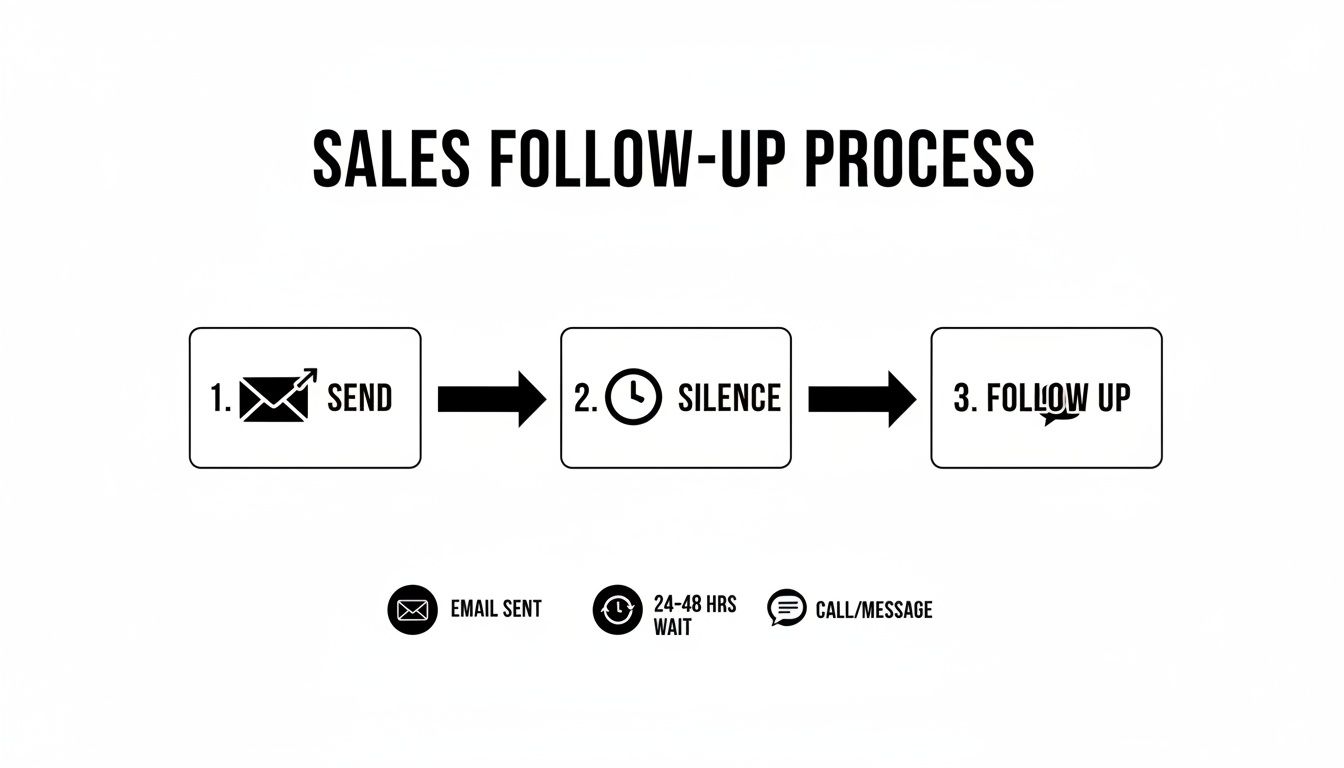
Infographic detailing a sales follow-up process: send email, wait 24-48 hours, then call or message.

This process flow highlights a critical, often-overlooked step: the wait. Patience isn't just a virtue here; it's a strategic part of any outreach that gets results.

A Blueprint for a 10-Day Follow Up Cadence

Every email in your sequence needs a job to do. Just firing off messages without a clear purpose is a fast track to the spam folder. A well-designed cadence makes sure each follow-up logically moves the conversation forward. Think of it as telling a short, compelling story over several days.

Here's a practical, multi-touch blueprint that balances persistence with genuine value.

Actionable 10-Day Follow Up Cadence Blueprint

DayAction/ChannelPurpose of MessageExample CTA
1EmailClearly state your value prop and the problem you solve."Worth a 15-min chat next week to explore this?"
3EmailRe-state value prop from a new angle; gentle reinforcement."Just wanted to bring this back to the top of your inbox."
5LinkedInView profile & send a connection request (no pitch).N/A (Passive engagement)
7EmailIntroduce social proof or a new piece of value (case study, stat)."Here's how we helped [Similar Company] solve this."
10EmailShift to a direct, low-friction question to gauge interest."Is solving [problem] a priority for your team this quarter?"

By assigning a specific role to each touchpoint, you build a cohesive narrative that guides the prospect toward a decision. It’s methodical, respectful, and a world away from just "checking in." This is how you stay persistent with a purpose.

Follow Up Templates That Actually Get Opened

What’s the difference between a follow-up that lands a meeting and one that gets instantly archived? Clarity. It’s that simple.

Your prospect’s inbox is a warzone of long, feature-heavy emails that are exhausting to read. Your job is to be a breath of fresh air. Think concise, relevant, and respectful of their time. Get straight to the point.

Let’s compare two email styles:

  • The "Wall of Text": A long, multi-paragraph follow-up with three different links and four value props. Action Required: The prospect has to decipher what you want. Result: Instant archive.
  • The "Surgical Strike": A two-sentence email with a single, clear question. Action Required: A simple yes/no or a quick thought. Result: Higher chance of a reply.

The psychology here is pretty straightforward: short emails with a single, clear call-to-action are just easier for a busy brain to process. They signal confidence and make it dead simple for the person on the other end to know what you want.
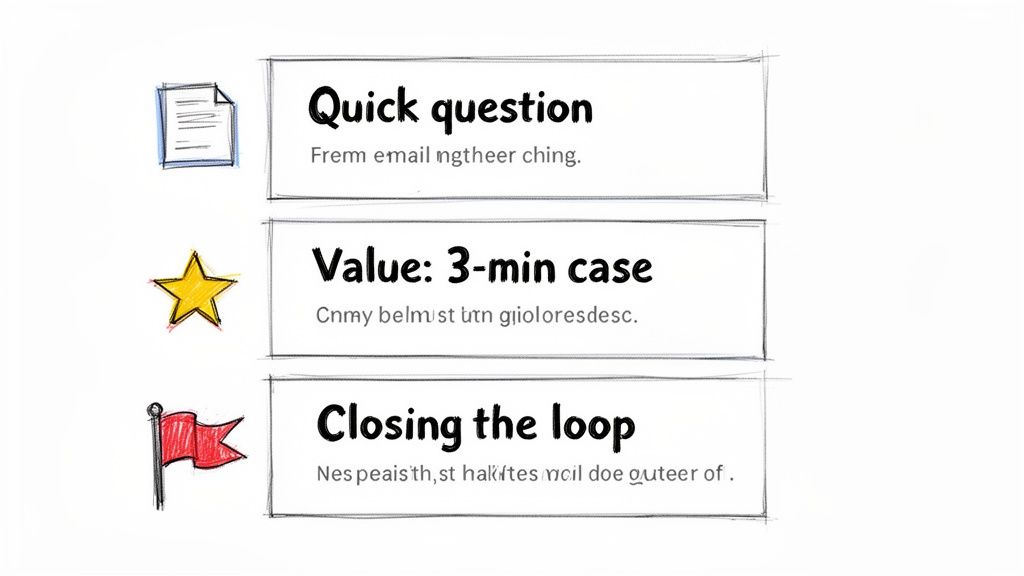
Visual guide to effective email follow-up techniques, featuring quick questions, value cases, and closing the loop.

This guide from MarketBetter breaks down how to use different templates for different goals, from a quick check-in to a value-packed case study. Every single one is designed to be direct and actionable, which is exactly what a good follow-up needs to be.

The Gentle Nudge After No Response

This is the one we all send the most. You’ve shot your shot, and now you’re hearing crickets. The goal here is to be polite and professional, gently bumping your message back to the top of their inbox without being annoying. Drop the guilt-tripping language like, "Did you see my last email?"

It's a low-pressure way to re-establish contact. You're just giving them a simple reminder without demanding a complicated reply.

Actionable Tip: Test these subject lines to see which performs best for your audience.

  • A/B Test 1: Re: Original Subject Line
  • A/B Test 2: Quick question about [Company Name]
  • A/B Test 3: Bringing this to the top of your inbox

Template: Hi [Prospect Name],

Just wanted to bring my previous email to the top of your inbox. We help sales leaders like you solve [specific problem] by [one-sentence value prop].

Worth a quick chat next week?

Best, [Your Name]

Re-Emphasizing Value with Social Proof

If the first nudge didn't land, it's time to bring something new to the table. Just repeating your original pitch is a wasted email. Instead, drop in some social proof—a killer case study or a compelling statistic—to show you're the real deal.

This tactic shifts the conversation from "here's what I think I can do" to "here's what we've already done for people just like you." If you need more inspiration for subject lines that grab attention, check out our guide on witty email subject lines.

Actionable Tip: Experiment with different formats for social proof.

  • A/B Test 1: A direct quote from a happy client.
  • A/B Test 2: A single, powerful data point (e.g., "30% increase in meetings").
  • A/B Test 3: A link to a full case study.

Template: Hi [Prospect Name],

I was thinking about your team and wanted to share how we helped [Similar Company/Client Name] achieve [specific outcome, e.g., a 30% increase in meetings booked].

We helped them fix [specific problem], and I thought you might find their story relevant.

Is this a priority for you right now?

Best, [Your Name]

Pro Tip: Keep the social proof bite-sized. Link out to the full case study, but pull the single most impressive result directly into the email itself. Don't make them hunt for the value.

The "Break-Up" Email to Re-Engage Cold Leads

Alright, you've tried a few times with no response. It's time to professionally close the loop. The "break-up" email is a surprisingly powerful psychological tool. It taps right into the fear of missing out (FOMO) and often jolts people into making a decision.

This isn't about being passive-aggressive. It's about respecting their time—and more importantly, yours. I've seen it time and again: this is one of the highest-response email follow ups you can have in your sequence.

Actionable Tip: A/B test the tone of your break-up email.

  • A/B Test 1 (Helpful Tone): "Permission to close your file?"
  • A/B Test 2 (Direct Tone): "Closing the loop"
  • A/B Test 3 (Goal-Oriented): "Is [goal] still a priority?"

Template: Hi [Prospect Name],

I’ve reached out a few times about how we help companies like yours with [problem] but haven’t heard back. This usually means it's not a priority right now.

I’m closing your file for now, but please feel free to reach out if things change.

Best, [Your Name]

Adding Personalization That Cuts Through the Noise

Let’s be honest: generic email follow ups are a one-way ticket to the trash folder. Every prospect's inbox is a battlefield, flooded with soulless, automated blasts. In that environment, personalization isn't just a nice touch—it's the only proof you've done your homework and are worth 30 seconds of their time.

A truly personalized email feels like it was written for an audience of one. That’s what gets replies.

The good news? This doesn't mean you have to sink an hour into researching every single prospect. The real secret is building a scalable framework that strikes the right balance between efficiency and a genuine human touch. It all comes down to knowing the two levels of personalization and when to deploy each.
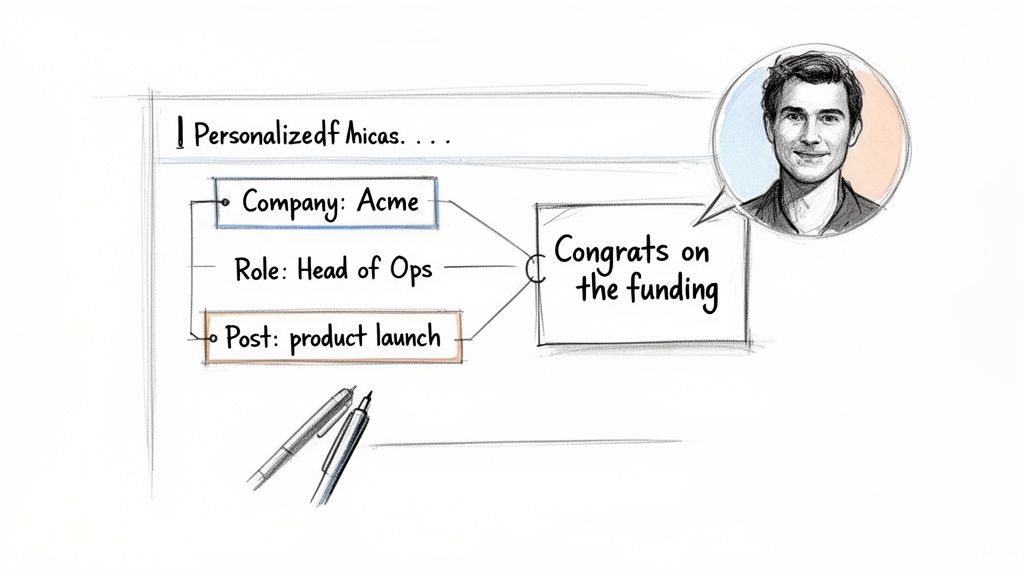
A diagram illustrates personalized outreach based on company, role, and a product launch post, leading to a congratulatory message from a man.

Comparing Light vs. Deep Personalization

Not all personalization is created equal, and the right move depends entirely on the account's value and where the prospect is in your sequence.

Let's break down the two main strategies.

Personalization LevelWhat It IsWhen to Use ItActionable Example
Light PersonalizationUsing easy-to-find info like their name, company, and job title.Perfect for early-stage nudges or lower-tier accounts where a deep dive isn't practical."Hi John, saw you're the VP of Sales at Acme..."
Deep PersonalizationReferencing specific, timely events—a funding round, a recent LinkedIn post, a mutual connection.Your go-to for high-value target accounts or later-stage follow-ups to re-engage a quiet prospect."Congrats on the new product launch you posted about on LinkedIn yesterday..."

Think of light personalization as your baseline. It shows you aren't a spam bot. But deep personalization? That’s your secret weapon. It proves you're a sharp, observant human who’s actually paying attention to their world.

A Scalable Framework for Meaningful Outreach

Doing this at scale is where most teams fall down. Manually scouring LinkedIn and company news for every single prospect is a recipe for burnout. This is where a smart workflow, powered by the right tools, makes all the difference.

The goal is to find a "trigger"—a specific piece of information that makes your email feel timely and hyper-relevant.

Here’s an actionable checklist of where to look for those triggers:

  • Company News: Did they just announce a funding round, launch a new product, or hire a key executive? That’s absolute gold for a congratulatory follow-up.
  • LinkedIn Activity: Did your prospect post an article, share an opinion, or comment on a relevant thread? Referencing it shows you’re tuned in.
  • Job Postings: If a company is hiring for a role you can help with (like hiring more SDRs when you sell sales software), it’s a massive signal of their current pain points.
  • Mutual Connections: Nothing builds instant credibility faster than mentioning a shared connection. It’s the ultimate shortcut to trust.

The most effective personalization connects their recent activity directly to the problem you solve. It’s not just about name-dropping their latest post; it's about explaining why that post made you think of a solution specifically for them.

Using AI to Accelerate Personalization

This is where modern tools completely change the game. Instead of you spending hours on manual research, an AI-powered engine can do the heavy lifting.

For example, MarketBetter’s SDR Task Engine automatically surfaces these crucial account insights and triggers. It can spot that a target account just landed its Series B funding and instantly generate a personalized snippet for your follow-up.

Here’s what that workflow looks like in practice:

  1. AI Surfaces an Insight: The system flags that "Acme Corp just announced a new integration with Salesforce."
  2. AI Generates a Snippet: It drafts a line like, "Saw the news about your new Salesforce integration—congrats! Scaling up often puts a strain on CRM data hygiene..."
  3. You Add the Human Touch: You grab that AI-assisted line and weave it into your follow-up, making sure the tone feels authentic to you.

This approach gives you the best of both worlds: the raw speed of automation combined with the irreplaceable authenticity of human oversight. You're no longer just sending another email; you're delivering a relevant, timely message that makes your follow-up impossible to ignore.

Automating and Tracking Follow Ups Like a Pro

A killer follow-up strategy is worthless if you don't execute it consistently. This is where the real work happens—inside your CRM. Managing your email follow ups in a system like Salesforce or HubSpot is non-negotiable for staying organized, but let's be honest, the manual process can quickly become a bottleneck that absolutely kills your selling time.

Even a well-organized manual workflow is better than chaos, but it’s still loaded with friction. Every single click, from creating a task to logging an email, pulls you away from what you should be doing: talking to prospects. Let's compare that old-school grind to a modern, automated approach.

Manual vs Automated Workflows: A Side-By-Side Look

The difference between a manual and an automated process isn't just about saving a few minutes here and there. It’s about completely changing where your SDRs spend their energy. One path is reactive and buried in admin tasks; the other is proactive and laser-focused on selling.

Take a look at how the two workflows stack up against each other. The contrast is pretty stark.

Actionable Comparison: Manual vs. Automated Follow Up Workflow

The table below breaks down the daily reality for a sales rep. On one side, you have the click-heavy, memory-dependent traditional process. On the other, a system that does the heavy administrative lifting for you.

TaskManual Process (in Salesforce/HubSpot)Automated Process (with MarketBetter)The Impact
Task CreationYou have to remember to create a "Follow Up" task for a specific date after sending an email.A task is auto-created and prioritized in your inbox based on a trigger (e.g., "no reply after 3 days").No leads fall through the cracks.
Daily PrioritizationYou stare at a long, unfiltered task list, trying to guess which lead to contact next.The system serves up a clear 'next best action' based on account fit, timing, and engagement signals.Reps work on the highest-value tasks first.
Email DraftingYou hunt for a template, copy-paste it, and then manually dig through records for personalization details.AI generates a context-aware follow-up email using account and persona data, ready for your review.Time spent drafting is cut by over 90%.
Activity LoggingYou have to manually log the email activity, copy the text, and update the contact record. Tedious.The email is sent and all activity is auto-logged to the correct Salesforce or HubSpot record instantly.Perfect CRM data hygiene with zero effort.

This comparison shines a spotlight on the core problem: the manual process forces reps to waste a huge chunk of their day on low-value admin work. All those clicks add up, devouring the time that could be spent having actual conversations that generate pipeline.

The goal of automation isn't to replace the seller. It's to eliminate the tedious, repetitive tasks that prevent the seller from doing what they do best: selling.

How an SDR Task Engine Changes the Game

This is exactly where a tool like MarketBetter's SDR Task Engine completely flips the script. Instead of you chasing down what to do next, the system intelligently serves up the next best action. It basically turns buyer signals into a prioritized, actionable to-do list.

Imagine this actionable scenario: the engine sees that a prospect hasn't replied to your first email after three days. It doesn't just send you a reminder; it gets to work.

  1. Auto-Creates a Prioritized Task: A new "Follow-Up" task for that specific contact pops to the top of your queue. You don't have to remember a thing.
  2. Provides Full Context: The task is packed with the prospect's details, your previous email history, and key account insights so you're not flying blind.
  3. Generates an AI-Written Draft: With a single click, MarketBetter’s AI drafts a concise, relevant follow-up email. It references your last touchpoint and is ready for you to quickly tweak and send.

This approach ensures your CRM hygiene is perfect because every single action is logged automatically. But more importantly, it frees you from the decision fatigue of figuring out who to follow up with and what to say. The system handles the "when" and the "what," so you can focus on the "how"—adding that critical human touch that actually closes deals.

For a deeper dive into this, you can learn more about how marketing automation workflows can supercharge your entire sales process.

Free Tool

Try our AI Lead Generator — find verified LinkedIn leads for any company instantly. No signup required.

Common Questions About Email Follow Ups

Even with the best playbook, you'll run into situations that feel like a gray area. When you're juggling dozens of prospects, knowing the right move isn't just helpful—it's what separates the pros from the pests.

Here are the straight-up answers to the questions our sales teams get asked the most about nailing the follow-up.

How Many Email Follow Ups Is Too Many?

There’s no magic number, but all the data—and my own experience—points to a sweet spot: a multi-channel sequence of 5 to 7 touches. But honestly, the number isn't the point. It's the value and tone of each message that matters.

Sending the same "just checking in" email seven times is just spam with extra steps. But if each follow-up offers a new insight, a relevant case study, or a helpful resource? You've earned the right to stay in their inbox.

Think about it this way:

  • The Annoying Approach: "Hi, following up again." "Hi, just checking in on my last email." This adds zero value and instantly tags you as a nuisance.
  • The Value-Add Approach: "Hi, thought you'd find this article on [pain point] useful." or "Hi, here's how we helped a similar company solve [problem]." Now you're a helpful advisor, not a salesperson chasing a commission.

Actionable takeaway: End your sequence with a "break-up" email. It politely closes the loop and, you'd be surprised, often gets a high response rate from busy people who just appreciate the professional courtesy. And always, always watch your engagement. If you see zero opens after 3-4 attempts, it’s a pretty clear signal to move on.

What Is the Best Time to Send a Follow Up?

You’ve probably seen the studies pointing to mid-morning (10 AM) and mid-afternoon (2 PM) on Tuesdays. That advice is so generic it’s almost useless. The "best" time is completely different depending on the industry, role, and time zone. An East Coast CFO’s workflow is nothing like a West Coast marketing manager's.

Your own data is your best friend here. But an even better strategy is to follow up based on when your prospect is actually active.

An email sent at a "good enough" time consistently is far more effective than an email sent at the "perfect" time inconsistently. Don't let perfectionism kill your execution.

Actionable takeaway: Use tools with real-time engagement alerts. If a prospect opens your email at 8 PM on a Wednesday, that’s a massive clue about their work habits. Schedule your next touchpoint for a similar time to massively boost your odds of catching them when you're already top-of-mind.

Should I Mention My Previous Email in a Follow Up?

Yes, but do it with finesse. The goal is to re-establish context, not to remind them they ignored you. Whatever you do, avoid the cliché and slightly passive-aggressive phrase, "I'm just following up on my email below." It feels like you're pointing a finger.

Instead, just briefly and professionally reference the core idea of your last message.

What to Avoid (Passive-Aggressive): "Did you get a chance to read my last email?" (This implies they owed you something.)

What to Do Instead (Professional Context): "When I last reached out, I mentioned how we help sales leaders fix their CRM data problem..." (It's quick, professional, and gets right back to the value.)

Actionable takeaway: Ensure every follow-up can stand on its own. The recipient shouldn't have to go digging through their inbox to figure out what you're talking about. Briefly restate the value, connect it to their world, and give them a clear, simple call-to-action.


Stop letting your SDRs drown in manual admin work. MarketBetter turns buyer signals into a prioritized task list and helps your reps execute faster with an AI email writer and dialer that lives right inside Salesforce and HubSpot. See how you can book more meetings, not more busywork. Learn more at marketbetter.ai.

MarketBetter vs Apollo.io: The Complete 2026 Alternative Comparison

· 11 min read

Looking for an Apollo.io alternative? You've found the right comparison.

Apollo.io is one of the most popular sales intelligence platforms on the market—275M+ contacts, strong Chrome extension, and pricing that doesn't require selling a kidney. With a 4.7/5 rating on G2 and 9,000+ reviews, they've clearly built something people like.

But here's the catch: Apollo gives you a database. Not a game plan.

Apollo tells you WHO to contact. It doesn't tell you WHAT to do next. It doesn't see who's already on your website. It doesn't have a chatbot to capture leads at 2 AM. And those 275M contacts? Users report 10-35% bounce rates, especially outside the US.

MarketBetter delivers what Apollo can't: a complete SDR command center with visitor identification, AI chatbot, daily task playbook, AND outreach automation—all with data you can actually trust.

This guide breaks down everything you need to know.

Quick Comparison: MarketBetter vs Apollo.io

FeatureMarketBetterApollo.io
Website Visitor Identification✅ Company + person level❌ Not included
AI Chatbot✅ Qualified-style with live handoff❌ Not included
Daily SDR Playbook✅ AI-prioritized task lists❌ Not included
Pre-Meeting Intelligence✅ Auto-generated briefs❌ Not included
Contact Database✅ Integrated enrichment✅ 275M+ contacts
Email Sequences✅ AI-personalized drafts✅ Built-in sequencing
LinkedIn Outreach✅ Connection + messaging⚠️ Chrome extension only
Phone/Dialer✅ Smart dialer (all plans)⚠️ Professional+ only ($79/mo)
Intent Data✅ First-party + enrichment✅ Third-party signals
CRM Integration✅ HubSpot + Salesforce bidirectional✅ Major CRMs
Data Accuracy✅ Verified enrichment⚠️ 10-35% bounce rates reported
Inbound Lead Capture✅ Full workflow❌ Outbound only
Meeting Booking✅ Chatbot + sequences⚠️ Manual setup required

The bottom line: Apollo is a solid contact database with sequencing. MarketBetter is your complete SDR command center—the platform that shows you who's visiting, captures inbound, prioritizes outreach, and prepares your team to close.

What Is Apollo.io?

Apollo.io launched as a sales intelligence platform combining a massive B2B database with built-in engagement tools. Unlike pure data providers like ZoomInfo, Apollo bundles prospecting, sequencing, calling, and basic CRM features into one platform.

Database Size: 275M+ contacts, 65M+ companies

G2 Rating: 4.7/5 (9,000+ reviews)

Target Market: SMB and mid-market sales teams looking for an affordable all-in-one solution

Apollo Pricing (2026)

PlanAnnual (per user/mo)MonthlyKey Features
Free$0$010 contacts/mo, basic filtering, Chrome extension
Basic$49$59Intent data, job changes, advanced filtering
Professional$79$99Uncapped sending, AI email writing, dialer
Organization$119$1493+ users required, call transcripts, custom reports

The credit system: Apollo uses credits for mobile numbers, exports, and certain enrichment features. Credits are limited per tier and don't fully roll over—a common complaint.

What users say about pricing:

"One year ago Basic was $19/mo, then $29, then $39, then $49, then $59." — Trustpilot review

Apollo's pricing has increased significantly over time, and users report surprise renewal increases.

What Apollo Does Well

Let's give credit where it's due:

Massive B2B Database
275M+ contacts with 65+ search filters including company size, industry, technology stack, job postings, and buyer intent signals. For pure prospecting volume, it's impressive.

Affordable Entry Point
Compared to ZoomInfo ($15K+/year), Apollo's $49/user/month starting price is accessible to SMBs. The free tier lets teams test before committing.

All-in-One Approach
Unlike point solutions, Apollo bundles prospecting, sequencing, calling, and basic CRM features. You can run outbound campaigns without juggling multiple tools.

Strong Chrome Extension
Apollo's LinkedIn integration lets you research prospects and add them to sequences without leaving the browser. It's one of their most-loved features.

Decent CRM Integrations
Connects with Salesforce, HubSpot, Pipedrive, Outreach, Salesloft, and others. Two-way sync keeps your CRM updated.

Where Apollo Falls Short

Here's what Apollo doesn't do—and why it matters:

1. No Website Visitor Identification

Apollo helps you reach out to cold prospects. But what about the warm leads already on your website?

Every day, potential customers visit your site, read your pricing page, check out case studies—and leave without a trace. Apollo has zero visibility into this traffic.

MarketBetter identifies these visitors at the company and person level, then routes them to your SDRs as high-priority tasks.

Why it matters: Website visitors are 5-10x more likely to convert than cold outbound prospects. Missing them is leaving money on the table—and Apollo can't help you catch them.

2. No AI Chatbot

When a high-intent visitor lands on your pricing page at 2 AM, Apollo can't help. There's no chatbot to engage them, qualify them, or book a meeting.

MarketBetter includes a Qualified-style AI chatbot that:

  • Engages visitors in real-time
  • Qualifies based on your ICP criteria
  • Books meetings directly on your team's calendar
  • Hands off to live reps when needed

Why it matters: 50% of leads go to the vendor that responds first. Without a chatbot, you're losing deals to competitors who capture leads 24/7.

3. No Daily SDR Playbook

Apollo gives you a database. A big one. But then what?

Your SDRs still need to figure out who to contact first, what to say, and how to prioritize their day. Apollo doesn't help with that.

MarketBetter generates a daily task list for each SDR:

  • Prioritized by fit score + intent signals
  • Organized by territory/ownership
  • Clear guidance on what to do and say

Your SDRs don't waste time figuring out who to contact. They open their dashboard and start executing.

Why it matters: Data without direction is just noise. A playbook turns data into action.

4. Data Accuracy Problems

This is Apollo's Achilles heel. Users consistently report data quality issues:

Email bounce rates: 10-35% depending on market (worse outside the US)

Phone number issues: Many numbers are outdated or route to headquarters instead of direct lines

International data: UK and EU coverage significantly weaker than US

User quotes from reviews:

"60% of UK contacts were wrong" — Reddit user

"Phone numbers are often outdated or just company headquarters" — G2 review

MarketBetter uses verified enrichment sources and focuses on quality over raw database size.

Why it matters: Bad data wastes time, burns your sender reputation, and makes your team look unprofessional. A smaller, accurate database beats a massive unreliable one.

5. Security Concerns

Apollo has experienced two documented data breaches:

  • 2018 breach: Compromised contact information
  • 2021 breach: 130M+ records exposed (per Cognism research)

When you upload your customer data to Apollo for enrichment, you're trusting it to a platform with a breach history.

Why it matters: Your prospect data is valuable. Security incidents put both your data and your reputation at risk.

6. Dialer Paywalled to Higher Tiers

Apollo's phone dialer—a key SDR tool—requires the Professional plan ($79/user/month) or above. Basic plan users can't make calls through the platform.

MarketBetter includes smart dialer on all plans. No feature paywalls for essential SDR capabilities.

7. No Pre-Meeting Intelligence

After your SDR books a meeting, what happens? With Apollo, your AE is on their own. They still need to research the company, understand the context, and prepare their pitch.

MarketBetter auto-generates pre-meeting briefs including:

  • Company background and ICP fit
  • Pricing guidance based on company size
  • Browsing history (what pages they viewed)
  • Talking points and likely objections

Why it matters: Prepared AEs close at higher rates. Automated briefs save 20-30 minutes per meeting.

The Real Difference: Data Provider vs SDR Command Center

Here's the clearest way to understand the difference:

Apollo's approach: "Here's a big database. Go find prospects and email them."

MarketBetter's approach: "Here's who visited your site today, here's who you should contact first, here's what to say, here's your AI chatbot catching leads while you sleep, and here's your meeting prep for tomorrow's calls."

SDR FunctionMarketBetterApollo.io
Know who's on your website
Capture inbound leads 24/7
Prioritize daily tasks
Access B2B contacts
Send email sequences
Make phone calls✅ (all plans)⚠️ ($79+ plans)
Prepare reps for meetings
Verify data accuracy⚠️

Apollo tells you WHO. MarketBetter tells you WHO + WHAT TO DO + WHY THEY MATTER.

Apollo vs MarketBetter: Use Case Breakdown

When Apollo Makes Sense

  • Pure cold outbound at scale — you need maximum contacts, accuracy is secondary
  • Tight budget — $49/user/month is genuinely affordable
  • You already have visitor ID and chatbot — Apollo fills the database gap
  • US-focused prospecting — their US data is strongest
  • You don't need a dialer — email-only outreach on Basic plan

When MarketBetter Makes Sense

  • Website traffic is valuable — you want to know (and act on) who's browsing
  • Inbound matters — you need a chatbot capturing leads 24/7
  • Quality over quantity — fewer accurate contacts beats millions of bad emails
  • Your team needs direction — a daily playbook makes SDRs more effective
  • Complete SDR stack — you want one platform, not five tools stitched together
  • Data security matters — you need a platform without breach history

Common Questions About Switching from Apollo

Can MarketBetter replace Apollo entirely?

Yes. MarketBetter includes contact enrichment, email sequencing, smart dialer, and CRM integration—everything Apollo offers—plus visitor identification, AI chatbot, daily playbook, and pre-meeting intelligence.

What about Apollo's database size?

Apollo's 275M contacts sounds impressive, but size doesn't matter if the data bounces. MarketBetter prioritizes accuracy—fewer contacts that actually work, plus the website visitors Apollo can't see.

Will I lose my Apollo sequences?

You can recreate sequences in MarketBetter. Our AI helps you personalize at scale, and we offer migration support for teams switching over.

Does MarketBetter integrate with my CRM?

Yes. Bidirectional sync with HubSpot and Salesforce, plus integrations with major tools in your stack.

What about Apollo's free tier?

Apollo's free tier (10 contacts/month) is useful for testing but too limited for real work. MarketBetter offers demos and trials so you can evaluate the full platform before committing.

Frequently Asked Questions

Is Apollo really 10-35% bounce rates?

Multiple user reviews and third-party analyses report bounce rates in this range, particularly for international data. US data tends to be more accurate, but results vary.

Why doesn't Apollo have visitor identification?

Apollo is fundamentally a database company that added engagement features. Visitor identification requires different technology (IP intelligence, identity resolution) that isn't their core competency.

Can I use both Apollo and MarketBetter?

You can, but there's significant overlap. Most teams find MarketBetter replaces Apollo entirely while adding capabilities Apollo lacks.

How does pricing compare for a 5-person team?

Apollo Professional (with dialer): $79 × 5 = $395/month Apollo Organization: $119 × 5 = $595/month (minimum 3 users)

MarketBetter pricing scales based on your team size, traffic, and usage. Contact us for a custom quote—many teams find comparable or better value with significantly more capabilities.

What about Apollo's Chrome extension?

MarketBetter also offers browser-based tools for LinkedIn prospecting. You won't lose this workflow.

The Complete SDR Stack vs. The Contact Database

Let's summarize with a simple question:

What does your SDR team actually need?

NeedBest Choice
Massive contact database, accuracy secondaryApollo.io
Know who's on your website + act on itMarketBetter
Capture inbound leads 24/7 with AI chatbotMarketBetter
Daily prioritized task lists for SDRsMarketBetter
Pre-meeting prep for your AEsMarketBetter
Cheapest possible entry pointApollo.io (Free tier)
Data accuracy you can trustMarketBetter
Complete SDR command centerMarketBetter

Apollo built a big database with some engagement features bolted on. That was innovative five years ago.

MarketBetter is what comes next—the platform that shows you who's visiting, captures inbound leads, tells your SDRs exactly what to do, and prepares your team to close.

Free Tool

Try our AI Lead Generator — find verified LinkedIn leads for any company instantly. No signup required.

Ready to See the Difference?

Book a demo and we'll show you:

  1. Who's visiting your site right now—prospects Apollo can't see
  2. How our AI chatbot captures leads—even when your team is asleep
  3. What your daily SDR playbook looks like—prioritized tasks, ready to execute
  4. AI-personalized outreach—quality over quantity

Stop settling for a database when you need a command center.

Book a Demo →


Questions? Email us at [email protected]

MarketBetter vs Common Room: Signal Aggregation vs SDR Workflow [2026]

· 7 min read

Looking for a customer intelligence platform to drive pipeline? Common Room and MarketBetter both help sales teams identify high-intent accounts—but they take fundamentally different approaches to what happens next.

The key difference: Common Room aggregates buying signals. MarketBetter turns those signals into a daily SDR playbook with specific tasks your reps can execute.

If you're evaluating these platforms, this comparison breaks down how they differ so you can choose the right fit for your team.

Quick Comparison

FeatureMarketBetterCommon Room
Primary FocusSDR workflow automationSignal aggregation
What You GetWHO to contact + WHAT to doWHO to contact
Website Visitor ID✅ Built-in✅ Built-in
SDR Task List✅ Daily playbook❌ Requires separate tools
Smart Dialer✅ Built-in❌ Not available
AI Chatbot✅ Qualified-style bot❌ Not available
Email Automation✅ Hyper-personalized sequences⚠️ Via integrations only
Outreach Execution✅ All-in-one❌ Requires Apollo, Outreach, etc.
LinkedIn Integration✅ Native✅ Native
PricingStarting $99/user/monthStarting $1,000/mo ($12K/yr)
Target Company SizeSMB to Mid-market (50-500 employees)Mid-market to Enterprise

What is Common Room?

Common Room is a customer intelligence platform that aggregates buying signals from 50+ data sources. It captures intent data from:

  • Website activity and IP enrichment
  • Community engagement (Slack, Discord, GitHub)
  • Social media activity
  • Job changes and hiring trends
  • Product usage signals
  • Bombora intent topics

Common Room excels at signal detection and account prioritization. Their "Person 360" feature builds comprehensive profiles with contact enrichment from a 200M+ database.

Pricing: Common Room starts at $1,000/month (billed annually) for the Starter plan with up to 35K contacts. Team plan is $2,500/month with 100K contacts. Enterprise is custom pricing.

What Common Room Does Well

  • Comprehensive signal coverage — 50+ integrations capture buying signals across the customer journey
  • Strong enrichment — Waterfall enrichment finds emails and phone numbers
  • AI agent (RoomieAI) — Crafts personalized messages based on signals
  • Enterprise-grade — Built for large GTM teams with complex signal requirements

Where Common Room Falls Short

According to user reviews and competitor analysis:

  • No native outreach execution — You still need Apollo, Outreach, Salesloft, or similar tools to actually contact prospects
  • Non-intuitive UI — G2 reviews mention filters and segments can be hard to navigate
  • Requires integration management — Success depends on connecting multiple tools together
  • Enterprise pricing — $12K+ annual commitment puts it out of reach for many SMBs
  • Signals without action — Knowing WHO isn't helpful if reps don't know WHAT to do

What is MarketBetter?

MarketBetter is an AI-powered SDR platform that transforms intent signals into daily action. Rather than just showing you who's interested, MarketBetter tells your SDRs exactly what to do next.

The core difference: MarketBetter is a workflow platform, not just a signal platform.

Core Features

1. Daily SDR Playbook Every morning, SDRs log in to a prioritized task list. No deciding who to call or what to say—the AI researches prospects, scores them, and creates specific action items.

2. Website Visitor Intelligence Identify companies visiting your site with intent scoring. But unlike signal-only platforms, MarketBetter automatically routes visitors to the right rep with tasks pre-created.

3. Built-in Smart Dialer No need for a separate calling tool. Warm outbound calls happen inside the same platform where tasks are assigned.

4. AI Chatbot Qualified-style conversational bot that qualifies visitors and books meetings directly. Live handoff to your team via Slack when a hot prospect engages.

5. Hyper-Personalized Email AI writes emails researched to each prospect's company, role, and signals. Not generic templates—actual personalization at scale.

6. Pre-Meeting Briefs Before every call, reps get background research, pricing guidance, and ICP fit analysis. No scrambling to prep.

What Makes MarketBetter Different

From 20 tabs to one SDR task list.

Most sales teams juggle CRMs, intent data platforms, dialers, email tools, chatbots, and research tools. MarketBetter consolidates these into a single workflow.

SDRs don't decide what to do—they follow the AI's playbook:

  • "Call John at Acme Corp (visited pricing page 3x this week)"
  • "Send follow-up email to Sarah at TechCo (opened proposal yesterday)"
  • "Respond to inbound chat from qualified visitor"

Why this matters: Intent data is worthless if reps don't act on it. Most signal platforms create dashboards. MarketBetter creates action.

Common Room vs MarketBetter: Feature Deep Dive

Signal Detection

Common Room: Aggregates 50+ signal sources including website activity, community engagement, social media, job changes, hiring trends, and third-party intent (Bombora). Best-in-class breadth of signal capture.

MarketBetter: Focuses on highest-intent signals—website visitors, email engagement, chat interactions, and CRM activity. Less breadth but tighter integration with action.

Verdict: Common Room wins on signal breadth. MarketBetter wins on signal-to-action speed.

Outreach Execution

Common Room: RoomieAI crafts messages, but execution requires integrating with Outreach, Apollo, Salesloft, or similar. This creates workflow gaps and integration complexity.

MarketBetter: Email, calling, and chat are all native. One platform, one workflow. When a hot visitor appears, your rep can call them in seconds—not after syncing data between systems.

Verdict: MarketBetter for all-in-one execution. Common Room if you already have a sales engagement platform you love.

SDR Productivity

Common Room: Surfaces signals that reps must interpret and act on. Great for sophisticated RevOps teams who can build custom workflows.

MarketBetter: Prescriptive daily tasks that new SDRs can follow immediately. Onboard reps in days, not months.

Verdict: MarketBetter for teams that want plug-and-play productivity. Common Room for teams with dedicated ops resources.

Pricing and Value

Common Room:

  • Starter: $1,000/month ($12K/year) — 35K contacts, 2 seats
  • Team: $2,500/month ($30K/year) — 100K contacts, 5 seats
  • Enterprise: Custom pricing — 200K+ contacts

MarketBetter:

  • Starting around $500-2,000/month depending on usage
  • All features included (no separate dialer, chatbot, email tools)
  • Built for SMB and mid-market budgets

Verdict: MarketBetter delivers more complete functionality at lower total cost—especially when you factor in the tools you'd need to add to Common Room.

Who Should Use Common Room?

Common Room is the right choice if:

  • ✅ You're an enterprise company with 200K+ contacts to track
  • ✅ You have dedicated RevOps to build custom signal workflows
  • ✅ You already use Apollo, Outreach, or Salesloft and want to enhance them
  • ✅ You need comprehensive community/social signal tracking
  • ✅ Budget isn't a constraint ($30K+/year for full functionality)

Who Should Use MarketBetter?

MarketBetter is the right choice if:

  • ✅ You want SDRs executing tasks, not analyzing dashboards
  • ✅ You need all-in-one execution (email + dialer + chatbot + tasks)
  • ✅ You're an SMB or mid-market company (50-500 employees)
  • ✅ You want fast time-to-value without complex integrations
  • ✅ Your SDRs need a daily playbook, not just signals

The Bottom Line

Common Room is a powerful customer intelligence platform for enterprises that want comprehensive signal aggregation across dozens of sources. If you have the budget and ops resources to integrate it with execution tools, it provides deep insights into buying behavior.

MarketBetter takes a different approach: instead of just telling you WHO is interested, it tells your SDRs exactly WHAT to do. The daily playbook, built-in dialer, AI chatbot, and email automation mean your team executes faster without juggling multiple tools.

The key question: Do you need more signals, or do you need more action?

If your team already drowns in data and struggles to act on it, adding another signal platform won't help. MarketBetter's prescriptive workflow gets reps executing immediately.

If you have a sophisticated RevOps function and need enterprise-scale signal aggregation, Common Room's depth is valuable—just be prepared to integrate it with your outreach stack.


Free Tool

Try our AI Lead Generator — find verified LinkedIn leads for any company instantly. No signup required.

Ready to See the Difference?

MarketBetter turns buying signals into an SDR playbook your team can execute today.

Book a Demo →

See how MarketBetter's AI assigns tasks, writes personalized outreach, and helps SDRs close more deals—without the complexity of stitching together multiple tools.

MarketBetter vs Landbase: The Complete 2026 Alternative Comparison

· 13 min read

Looking for a Landbase alternative? You're asking the right question.

Landbase is the newest entrant in the AI SDR space—founded in 2024 and backed by $30M from Sound Ventures (Ashton Kutcher's fund), 8VC, and others. Their pitch is bold: fully autonomous AI agents that replace your entire SDR team.

But here's the fundamental question: Do you want AI that replaces your team, or AI that makes your team unstoppable?

Landbase believes in full automation. Set it and forget it. The AI handles everything.

MarketBetter believes in human-in-the-loop AI. We augment your SDRs with superpowers—telling them WHO to call, WHAT to say, and WHY each prospect matters—while humans maintain control over relationships and decisions.

This isn't just a feature difference. It's a philosophy difference. And it matters more than you might think.

Quick Comparison: MarketBetter vs Landbase

FeatureMarketBetterLandbase
AI PhilosophyHuman-in-the-loop (augment your team)Fully autonomous (replace your team)
Website Visitor Identification✅ Company + person level❓ Unclear
AI Chatbot✅ Qualified-style with live handoff❌ Not included
Daily SDR Playbook✅ AI-prioritized task lists❌ Not included
Pre-Meeting Intelligence✅ Auto-generated briefs❌ Not included
Outbound Email Sequences✅ Personalized AI drafts✅ Full automation
LinkedIn Outreach✅ Connection + messaging✅ Full automation
AI Phone Calls✅ Smart dialer✅ AI caller
Human Control✅ Full oversight and approval❌ Black-box autonomous
Track Record✅ Established⚠️ Founded 2024, ~10 G2 reviews
Pricing Transparency✅ Clear plans❌ Contact us (~$36K/year)
SMB-Friendly✅ Flexible pricing⚠️ ~$36K/year minimum

The bottom line: Landbase bets everything on full automation. MarketBetter gives you AI superpowers while you keep the steering wheel.

What Is Landbase?

Landbase launched in 2024 with an ambitious vision: an "agentic AI GTM platform" where multiple AI agents collaborate to run your entire sales development operation.

Funding: $30M Series A (June 2025) from Sound Ventures, Picus Capital, 8VC, A*, Firstminute Capital, and TheGP.

Leadership: CEO Daniel Saks previously co-founded AppDirect (reached unicorn status), so this isn't a first-time founder.

The Pitch: Their GTM-1 system includes specialized AI agents:

AgentRole
GTM StrategistPlans outreach strategy
AI ResearcherFinds and qualifies prospects
AI SDRPersonalizes and sends messages
AI RevOps ManagerHandles data and analytics
AI IT ManagerDomain warmup, deliverability

They claim 220M+ B2B contacts, 10M+ intent signals, and the ability to send 3,000+ emails per day per domain.

What Landbase Claims

According to their marketing:

  • 4-7x conversion uplift vs manual outbound
  • 150+ paid customers (as of mid-2025)
  • $100M+ pipeline generated for customers
  • 60-70% cost reduction vs human SDR teams
  • Campaign launch in "minutes, not months"

Important caveat: These are vendor claims. With only ~10 G2 reviews and one year of operating history, independent verification is limited.

What Landbase Does Well

Let's give credit where it's due:

True Agentic AI Architecture
Landbase isn't just using AI for drafting emails—they've built a multi-agent system where specialized AI components collaborate. This is genuinely innovative architecture.

Strong Founding Team
Daniel Saks built AppDirect to a $1B+ valuation. He knows how to scale B2B companies. This isn't a couple of engineers with a cool demo.

No Per-User Pricing
Unlike many tools, Landbase charges a flat rate regardless of how many "users" you have. For teams that want to scale, this could be cost-effective.

Serious Investor Backing
Sound Ventures has invested early in Airbnb, Uber, and OpenAI. They pick winners. 8VC (Joe Lonsdale) also has a strong B2B track record.

Where Landbase Falls Short

Here's the uncomfortable truth about fully autonomous AI SDRs:

1. The Black Box Problem

Landbase's pitch is "set it and forget it." But what happens inside that black box?

  • Who decides which prospects to contact?
  • What messaging does the AI send on your behalf?
  • How do you stop a problematic campaign mid-flight?

With MarketBetter, you see exactly what the AI recommends, approve what goes out, and maintain control over your brand voice.

Why it matters: One bad AI-generated email to a key prospect can torpedo a deal. One inappropriate message to a customer's competitor can end a relationship. Human oversight isn't a bug—it's a feature.

2. No Website Visitor Identification

Landbase focuses on outbound to cold prospects. But what about the warm leads already showing buying intent on your website?

Every day, potential customers visit your pricing page, read your case studies, and browse your features—then leave. Landbase has no visibility into this traffic.

MarketBetter identifies these visitors at the company and person level, then routes them to your SDRs as high-priority tasks.

Why it matters: Website visitors are 5-10x more likely to convert than cold outbound. Missing them is leaving money on the table.

3. No AI Chatbot

When a VP of Sales lands on your site at 11 PM, Landbase can't help. There's no chatbot to engage them, qualify them, or book a meeting.

MarketBetter includes a Qualified-style AI chatbot that:

  • Engages visitors in real-time
  • Qualifies based on your ICP criteria
  • Books meetings directly on your team's calendar
  • Hands off to live reps when high-value

Why it matters: 50% of deals go to the vendor that responds first. Without 24/7 inbound capture, you're losing to competitors who never sleep.

4. No Daily SDR Playbook

Landbase replaces your SDR team. But most teams don't want zero human involvement—they want efficient human involvement.

MarketBetter generates a daily task playbook for each SDR:

  • Prioritized by fit score + intent signals
  • Clear guidance on what to do and say
  • Organized by territory and ownership

Your SDRs don't waste time figuring out who to contact. They open their dashboard and start executing.

Why it matters: Human SDRs still outperform AI on complex deals, enterprise accounts, and relationship-building. A playbook makes them 3x more efficient.

5. Very Limited Track Record

Landbase was founded in 2024. As of early 2026, they have approximately 10 G2 reviews.

For comparison:

  • 11x.ai: 50+ reviews
  • Apollo: 1,000+ reviews
  • Outreach: 3,000+ reviews

MarketBetter has an established track record with customers who can speak to real results over time.

Why it matters: You're betting your pipeline on this platform. A year of operating history isn't enough to prove enterprise reliability.

6. Opaque Pricing

Landbase doesn't publish pricing. Based on their comparison content and market research, expect approximately $36,000/year (~$3K/month) with annual contracts.

MarketBetter offers transparent, flexible pricing that scales with your team.

Why it matters: Budget planning matters. You shouldn't need a sales call to know if a tool fits your budget.

The Core Philosophy Difference

This is the most important section of this comparison.

Landbase's Philosophy: Replace Humans

"AI agents that work 24/7 to find, qualify, and engage your ideal customers—automatically."

Landbase believes AI has progressed enough to handle the entire SDR function without human involvement. Their vision is a world where companies don't need SDR teams—just AI agents.

The appeal: Lower headcount costs, unlimited scale, no human inconsistency.

The risk: Loss of control, brand voice drift, no human judgment on high-stakes interactions.

MarketBetter's Philosophy: Augment Humans

"AI that tells your team WHO to call, WHAT to say, and WHY they matter—while humans build relationships."

MarketBetter believes the best results come from human + AI collaboration. AI handles the grunt work (research, prioritization, drafting). Humans handle what they're best at (relationships, judgment, nuance).

The appeal: Best of both worlds—AI efficiency with human quality control.

The trade-off: Requires SDRs to execute (though far fewer than without AI).

Which Philosophy Is Right?

Honestly? It depends on your business.

If You...Consider
Sell transactional, lower-ACV productsFull automation (Landbase)
Sell complex, high-ACV enterprise dealsHuman-in-loop (MarketBetter)
Have zero SDRs and can't hireFull automation (Landbase)
Have SDRs you want to make 3x more productiveHuman-in-loop (MarketBetter)
Want maximum control over brand voiceHuman-in-loop (MarketBetter)
Want to "set it and forget it"Full automation (Landbase)
Have experienced outbound repsHuman-in-loop (MarketBetter)
Are starting from zero outbound motionEither could work

For most B2B companies selling considered purchases, human oversight still matters. Buyers can tell when they're talking to a robot. Relationships still win deals.

Feature-by-Feature Comparison

Outbound Automation

CapabilityMarketBetterLandbase
Email sequences✅ AI-drafted, human-approved✅ Fully autonomous
LinkedIn outreach✅ Connection + messaging✅ Fully autonomous
Phone/dialer✅ Smart dialer with AI assist✅ AI phone agent
Multi-channel coordination✅ Yes✅ Yes
Message personalization✅ Intent + browsing + research✅ Research + signals
Human approval before send✅ Yes❌ No

Verdict: Both automate outbound well. The difference is whether humans stay in the loop.

Inbound Capture

CapabilityMarketBetterLandbase
Visitor identification✅ Company + person level❓ Unclear/not featured
AI chatbot✅ 24/7 with live handoff❌ Not included
Form enrichment✅ Yes❓ Unknown
Inbound routing✅ Smart assignment❌ N/A

Verdict: MarketBetter captures inbound. Landbase is outbound-only.

SDR Enablement

CapabilityMarketBetterLandbase
Daily task playbook✅ Prioritized by AI❌ No human tasks
Pre-meeting briefs✅ Auto-generated❌ Not included
Call coaching✅ Real-time suggestions❌ N/A
Activity tracking✅ Full dashboard⚠️ AI activity only

Verdict: MarketBetter makes SDRs superhuman. Landbase replaces them.

Data & Intelligence

CapabilityMarketBetterLandbase
Contact database✅ Via enrichment partners✅ 220M+ contacts
Intent signals✅ First-party + third-party✅ 10M+ signals
Company research✅ AI-powered✅ AI-powered
Buying committee mapping✅ Yes✅ Yes

Verdict: Roughly comparable data capabilities.

Pricing Comparison

Landbase Pricing

Landbase doesn't publish pricing. Based on available information:

TierEstimated PriceNotes
Free Preview$0Limited—identify customers, preview messaging
Paid$3K/month ($36K/year)No per-user fees, unlimited sends
EnterpriseCustomLikely higher with additional features
  • Annual contracts expected
  • No self-serve option
  • "Contact us" model despite SMB positioning

MarketBetter Pricing

MarketBetter offers flexible pricing based on:

  • Number of SDRs
  • Monthly website traffic
  • Outreach volume needed

Every plan includes:

  • Website visitor identification
  • AI chatbot
  • Daily task playbook
  • Personalized outreach drafts
  • Pre-meeting briefs
  • CRM sync (HubSpot + Salesforce)
  • Slack/Teams alerts

Contact us for a custom quote—or explore self-serve options on our website.

The Real Risk of Full Automation

Let's talk about what could go wrong with fully autonomous AI SDRs:

1. Brand Damage

Your AI reaches out to the CEO of a key target account with an awkward message. They form a negative impression of your company. Your human sales team never gets a chance.

With MarketBetter, you review and approve outreach to strategic accounts.

2. Compliance Issues

AI sends messages that violate GDPR, CAN-SPAM, or industry-specific regulations. Who's accountable?

With MarketBetter, human oversight catches compliance risks before they become legal problems.

3. Competitive Intelligence Leak

Fully autonomous AI might inadvertently reveal information about your targeting, positioning, or strategy through the patterns of who it contacts and what it says.

With MarketBetter, humans maintain control over sensitive outreach decisions.

4. No Course Correction

A fully autonomous campaign is running poorly, but you don't know until it's been active for weeks. Damage done.

With MarketBetter, daily playbook visibility lets you course-correct in real-time.

We're not saying Landbase will cause these problems. We're saying full autonomy introduces risks that human oversight mitigates.

Who Should Choose Landbase?

Landbase might be right if:

  • You have zero SDRs and can't hire any—full automation is your only option
  • You sell transactional products where personalized relationships matter less
  • You're comfortable with a black box—you trust AI to represent your brand without oversight
  • You have $36K+ annual budget for outbound automation alone
  • Speed to launch matters most—you want campaigns live in minutes, not days
  • You're an early adopter comfortable with a 1-year-old platform with limited reviews

Who Should Choose MarketBetter?

MarketBetter is the better fit if:

  • You have SDRs you want to make dramatically more effective
  • You sell considered purchases where relationships and trust matter
  • You want control over what messages go out in your company's name
  • Website visitors are valuable—you want to know (and act on) who's browsing
  • You need inbound capture—24/7 chatbot to never miss a lead
  • You want a proven platform—with a longer track record and more customer evidence
  • Human + AI collaboration matches your philosophy

Frequently Asked Questions

How new is Landbase really?

Founded 2024, Series A in mid-2025, approximately 10 G2 reviews as of early 2026. They're growing fast but are genuinely a young company.

Is Landbase's $36K/year pricing accurate?

Based on their comparison content and market research, yes—approximately $3K/month or $36K/year for their paid tier. They don't publish official pricing.

Can MarketBetter fully automate like Landbase?

MarketBetter can automate heavily, but we believe human approval on outreach produces better results. If you want zero-human-involvement automation, Landbase's philosophy is more aligned.

What if I don't have any SDRs?

MarketBetter works well for founders doing their own selling—the AI does the heavy lifting, you just execute the high-priority tasks. But if you truly want zero involvement, Landbase's full automation is more aligned.

Is Landbase's AI actually better?

Their multi-agent architecture is genuinely innovative. Whether it produces better outcomes is unproven—with only 10 G2 reviews and 1 year of history, there's limited independent evidence.

Why does human-in-the-loop matter?

Three reasons: (1) Brand protection—humans catch problematic messages before they send. (2) Quality—human judgment on high-stakes interactions. (3) Learning—your team develops skills and market knowledge, not just your AI.

The Bottom Line: Control vs. Autopilot

NeedBest Choice
Full autonomous outbound, zero humansLandbase
Know who's visiting your websiteMarketBetter
24/7 inbound capture with AI chatbotMarketBetter
Daily prioritized playbook for SDRsMarketBetter
Human approval before outreach sendsMarketBetter
Proven platform with track recordMarketBetter
Flexible, transparent pricingMarketBetter
Complete SDR command centerMarketBetter

Landbase is building an ambitious vision of fully autonomous GTM. If that future excites you and you're comfortable being an early adopter, they're worth evaluating.

MarketBetter is the complete SDR command center that makes your team superhuman—without giving up control. We identify who's visiting, capture inbound leads, prioritize outreach, and prepare your team to close.

The question isn't "Can AI do the job?" The question is: "Do you want AI working for you, or instead of you?"

Free Tool

Try our AI Lead Generator — find verified LinkedIn leads for any company instantly. No signup required.

Ready to See Human-in-the-Loop AI in Action?

Book a demo and we'll show you:

  1. Who's visiting your site right now—companies and people with buying intent
  2. How our AI chatbot captures leads—24/7, even when you're asleep
  3. What your daily SDR playbook looks like—prioritized tasks, ready to execute
  4. AI-personalized outreach—with your approval before anything sends

Keep the steering wheel. Get AI superpowers.

Book a Demo →


Questions? Email us at [email protected]

MarketBetter vs ZoomInfo: The Best ZoomInfo Alternative for 2026

· 10 min read

Looking for a ZoomInfo alternative? You're not alone—and you're probably here because of sticker shock.

ZoomInfo is the 800-pound gorilla of B2B data. With 320 million contacts and 100 million company profiles, they've earned their reputation as the industry's gold standard. Fortune 500 companies swear by them.

But here's the catch: ZoomInfo costs $15,000 to $50,000+ per year, locks you into annual contracts, and gives you data—not direction.

You'll get a massive database. You'll still wake up wondering: Who should I call today? What should I say? Which prospects are actually ready to buy?

MarketBetter takes a different approach. Instead of just handing you a phonebook, we give you a daily playbook—complete with visitor identification, AI-prioritized tasks, and the tools to execute. starting at $99/user/month.

Let's break down the real differences.

Quick Comparison: MarketBetter vs ZoomInfo

FeatureMarketBetterZoomInfo
Starting Price$99/user/month$14,995/year (~$1,250/mo)
Contract RequirementsMonthly availableAnnual only
Free Trial✅ Free trial❌ Demo only
Website Visitor ID✅ Company + person level✅ WebSights (company level)
AI SDR Playbook✅ Daily prioritized tasks❌ Not included
AI Chatbot✅ Qualified-style❌ Not included
Smart Dialer✅ Included⚠️ Engage add-on (~$15K extra)
Email Sequences✅ Included⚠️ Engage add-on (~$15K extra)
Intent Data✅ Included⚠️ Add-on ($9K-$20K extra)
CRM Integration✅ HubSpot + Salesforce✅ Deep integrations
International Data✅ Global⚠️ Add-on ($10K for worldwide)
Credit System✅ Generous allocation⚠️ Credits drain fast
Auto-Renewal Traps❌ No gotchas⚠️ 60-day notice, 10-20% increases
SOC 2 / GDPR✅ Compliant✅ Compliant

The bottom line: ZoomInfo gives you the world's biggest phonebook. MarketBetter tells you who to call, what to say, and does half the work for you—at a fraction of the cost.

What Is ZoomInfo?

ZoomInfo is the enterprise-grade B2B intelligence platform. They've built the largest database in the industry—320 million contacts across 100 million companies—with particularly strong coverage in North America.

Their platform is modular: SalesOS for prospecting, MarketingOS for campaigns, and TalentOS for recruiting. Enterprise teams at Oracle, Ernst & Young, and Lyft rely on it daily.

What ZoomInfo Does Well

Let's be fair—ZoomInfo earned its reputation:

  • Massive database with detailed firmographic, technographic, and demographic data
  • Enterprise-grade security including SOC 2 compliance and advanced governance
  • Strong intent data through their Streaming Intent product
  • Deep CRM integrations with Salesforce, HubSpot, Outreach, and Salesloft
  • Conversation intelligence via Chorus AI for call recording

For enterprise teams with $50K+ budgets and dedicated ops support, ZoomInfo delivers.

The Reality Check

But here's what the marketing doesn't tell you:

The $14,995 "starting" price is just the beginning. Add user seats ($1,500-$2,500 each), intent data ($9K-$20K), worldwide data ($10K), the Engage module ($15K)—and suddenly you're looking at $50K+ per year.

It's a data warehouse, not a workflow engine. ZoomInfo tells you WHO exists. It doesn't tell you who to contact TODAY, what to say, or help you execute the outreach.

SMB teams get enterprise complexity without enterprise resources. The learning curve is steep. Reviews consistently mention needing ops support to get value from the platform.

Where ZoomInfo Falls Short for Growing Teams

1. No Daily Playbook or Task Prioritization

You log into ZoomInfo. You have access to 320 million contacts.

Now what?

Your SDRs still need to figure out:

  • Which accounts should I prioritize today?
  • Who within these accounts is worth reaching out to?
  • What messaging will resonate with each prospect?

ZoomInfo gives you the data. You still need to build the process around it.

MarketBetter generates a daily task list for each SDR:

  • AI-prioritized by fit score + engagement signals
  • Clear guidance on what to do and what to say
  • Organized by territory and ownership

The gap: ZoomInfo tells your team WHO exists. MarketBetter tells them WHO to call TODAY and WHY.

2. No AI Chatbot for Inbound

A VP of Sales visits your website at 11 PM. They read your pricing page, check a case study, and hover on "Contact Us."

With ZoomInfo alone? They leave. Maybe you catch them in WebSights later. Maybe you don't.

MarketBetter's AI chatbot engages them in real-time:

  • Qualifies against your ICP criteria
  • Answers questions instantly
  • Books meetings while your team sleeps

Why it matters: 50% of deals go to the first vendor who responds. Inbound intent is gold—you need to capture it.

3. Credit Anxiety Is Real

ZoomInfo's credit system is one of the most common complaints in reviews:

"Credits drain fast, expensive top-ups, usage anxiety" "We paid $50K/year but could only reach 3 out of 10 prospects"

Your team starts rationing credits. They hesitate to export the contacts they need. The tool you bought to accelerate prospecting creates friction instead.

MarketBetter includes generous credit allocations designed for actual usage, not artificial scarcity.

4. Contract Lock-In and Renewal Shock

ZoomInfo requires annual contracts—paid upfront. Want to cancel? You need 60 days notice before your renewal date.

Miss that window? You're auto-renewed for another year, often with a 10-20% price increase.

From Trustpilot reviews (~2.5/5 rating):

"Trapped in another 12-month contract despite minimal value" "Auto-renewal traps and cancellation difficulties"

MarketBetter offers monthly flexibility. No 60-day cancellation windows. No auto-renewal gotchas.

5. Add-On Fatigue

ZoomInfo's pricing page shows you three tiers: Professional, Advanced, Elite. What it doesn't show clearly:

  • Intent data? Add-on ($9K-$20K)
  • Worldwide coverage? Add-on ($10K)
  • FormComplete? Add-on ($7,500)
  • Engage (dialer + sequences)? Add-on ($15K)
  • API access? Starts at $50K/year

The platform you thought cost $15K suddenly costs $40K. Then $60K.

MarketBetter bundles the core SDR tools into every plan. Visitor ID, chatbot, playbook, sequences, dialer—included.

The Real Difference: Data Warehouse vs. Action Engine

Here's the clearest way to understand the difference:

SDR NeedMarketBetterZoomInfo
Find contacts✅ (this is their strength)
Know who's on your website⚠️ (WebSights - company only)
Capture inbound 24/7
Get AI-prioritized daily tasks
See what to say to each prospect
Auto-generate pre-meeting briefs
Send sequences without add-ons⚠️ (Engage = extra $15K)
Make calls without add-ons⚠️ (Engage = extra $15K)

ZoomInfo is a data powerhouse. It excels at giving you access to millions of contacts with rich firmographic data.

MarketBetter is your SDR command center. It combines data with daily workflows, AI prioritization, and execution tools in one platform.

Pricing Comparison: The Real Numbers

ZoomInfo Pricing (2026)

PlanAnnual CostWhat You Get
Professional$14,995/year5,000 bulk credits, core data, CRM sync
Advanced$24,995/year500 enrichment credits per seat +, intent signals, org charts
Elite$39,995+/yearFull suite, advanced segmentation

Additional costs that add up:

  • User seats: $1,500-$2,500 each
  • Intent data: $9,000-$20,000
  • Worldwide data: $9,995
  • FormComplete: $7,500
  • Engage (dialer + sequences): $15,000
  • API access: Starts at $50,000/year

Contract terms:

  • Annual only (no monthly option)
  • 60-day cancellation notice required
  • Auto-renewal with 10-20% increases

MarketBetter Pricing (2026)

PlanMonthly CostWhat's Included
Standard$99/user/monthAll features included: Daily SDR Playbook, Website Visitor ID, AI Chatbot, Email Automation, Smart Dialer ($50/seat add-on), 5M AI credits + 500 enrichment credits per seat
EnterpriseCustomEverything in Standard + custom integrations, dedicated support, volume discounts
EnterpriseCustomUnlimited actions, SLA, SSO

Every plan includes:

  • Website visitor identification
  • AI chatbot
  • Daily task playbook
  • Personalized outreach drafts
  • Pre-meeting intelligence
  • CRM sync (HubSpot + Salesforce)
  • Real-time alerts

No annual lock-in required. free trial to start.

What People Are Actually Saying

About ZoomInfo

G2 (4.4/5, 7,000+ reviews):

"Massive database, accurate US data, great integrations" "Expensive, rigid contracts, credit confusion"

Trustpilot (~2.5/5):

"Trapped in another 12-month contract despite minimal value" "Auto-renewal traps and cancellation difficulties"

Reddit (r/sales):

"Great data, but costs are scandalous vs value" "We paid $50K/year but could only reach 3 out of 10 prospects"

LinkedIn:

"More teams asking how to drop ZoomInfo, almost exclusively because of price"

About MarketBetter

"65% growth in funnel and faster conversions." — B2B CEO

"Saved 12+ hours every week and shortened deal cycles by 40%." — SaaS VP Sales

"Follow-ups dropped from days to minutes." — Telecom CEO

Who Should Choose ZoomInfo?

ZoomInfo might be the right choice if:

  • You're an enterprise team with $50K+ budget and ops support
  • Data quantity is your #1 priority—you need access to 320M contacts
  • You already have workflow tools (Outreach, SalesLoft) and just need data to feed them
  • International coverage is critical—and you're willing to pay the add-on
  • Your team can navigate complexity—ZoomInfo has a steep learning curve

Who Should Choose MarketBetter?

MarketBetter is the better fit if:

  • Budget matters—you want powerful tools without enterprise pricing
  • You want action, not just data—daily playbooks tell your team exactly what to do
  • Inbound matters—chatbot and visitor ID capture warm leads
  • You're an SMB or mid-market team—you need simplicity, not complexity
  • You hate contract traps—monthly flexibility, no auto-renewal gotchas
  • You want tools bundled—not nickel-and-dimed on every feature

Frequently Asked Questions

Is ZoomInfo worth $15K/year?

For enterprise teams with ops support and a large SDR org, ZoomInfo's database is genuinely valuable. But for SMB and mid-market teams, that $15K (which often becomes $30K-$50K with add-ons) may be overkill when you need action-oriented workflows, not just data.

Can MarketBetter replace ZoomInfo?

For most growing sales teams, yes. MarketBetter provides contact data AND the daily workflows, prioritization, and execution tools that ZoomInfo doesn't include. You get a complete SDR stack instead of a data warehouse you still need to figure out.

What about data quality?

ZoomInfo has the largest database, but users report 10-20% of contacts have outdated info (job changes, etc.). MarketBetter focuses on actionable data—verified contacts plus engagement signals that tell you who's actually ready to talk.

Can I use both?

Some teams layer MarketBetter on top of ZoomInfo data exports to add the workflow layer ZoomInfo lacks. But most find they can consolidate into MarketBetter alone and save $20K-$40K/year.

What if I'm locked into a ZoomInfo contract?

Start your free MarketBetter trial now. Compare them side-by-side. When your ZoomInfo contract is up (remember that 60-day notice!), you'll know if MarketBetter can fully replace it.

The Decision Framework

Your SituationBest Choice
Enterprise team, $50K+ budget, ops supportZoomInfo
SMB/mid-market, budget-consciousMarketBetter
Need data warehouse + external workflow toolsZoomInfo
Want data + workflows in one platformMarketBetter
Annual contracts are fineZoomInfo
Prefer monthly flexibilityMarketBetter
Only need US/North America dataEither
Need AI playbook + daily task prioritizationMarketBetter
Need inbound chatbotMarketBetter

The Bottom Line

ZoomInfo built an incredible B2B database. If your only need is raw contact data and you have $50K+ to spend, they deliver.

But data alone doesn't close deals. Your SDRs still need to know:

  • Who to prioritize today
  • What messaging will resonate
  • Which inbound visitors to chase
  • How to prepare for meetings

MarketBetter is the complete SDR command center—not just contacts, but daily playbooks, AI chatbot, visitor identification, and execution tools. All in one platform. starting at $99/user/month.

Stop paying enterprise prices for a phonebook.

Free Tool

Try our AI Lead Generator — find verified LinkedIn leads for any company instantly. No signup required.

Ready to See the Difference?

Book a demo and we'll show you:

  1. How our AI playbook prioritizes tasks—so your team knows exactly what to do each day
  2. Website visitors you're missing—companies and people browsing right now
  3. Our AI chatbot in action—capturing leads while your team sleeps
  4. The tools ZoomInfo charges extra for—included in every plan

Start your free trial. No credit card. No annual contract trap.

Book a Demo →


Related reading:

Questions? Email us at [email protected]

14 Best AI SDR Tools & Software in 2026: Real Pricing ($49/mo to $50K/yr) Compared

· 36 min read

14 Best AI SDR Tools Compared for 2026

11x charges $50,000/year and won't put pricing on their website. Artisan raised $12M and still can't tell you what their "AI employee" actually costs. Monaco just launched with $35M from Founders Fund and no public pricing at all.

Most AI SDR comparisons are written by vendors ranking themselves #1. This one isn't. We'll tell you the actual costs, show you which tools only automate cold email (spoiler: most of them), and explain why 80% of AI SDR tools do essentially the same thing.

The real differentiator: It's not the AI. It's whether the tool helps your SDRs find warm leads, prioritize their day, and close pipeline — or just sends more emails into the void. The market is splitting into two camps: tools that replace SDRs (11x, Artisan) and tools that make SDRs better (MarketBetter, Apollo). Know which camp you're buying from — it changes everything.

Here's what we found after analyzing 14 platforms.


Quick Comparison: Best AI SDR Tools 2026

FeatureMarketBetter11x (Alice)Artisan (Ava)MonacoWarmlyUnify GTMAiSDRApolloInstantly
Website Visitor ID✅ All plans⚠️ Enterprise
AI Chatbot
Daily SDR Playbook
Pre-Meeting Briefs
Email Sequences
LinkedIn Outreach
Phone/Dialer✅ Built-in⚠️ Add-on
Built-in CRM
Lead Database✅ 300M+✅ 700M+✅ 275M+✅ 200M+
Transparent Pricing❌ Beta
SMB-Friendly❌ Enterprise⚠️ Annual✅ Startups⚠️⚠️
Starting PriceFlexible~$50K/yrCustomFlat fee (beta)$499/moCustom$900/moFree$30/mo

Bottom line: MarketBetter is the most complete AI SDR platform — the only one that combines visitor ID, chatbot, daily playbook, and outbound in one tool. If you need just outbound automation, the others work. If you want the full stack, MarketBetter is the clear winner.


1. MarketBetter — Best for SMBs Who Want the Full Stack

Best for: Sales teams that want visitor identification + chatbot + playbook + outreach in one platform

What Is MarketBetter?

MarketBetter is the only AI SDR platform that combines website visitor identification, AI chatbot, daily playbook, AND outbound automation in a single tool. While other AI SDRs focus solely on sending cold emails, MarketBetter helps you identify warm leads, capture inbound, prioritize your day, and close more deals.

Think of it as your SDR command center — not just an email automation tool.

Key Features

  • Website Visitor Identification: See which companies AND people are browsing your site, down to the page level
  • AI Chatbot: Qualified-style conversational AI that captures leads 24/7 and books meetings while you sleep
  • Daily SDR Playbook: AI-prioritized task lists that tell each rep exactly what to do and who to contact
  • Pre-Meeting Intelligence: Auto-generated briefs so AEs walk into every call prepared
  • Personalized Outreach: AI-drafted emails and LinkedIn messages based on research signals
  • Smart Dialer: Built-in calling with local presence and CRM logging
  • Intent Signals: Track funding rounds, job changes, tech stack, and hiring activity

Pricing

MarketBetter offers transparent, flexible pricing based on team size and usage. Every plan includes visitor ID, chatbot, and playbook — no enterprise gate.

Book a demo for a custom quote.

Pros

  • Most complete feature set — visitor ID + chatbot + playbook + outreach
  • Identifies warm leads others miss — website visitors are 5-10x more likely to convert
  • 24/7 lead capture — chatbot books meetings even at 2 AM
  • Daily playbooks — SDRs know exactly what to work on
  • SMB-friendly pricing — no $50K annual contracts
  • Full CRM sync — bidirectional HubSpot and Salesforce integration
  • 4.97 rating on G2 — top performer in 15 lead gen categories

Cons

  • ❌ Smaller brand presence vs VC-funded competitors (for now)
  • ❌ No autonomous SDR replacement positioning — designed to augment humans, not replace them

Who Should Choose MarketBetter?

  • Teams that want one platform instead of stitching together 5 tools
  • Companies where website visitors matter (high-intent leads)
  • SDR managers who want daily task prioritization for their reps
  • SMBs who need enterprise features without enterprise pricing

Deep dive: MarketBetter vs every competitor — full 10-platform evaluation

Book a Demo →


2. 11x (Alice) — Best for Enterprise with Deep Pockets

Best for: Large enterprises with $40-60K/year budgets focused purely on cold outbound

What Is 11x?

11x.ai is the VC darling of the AI SDR space, with $74M in funding from Andreessen Horowitz and Benchmark. Their "digital worker" Alice handles prospect research, personalized outreach, follow-ups, and meeting booking — claiming to replace 10 human SDRs.

At a reported valuation of $350M, 11x represents the high end of AI SDR tools.

Key Features

  • AI Research: Alice researches each prospect before outreach
  • Multi-Channel Sequences: Email, LinkedIn, and phone outreach
  • Personalized Messaging: AI-written emails based on prospect signals
  • Autonomous Follow-Up: Handles replies and objections
  • Meeting Booking: Direct calendar integration

Pricing

11x uses custom enterprise pricing. Based on market research:

  • Estimated: $40,000-$60,000/year
  • Annual contracts required
  • Sales call required for pricing

No transparent pricing available.

Full breakdown: 11x Pricing: What It Really Costs in 2026

Pros

  • a16z + Benchmark backing — strong credibility signal
  • Sophisticated AI — deep personalization capabilities
  • "Digital worker" positioning — appeals to cost-conscious execs
  • Multi-channel — email, LinkedIn, phone in one

Cons

  • No website visitor identification — can't see who's already interested
  • No chatbot — misses inbound leads entirely
  • No daily playbook — human SDRs get no guidance
  • Enterprise-only pricing — ~$50K/year excludes SMBs
  • Outbound only — cold email focus, no warm lead capture
  • Mixed reviews on Reddit — complaints about deliverability and email quality

Who Should Choose 11x?

  • Enterprise companies with $50K+ budgets for AI SDR tools
  • Teams focused purely on cold outbound with no visitor ID needs
  • Organizations where brand credibility (VC backing) matters for procurement

Read more: 11x AI Review 2026 · Best 11x Alternatives · MarketBetter vs 11x


3. Artisan (Ava) — Best for Bold Marketing Claims

Best for: Teams who want aggressive outbound automation and don't mind controversy

What Is Artisan?

Artisan launched the AI BDR "Ava" with $25M in Series A funding from Glade Brook Capital and HubSpot Ventures. They're known for bold marketing — including "stop hiring humans" billboards that generated both buzz and backlash.

Ava automates up to 80% of outbound tasks: lead sourcing, email writing, and follow-up sequences.

Key Features

  • 300M+ Contact Database: Built-in B2B data for prospecting
  • Waterfall Data Enrichment: Pulls from 10+ data providers
  • AI Email Writer: Generates personalized cold email sequences
  • LinkedIn Outreach: Automated connection requests and messages
  • Auto-Follow-Up: Handles multi-touch sequences automatically
  • Email Warmup: Built-in deliverability optimization

Pricing

Artisan uses custom pricing with annual contracts:

  • Estimated: $30,000-$60,000/year
  • Annual commitment required
  • Sales call required for pricing

Full breakdown: Artisan AI Pricing: What "Stop Hiring Humans" Actually Costs

Pros

  • Large contact database — 300M+ contacts included
  • End-to-end outbound — sourcing through follow-up
  • Built-in email warmup — helps deliverability
  • Strong LinkedIn automation — connection requests + messages

Cons

  • No website visitor identification — can't identify warm leads
  • No chatbot — zero inbound capture
  • No daily playbook — no SDR task prioritization
  • Controversial positioning — "replace humans" alienates some buyers
  • Opaque pricing — annual contracts only
  • Mixed reviews — G2 reviewers report email quality issues and rigid templates

Who Should Choose Artisan?

  • Teams with $30K+ budgets that want aggressive outbound
  • Organizations that need large contact databases included
  • Companies comfortable with AI-first, human-second positioning

Read more: Artisan AI Review 2026 · Best Artisan Alternatives · MarketBetter vs Artisan


4. Monaco — Best for Seed-Stage Startups (NEW — Feb 2026)

Best for: Early-stage startups that want a CRM + AI outbound in one flat-fee platform

What Is Monaco?

Monaco is the newest entrant in the AI sales space, launching from stealth in February 2026 with $35M led by Founders Fund. Founded by Sam Blond (ex-Brex CRO, ex-Founders Fund), Brian Blond, Abishek Viswanathan (ex-Apollo/Qualtrics), and Malay Desai (ex-Clari), Monaco aims to be the all-in-one sales platform for startups.

Their pitch: an AI-native CRM with prospect database, AI outbound, meeting notetaker, and human-in-the-loop workflows — purpose-built for seed and Series A companies.

Key Features

  • Built-in CRM: AI-native pipeline management
  • Prospect Database: Integrated B2B contact data
  • AI Outbound: Email sequences with AI personalization
  • Meeting Notetaker: Transcription and action items
  • Human-in-the-Loop: AI drafts, humans approve
  • Flat-Fee Pricing: No per-seat charges (currently in beta)

Pricing

Monaco uses flat-fee pricing (no per-seat model). Currently in discounted public beta. Specific pricing not publicly disclosed — sales call required.

Pros

  • All-in-one for startups — CRM + outbound + notetaker
  • Flat-fee model — no per-seat anxiety
  • Strong founding team — deep GTM experience (Brex, Apollo, Clari)
  • $35M funding — well-capitalized for product development
  • Human-in-the-loop — AI assists, doesn't replace

Cons

  • No website visitor identification — can't identify anonymous traffic
  • No AI chatbot — misses inbound capture entirely
  • No daily SDR playbook — no task prioritization
  • No smart dialer — no calling capabilities
  • Still in beta — product maturity unknown
  • Startup focus only — may not scale to mid-market needs
  • No LinkedIn outreach — email-only outbound
  • No G2 reviews yet — zero track record

Who Should Choose Monaco?

  • Seed/Series A startups that need one tool instead of many
  • Founders who want a modern CRM without Salesforce complexity
  • Teams that trust the founding team's pedigree over product maturity

Read more: Monaco Review 2026 · Best Monaco Alternatives · MarketBetter vs Monaco


5. Warmly — Best for Enterprise Visitor ID + Orchestration

Best for: Mid-market to enterprise companies focused on website visitor deanonymization and automated outbound

What Is Warmly?

Warmly started as a virtual backgrounds app before pivoting to B2B sales orchestration. Now with $32M+ in funding, Warmly combines website visitor identification with AI-powered outbound — detecting companies on your site and triggering automated email and LinkedIn sequences.

They position as an "autonomous revenue orchestration" platform — meaning the AI acts on signals without human input.

Key Features

  • Website Visitor Identification: Identifies companies visiting your site via IP resolution
  • AI Chat: Basic chat widget for website visitors
  • Signal-Based Orchestration: Auto-trigger outreach when ICP accounts visit
  • Job Change Tracking: Monitor when champions move companies
  • CRM Enrichment: Auto-populate account records with intent data
  • Bombora Intent Integration: Third-party intent signals

Pricing

Warmly has transparent pricing:

  • Free: Up to 500 monthly visitors identified
  • Startup: $700/month (billed annually)
  • Business: $1,440-$1,740/month
  • Enterprise: Custom pricing

Full breakdown: Warmly Pricing 2026: The Real Cost

Pros

  • Strong visitor ID — good company-level identification
  • Signal-based automation — triggers outreach on intent signals
  • Free tier available — test before committing
  • Bombora integration — third-party intent data
  • CRM enrichment — auto-updates account records

Cons

  • No daily SDR playbook — identifies visitors but doesn't prioritize tasks
  • No smart dialer — requires separate calling tool
  • No LinkedIn outreach — limited multi-channel capabilities
  • Company-level ID only on lower tiers — person-level requires Business+
  • Expensive at scale — $1,400+/mo for mid-tier plan
  • Data-focused, not action-focused — shows signals, doesn't tell reps what to do next

Who Should Choose Warmly?

  • Companies focused on deanonymizing website traffic as their primary GTM motion
  • Teams that already have strong outbound infrastructure and need signal triggers
  • Mid-market orgs with $8K-$20K annual budgets for visitor ID

Read more: Warmly AI Review 2026 · Best Warmly Alternatives · MarketBetter vs Warmly


6. Unify GTM — Best for Signal-Based Warm Outbound

Best for: Revenue teams that want to layer intent signals over existing outbound workflows

What Is Unify GTM?

Unify GTM (formerly Unify) combines intent signals with outbound execution. Rather than blasting cold email, Unify monitors buying signals — website visits, G2 research, job postings, funding events — and triggers sequences to accounts showing real intent.

Their model: warm outbound at scale, powered by signals rather than spray-and-pray.

Key Features

  • Intent Signal Aggregation: Combines 10+ signal sources (G2, website visits, hiring, funding)
  • Website Visitor ID: Identifies companies visiting your site
  • AI Plays: Pre-built outbound workflows triggered by signals
  • Multi-Channel Sequences: Email + LinkedIn outreach
  • Prospect Database: Access to B2B contact data
  • Chrome Extension: Prospect from LinkedIn and other sites

Pricing

Unify GTM uses custom pricing. Based on market research:

  • Estimated: $1,000-$3,000/month depending on volume
  • Annual contracts common
  • Sales call required for pricing

Full breakdown: Unify GTM Pricing: Credit System Explained

Pros

  • Signal-first approach — outreach triggered by real buying intent
  • Multi-signal aggregation — combines multiple intent sources
  • Visitor identification — sees who's on your site
  • Pre-built plays — templates for common GTM motions
  • Chrome extension — prospect from anywhere

Cons

  • No daily SDR playbook — signals without prioritized task lists
  • No AI chatbot — can't capture inbound leads on website
  • No smart dialer — requires separate calling solution
  • No pre-meeting intelligence — no automated briefings
  • Credit-based pricing — hard to predict costs; heavy users pay significantly more
  • Opaque pricing — custom quotes only

Who Should Choose Unify GTM?

  • Revenue teams that believe in signal-based selling over cold outbound
  • Organizations with existing SDR infrastructure that need a signal layer
  • Companies that want warm outbound at scale but already have calling and CRM

Read more: Unify GTM Review 2026 · Best Unify GTM Alternatives · MarketBetter vs Unify GTM


7. AiSDR — Best for Transparent Pricing

Best for: Mid-market companies that want a predictable AI SDR budget without enterprise contracts

What Is AiSDR?

AiSDR positions as the transparent alternative to 11x and Artisan. While those platforms hide pricing behind sales calls, AiSDR publishes their rates openly: starting at $900/month with quarterly contracts.

They combine a 700M+ contact database with AI-powered email and LinkedIn outreach, plus optional phone capabilities.

Key Features

  • 700M+ Contact Database: Massive built-in B2B data
  • AI Email Writer: Personalizes based on LinkedIn, news, and company data
  • LinkedIn Automation: Connection requests and InMail sequences
  • Lead Scoring: AI-prioritized prospect lists
  • Phone Add-On: Optional calling capabilities
  • CRM Integration: HubSpot and Salesforce sync

Pricing

AiSDR is refreshingly transparent:

  • Explore: $900/month — 1,000 personalized emails
  • Grow: Custom pricing — higher volume
  • Quarterly contracts (not annual)

Pros

  • Transparent pricing — you know what you're paying
  • Huge database — 700M+ contacts included
  • Quarterly contracts — less commitment than annual
  • Multi-channel — email + LinkedIn + phone (add-on)
  • Good personalization — uses LinkedIn and news signals

Cons

  • No website visitor identification on standard plans — enterprise only
  • No chatbot — zero inbound capture
  • No daily playbook — no task prioritization for SDRs
  • Phone is an add-on — not built in
  • $900/mo minimum — expensive for small teams

Who Should Choose AiSDR?

  • Teams that want transparent AI SDR pricing without the enterprise runaround
  • Companies that need a huge contact database included
  • Organizations that prefer quarterly over annual commitment

8. Regie.ai — Best for SEP Integration

Best for: Enterprise teams already on Outreach or Salesloft that want AI-generated content

What Is Regie.ai?

Regie.ai doesn't replace your sales engagement platform — it enhances it. The platform layers AI content generation on top of tools like Outreach and Salesloft, helping SDRs write better emails and sequences faster.

Their "Auto-Pilot" tier adds autonomous outreach capabilities for enterprise buyers.

Key Features

  • SEP Integration: Deep integration with Outreach and Salesloft
  • AI Content Studio: Generate emails, sequences, call scripts, social messages
  • Auto-Pilot Agent: Autonomous outreach (enterprise tier)
  • Brand Voice Training: Custom AI trained on your messaging
  • A/B Testing: Test AI-generated vs. human-written sequences
  • Dynamic Personalization: Generates context-aware messaging

Pricing

Regie.ai uses custom enterprise pricing:

  • Estimated: $35,000-$50,000/year
  • Annual contracts required
  • Sales call required

Pros

  • Works WITH existing tools — enhances Outreach/Salesloft rather than replacing
  • Strong AI writing — trains on your brand voice
  • Enterprise-grade — SOC 2 compliant
  • A/B testing — data-driven optimization

Cons

  • No website visitor ID — no warm lead identification
  • No chatbot — can't capture inbound
  • No daily playbook — doesn't prioritize tasks
  • Requires existing SEP — adds cost on top of Outreach/Salesloft
  • Enterprise pricing — $35K+/year puts it out of reach for SMBs

Who Should Choose Regie.ai?

  • Enterprise teams already on Outreach or Salesloft that want AI content
  • Organizations with $35K+ budgets for AI-layer tools
  • Companies that want AI assistance without changing their existing tech stack

9. Instantly — Best for High-Volume Cold Email on a Budget

Best for: Startups and solopreneurs that want maximum email volume at minimum cost

What Is Instantly?

Instantly is the budget king of cold email. Starting at $30/month, it lets you send thousands of cold emails with unlimited mailbox connections, built-in warmup, and a growing B2B database.

It's not an AI SDR in the traditional sense — it's a cold email tool with some AI features bolted on. But at this price point, it's hard to beat for pure volume.

Key Features

  • Unlimited Email Accounts: Connect as many sending mailboxes as you want
  • Built-in Warmup: Automatic deliverability optimization
  • 200M+ Lead Database: Access to B2B contacts (paid add-on)
  • Campaign Builder: Multi-step email sequences
  • A/B Testing: Test subject lines and email variants
  • Analytics: Open rates, reply rates, and campaign performance
  • Unibox: Unified inbox for all sending accounts

Pricing

Instantly has clear, affordable pricing:

  • Growth: $30/month — 5,000 emails, 1,000 contacts
  • Hypergrowth: $77.60/month — 25,000 emails, 25,000 contacts
  • Light Speed: $286.30/month — 500,000 emails, 100,000 contacts
  • Lead Database: Separate add-on starting at $37.90/month

Pros

  • Unbeatable price-to-volume ratio — 5,000 emails for $30/mo
  • Unlimited mailbox connections — scale sending without limits
  • Built-in warmup — deliverability out of the box
  • Simple UI — easy to get started quickly
  • Monthly contracts — no annual lock-in

Cons

  • Email only — no LinkedIn, phone, or multi-channel
  • No visitor identification — can't see who visits your site
  • No chatbot — zero inbound capture
  • No daily playbook — no task prioritization
  • Limited AI — it generates copy, but doesn't do research or autonomous follow-up
  • Database is extra — the cheap plans don't include contact data

Who Should Choose Instantly?

  • Solopreneurs and startups with sub-$100/month budgets
  • Teams with proven cold email templates that just need sending infrastructure
  • Agencies managing multiple client campaigns

10. SalesHandy — Best for Affordable Multi-Channel Outbound

Best for: Budget-conscious teams that want email + basic LinkedIn outreach

What Is SalesHandy?

SalesHandy is a cold outreach platform that combines email sequences with LinkedIn automation. At $25/month, it's one of the most affordable multi-channel options on the market.

Key Features

  • Cold Email Sequences: Multi-step email campaigns
  • LinkedIn Automation: Connection requests and messages
  • Sender Rotation: Rotate across multiple mailboxes
  • Unified Inbox: Manage replies from all accounts
  • Email Verification: Built-in validation
  • Lead Finder: 700M+ contacts (add-on tiers)

Pricing

  • Outreach Starter: $25/month — 2,000 prospects, 10K emails
  • Outreach Pro: $74/month — 30,000 prospects, 125K emails
  • Outreach Scale: $149/month — 60,000 prospects, 250K emails
  • Outreach Scale Plus: $219/month — unlimited prospects, 500K emails

Pros

  • Very affordable — starts at $25/mo
  • Multi-channel — email + LinkedIn
  • Sender rotation — protects deliverability at scale
  • Large database — 700M+ contacts on higher plans
  • Monthly billing — no annual lock-in

Cons

  • No AI SDR capabilities — it's a sending tool, not an autonomous agent
  • No visitor identification — can't see site traffic
  • No chatbot — no inbound capture
  • No daily playbook — no task prioritization
  • No phone/dialer — email and LinkedIn only

Who Should Choose SalesHandy?

  • Budget-conscious teams that need both email and LinkedIn
  • Companies with existing prospecting processes that need a sending tool
  • Agencies that need high-volume capability at low cost

11. Jason AI (Reply.io) — Best for Existing Reply.io Users

Best for: Teams already on Reply.io that want AI capabilities added to their workflow

What Is Jason AI?

Jason AI is Reply.io's AI-powered SDR layer. It builds on Reply.io's established sales engagement platform by adding autonomous prospect research, email writing, and multi-channel sequencing.

The advantage: you get a mature platform with years of deliverability optimization, plus AI capabilities.

Key Features

  • AI Prospect Research: Identifies relevant contacts based on your ICP
  • AI Email Writing: Generates personalized cold emails
  • Multi-Channel Sequences: Email + LinkedIn + phone in one platform
  • AI Chat for Website: Basic conversational AI for inbound
  • B2B Database: Contact data integrated into sequences
  • Smart Replies: AI handles initial replies and objections

Pricing

Reply.io offers tiered pricing:

  • Email Volume: Starting at $49/month
  • Multi-Channel: Starting at $89/month
  • Agency Plans: Starting at $166/month

Pros

  • True multi-channel — email + LinkedIn + phone at reasonable cost
  • Mature platform — years of deliverability optimization
  • AI chat — basic inbound capture
  • Affordable entry — $49/mo starting price
  • Strong integrations — CRM, Zapier, API

Cons

  • No website visitor identification — can't identify anonymous traffic
  • No daily playbook — doesn't prioritize SDR tasks
  • No pre-meeting briefs — no automated AE preparation
  • AI is an add-on — core platform is traditional SEP
  • Complexity — many plans and pricing tiers can be confusing

Who Should Choose Jason AI?

  • Teams already on Reply.io that want to add AI
  • Companies that want multi-channel at reasonable cost
  • Organizations that value platform maturity over cutting-edge AI

12. Amplemarket — Best for Enterprise Signal-Based Outbound

Best for: Enterprise teams that want intent-driven outbound with deep data enrichment

What Is Amplemarket?

Amplemarket is an enterprise AI sales platform that combines prospect data, signal-based outreach, and multi-channel execution. Their focus is on identifying accounts showing buying signals and automatically engaging them across channels.

Key Features

  • Signal-Based Prospecting: Identifies accounts showing intent via job changes, funding, hiring
  • Multi-Channel Sequences: Email, LinkedIn, phone in orchestrated workflows
  • Data Enrichment: Real-time contact and company enrichment
  • Duo AI Copilot: AI-powered recommendations and messaging
  • Deliverability Suite: Advanced email health tools
  • CRM Automation: Bi-directional sync with major CRMs

Pricing

Amplemarket is enterprise-priced:

  • Estimated: $1,500/user/month
  • Annual contracts typical
  • Sales call required

Pros

  • Deep signal intelligence — surfaces high-intent accounts
  • True multi-channel — coordinated email + LinkedIn + phone
  • Strong data quality — real-time enrichment
  • Enterprise compliance — SOC 2, GDPR

Cons

  • Very expensive — ~$18K/user/year
  • No website visitor ID — relies on third-party signals, not your own website data
  • No chatbot — no inbound capture
  • No daily playbook — provides signals, not action plans
  • Annual lock-in — high commitment for enterprise contracts

Who Should Choose Amplemarket?

  • Enterprise teams with $18K+/user annual budgets
  • Companies where signal-based outbound is the primary GTM strategy
  • Organizations that need enterprise compliance and data quality

13. Apollo — Best for Data + Outreach in One Platform

Best for: Teams that want a massive B2B database AND outreach tools without paying enterprise prices

What Is Apollo?

Apollo is the Swiss Army knife of B2B sales tools. It combines a 275M+ contact database with email sequencing, calling, LinkedIn outreach, and basic AI capabilities — all starting with a generous free tier.

It's not a pure AI SDR, but its combination of data + outreach at this price point makes it the default tool for budget-conscious sales teams.

Key Features

  • 275M+ Contacts: One of the largest B2B databases
  • Email Sequences: Multi-step campaigns with tracking
  • LinkedIn Outreach: Extension-based automation
  • Built-in Dialer: Click-to-call with recording
  • Buying Intent: Basic intent signals
  • Enrichment: Auto-enrich CRM records
  • AI Email Writer: Generate and optimize sequences

Pricing

Apollo has transparent, tiered pricing:

  • Free: 100 emails/month, basic features
  • Basic: $49/user/month — 500 emails/day
  • Professional: $79/user/month — uncapped emails + AI
  • Organization: $119/user/month — advanced analytics + security

Full breakdown: Apollo Pricing 2026

Pros

  • Huge free tier — test extensively before paying
  • 275M+ contacts — massive database included in all plans
  • True multi-channel — email + LinkedIn + phone
  • Affordable — $49-$119/user/month
  • Strong integrations — works with most CRMs and tools

Cons

  • No website visitor identification — can't identify anonymous site traffic
  • No AI chatbot — no inbound lead capture
  • No daily SDR playbook — no task prioritization
  • Data accuracy varies — some contacts are outdated
  • Not truly autonomous — AI assists, doesn't run independently
  • Per-user pricing — costs scale with team size

Who Should Choose Apollo?

  • Teams that need a massive B2B database on a budget
  • Companies that want data + outreach combined without paying $50K/year
  • Solo founders or small teams who need a free starting point

Read more: Apollo Review 2026 · Best Apollo Alternatives · MarketBetter vs Apollo


14. Salesforge — Best for AI-Written Emails That Sound Human

Best for: Teams focused on email quality over volume, where every email needs to sound hand-crafted

What Is Salesforge?

Salesforge specializes in AI-generated cold emails that are nearly indistinguishable from human-written ones. Their "Overdrive" feature analyzes a prospect's LinkedIn, company website, and news to generate highly contextual first lines and full emails.

Key Features

  • Agent Frank: AI SDR that researches and writes autonomously
  • Overdrive AI: Ultra-personalized email generation
  • Multi-Language: Generate emails in 20+ languages
  • Email Warmup: Built-in Warmforge deliverability
  • Mailbox Management: Unlimited email accounts
  • Sequence Builder: Multi-step campaigns

Pricing

Salesforge has transparent pricing:

  • Pro: $48/month — 5,000 active contacts
  • Growth: $96/month — 10,000 active contacts
  • Agent Frank: $416/month — autonomous AI SDR

Pros

  • Best-in-class email personalization — messages sound genuinely hand-written
  • Multi-language support — great for international teams
  • Affordable entry — $48/month starting price
  • Built-in warmup — deliverability optimization included
  • Transparent pricing — no hidden costs

Cons

  • Email only — no LinkedIn, phone, or multi-channel (until Agent Frank)
  • No visitor identification — can't see website traffic
  • No chatbot — zero inbound capture
  • No daily playbook — no SDR task management
  • Agent Frank is pricey — $416/mo for autonomy

Who Should Choose Salesforge?

  • Teams where email quality matters more than volume
  • International companies that need multi-language outreach
  • Organizations that want AI email writing without a full platform commitment

The 2026 AI SDR Landscape: What's Really Changed

The Two Camps: Replace vs. Augment

AI SDR tools have split into two clear philosophies:

Camp 1: "Replace the SDR" — 11x, Artisan, and to some extent Monaco

  • Autonomous agents that operate independently
  • Promise: fire SDRs, let AI do everything
  • Reality: still requires human oversight for complex deals
  • Risk: your pipeline depends entirely on AI quality

Camp 2: "Augment the SDR" — MarketBetter, Apollo, Regie.ai, Warmly

  • AI handles repetitive tasks so humans focus on relationships
  • Promise: make every SDR 3x more productive
  • Reality: proven model with measurable ROI
  • Risk: lower ceiling on automation, higher floor on results

Our take: Camp 2 wins for most B2B sales teams. The "replace" tools are betting on AI being good enough for the entire sales conversation. In complex B2B deals, that bet hasn't paid off yet. MarketBetter's approach — tell SDRs exactly what to do, when to do it, and who to prioritize — delivers better results than letting AI run unsupervised.

The Consolidation Wave

2026 is seeing massive consolidation:

  • Monaco launched to combine CRM + outbound (similar to what HubSpot + Artisan would look like merged)
  • Warmly expanded from visitor ID into AI orchestration
  • Apollo keeps adding AI features to its already-sprawling platform
  • MarketBetter remains the only platform that combines visitor ID + chatbot + playbook + outbound natively — no integrations needed

The trend is clear: point solutions are dying. Buyers want fewer tools, not more. The question is which "all-in-one" actually delivers on the promise.


How to Calculate AI SDR ROI (Before You Buy)

Before spending $900/month or $50,000/year on an AI SDR, run this math:

Step 1: Baseline Your Current SDR Metrics

  • Emails sent per SDR/day: Typically 50-100
  • Response rate: Industry average is 1-3%
  • Meetings booked per SDR/month: Average is 8-15
  • Cost per SDR: $60K-$85K/year fully loaded (salary + tools + benefits)

Step 2: Estimate AI Impact

Conservative estimates (from verified G2 data across platforms):

  • AI tools increase email volume by 3-5x
  • AI personalization improves reply rates by 20-40%
  • AI follow-up recovers 15-25% of cold conversations
  • Net result: 30-60% more meetings per SDR or dollar spent

Step 3: Calculate Break-Even

Example: $900/month AI SDR (AiSDR tier)

  • Cost: $10,800/year
  • If your average deal is $24K ACV, you need 0.45 incremental deals per year to break even
  • If conversion from meeting → deal is 20%, you need ~2-3 extra meetings per year
  • Most teams see 2-3 extra meetings per month, not per year

Example: $50,000/year AI SDR (11x/Artisan tier)

  • Cost: $50,000/year
  • At $24K ACV, you need 2.1 incremental deals per year
  • At 20% close rate, you need ~10 extra meetings per year
  • That's less than 1 extra meeting per month — achievable if the tool works

Step 4: Factor in Hidden Costs

Most AI SDR tools don't mention:

  • Email infrastructure: $100-300/month for additional mailboxes and warmup
  • Data enrichment: $200-500/month for verified contact data
  • CRM integration: Setup time + potential middleware costs
  • Training time: 2-4 weeks to tune AI for your ICP and messaging

MarketBetter's advantage: All of these are included. Visitor ID, chatbot, playbook, and outreach in one price. No hidden infrastructure costs.

The Real ROI Question

Stop asking "which AI SDR sends the most emails?" Start asking:

"Which tool helps my team book the most qualified meetings per dollar spent?"

Email volume is vanity. Meetings booked is sanity. Pipeline generated is reality.


Feature Comparison: What Each AI SDR Is Missing

Let's be direct about what each platform can't do:

CapabilityMarketBetter11xArtisanMonacoWarmlyUnify GTMAiSDRApolloInstantlyJason AI
Website visitor ID⚠️ Ent.
AI chatbot (24/7)⚠️
Daily SDR playbook
Pre-meeting briefs
Smart dialer⚠️
Email sequences
LinkedIn outreach
Built-in CRM
Transparent pricing

The pattern is clear: Every AI SDR does email. Most do LinkedIn. Some include a dialer. But only MarketBetter combines visitor identification, inbound chatbot, daily task prioritization, AND multi-channel outbound in a single platform.

That's the difference between a cold email tool and an SDR command center.


Pricing Comparison: Every AI SDR Tool (Real Numbers)

ToolStarting PriceAnnual Cost (est.)ContractPricing Visible?
MarketBetterFlexibleFlexibleMonthly/Annual✅ Yes
Instantly$30/mo$360/yrMonthly✅ Yes
SalesHandy$25/mo$300/yrMonthly✅ Yes
Salesforge$48/mo$576/yrMonthly✅ Yes
Apollo$49/user/mo$588/user/yrAnnual✅ Yes
Jason AI (Reply.io)$49/mo$588/yrMonthly✅ Yes
Warmly$499/mo~$6K/yrAnnual✅ Yes
AiSDR$900/mo$10,800/yrQuarterly✅ Yes
Unify GTM~$1K+/mo~$12K+/yrAnnual❌ Sales call
Amplemarket~$1,500/user/mo~$18K/user/yrAnnual❌ Sales call
MonacoFlat fee (beta)TBDTBD❌ Beta pricing
Regie.ai~$35K/year~$35K/yrAnnual❌ Sales call
11x (Alice)~$40-60K/year~$50K/yrAnnual❌ Sales call
Artisan (Ava)Custom~$30K+/yrAnnual❌ Sales call

The price range is staggering. You can spend $25/month (SalesHandy) or $60,000/year (11x) on an AI SDR. The question is what you get for the money.

Budget picks: Instantly, SalesHandy, and Apollo offer genuine value under $100/month — but they're email-and-data tools, not AI SDRs in the truest sense.

Mid-market sweet spot: MarketBetter, AiSDR, and Jason AI deliver real AI capabilities without enterprise contracts.

Visitor ID tier: Warmly and Unify GTM add website intelligence at $500-$3K/month, but lack the daily playbook and dialer.

Enterprise plays: 11x, Artisan, Amplemarket, and Regie.ai target organizations with $30K+ budgets. Make sure the ROI justifies 10-50x the cost of budget tools.


How to Choose the Best AI SDR Tool

Choose MarketBetter if:

  • You want visitor ID + chatbot + playbook + outreach in one platform
  • Website visitors matter — you want to capture warm leads, not just chase cold ones
  • You need daily SDR guidance — task lists that prioritize the day
  • You're an SMB that wants enterprise features without $50K contracts
  • You believe AI should augment humans, not blindly replace them

Choose 11x if:

  • You have $50K+ annual budget for an AI SDR
  • Cold outbound is your only focus — you don't care about inbound
  • VC brand credibility matters for internal buy-in

Choose Artisan if:

  • You want aggressive outbound automation and don't mind annual contracts
  • The "digital worker" positioning resonates with your leadership

Choose Monaco if:

  • You're a seed/Series A startup that wants CRM + outbound in one tool
  • You trust the founding team's pedigree over product maturity
  • You want flat-fee pricing without per-seat scaling

Choose Warmly if:

  • Website visitor deanonymization is your #1 priority
  • You already have strong outbound infrastructure and need a signal layer
  • You want autonomous orchestration — triggers, not task lists

Choose Unify GTM if:

  • Signal-based warm outbound is your GTM philosophy
  • You want to aggregate intent signals from multiple sources
  • You already have SDR infrastructure and need a signal layer on top

Choose AiSDR if:

  • Transparent pricing is your top priority
  • You need a large contact database (700M+ contacts) included
  • Quarterly contracts work better than annual

Choose Apollo if:

  • You need a huge B2B database AND outreach in one tool
  • You want a generous free tier to test first
  • Budget is tight but you need contact data

Choose Instantly or SalesHandy if:

  • You want maximum email volume at minimum cost
  • You have proven templates and just need sending infrastructure
  • Budget is under $100/month

Choose Jason AI (Reply.io) if:

  • You're already on Reply.io and want AI added
  • You want true multi-channel (email + LinkedIn + phone) at reasonable cost

Choose Amplemarket or Regie.ai if:

  • You're enterprise with $20K+ budgets
  • Signal-based timing (Amplemarket) or SEP integration (Regie.ai) is your priority

The Full Stack vs. Point Solutions

Here's the honest truth about AI SDR tools in 2026:

Most AI SDRs solve one problem: automating cold email outreach. They help you send more messages to more prospects faster.

But cold outbound is only one part of sales development. What about:

  • Website visitors who are already interested?
  • Inbound leads who fill out forms at midnight?
  • Task prioritization for human SDRs?
  • Meeting prep for AEs?

If you buy 11x or Artisan, you'll still need:

  • A visitor identification tool (Clearbit, 6sense, etc.) — $500-$3K/month
  • A chatbot (Drift, Qualified, Intercom) — $500-$2K/month
  • A sales engagement platform (Outreach, Salesloft) — $100-$200/user/month
  • Manual processes for task prioritization — priceless (and painful)

That's 4-5 tools stitched together vs. one platform. The integration costs alone — setup time, data sync issues, multiple logins, vendor management — add thousands per year in hidden overhead.

MarketBetter is the full stack. One login. One data source. One command center for your entire SDR workflow.


Frequently Asked Questions

What is an AI SDR?

An AI SDR (Sales Development Representative) is software that automates tasks traditionally done by human SDRs — like prospect research, email outreach, follow-ups, and meeting booking. The best AI SDR tools also identify warm leads and prioritize daily activities.

Are AI SDRs worth it?

For the right use case, yes. AI SDRs can handle repetitive tasks like sending initial outreach and follow-up emails at scale. But they're not magic — you still need good ICP definition, messaging strategy, and human SDRs to handle complex conversations.

Can AI SDRs replace human SDRs?

Not entirely. AI SDRs excel at volume tasks (sending emails, basic personalization, follow-up sequences). Human SDRs are still essential for complex deals, relationship-building, handling objections in real-time, and strategic account development. The best approach in 2026 is augmentation — AI handles the repetitive work, humans handle the relationships.

How much do AI SDR tools cost?

Pricing varies wildly — from $25/month to $60,000/year:

  • Budget tools (Instantly, SalesHandy, Salesforge): $25-$200/month — mostly email automation
  • Mid-market platforms (Apollo, AiSDR, Reply.io): $49-$900/month — data + multi-channel
  • Visitor ID + outbound (Warmly, Unify GTM): $99/user/month with everything included — signals + orchestration
  • Full-stack SDR command center (MarketBetter): Flexible pricing based on team size
  • Enterprise AI SDRs (11x, Artisan, Amplemarket, Regie.ai): $18,000-$60,000/year — requires sales call

What's the difference between AI SDR tools and sales engagement platforms?

Sales engagement platforms (Outreach, Salesloft) help human SDRs execute sequences with some automation. AI SDR tools aim to autonomously handle outreach with minimal human involvement. The best AI SDRs (like MarketBetter) combine both approaches — AI does the research and drafting, humans make the final call.

Which AI SDR has the best visitor identification?

MarketBetter and Warmly both include website visitor identification. MarketBetter includes it in all plans with an integrated daily playbook. Warmly offers a free tier for basic visitor ID. 11x, Artisan, Monaco, and Regie.ai don't include visitor identification at all. AiSDR offers it only on enterprise tier. Unify GTM includes it as part of their signal aggregation.

What's the best AI SDR tool for startups?

For early-stage startups, consider:

  • Apollo (free tier, huge database) for teams with no budget
  • Instantly ($30/month) for pure cold email at scale
  • MarketBetter for startups with website traffic to capture + outbound needs
  • Monaco (new, beta) for startups wanting CRM + outbound in one flat-fee tool

How long does it take to see results from an AI SDR?

Typical timeline:

  • Week 1-2: Setup, integration, ICP configuration
  • Week 3-4: First sequences live, initial data coming in
  • Month 2: Meaningful pipeline from AI-generated conversations
  • Month 3+: Full optimization — you'll know what's working and what isn't

The tools that include website visitor identification (MarketBetter, Warmly) often show results faster because they work with warm signals from day one, rather than building cold lists from scratch.

Should I choose augmentation or replacement?

If your average contract value is under $25K and sales cycles are under 30 days, replacement-style tools (11x, Artisan) might work — the deals are simple enough for AI to handle end-to-end.

If ACV is over $25K or sales cycles involve multiple stakeholders, augmentation (MarketBetter, Apollo) is safer — complex B2B deals still need human judgment for objection handling, relationship building, and deal navigation.


The Bottom Line: Best AI SDR Tools for 2026

If You Need...ChooseStarting Price
Complete SDR command centerMarketBetterFlexible
Cheapest cold email at scaleInstantly$30/mo
Affordable multi-channelSalesHandy$25/mo
Huge database + outreachApolloFree / $49/mo
Multi-channel with AI repliesJason AI (Reply.io)$49/mo
Best AI email qualitySalesforge$48/mo
Enterprise visitor ID + orchestrationWarmly$499/mo
Transparent mid-market pricingAiSDR$900/mo
Signal-based warm outboundUnify GTMCustom
Signal-based enterprise outboundAmplemarket~$1,500/user/mo
Startup all-in-one (beta)MonacoFlat fee (beta)
SEP integration (Outreach/Salesloft)Regie.ai~$35K/yr
Enterprise cold outbound with VC cred11x~$50K/yr
Bold outbound automationArtisanCustom

Most AI SDRs are cold email tools with an AI label. They automate sending — and that's it.

MarketBetter is the full stack. We built the SDR command center: identify warm website visitors, capture inbound leads with AI chatbot, prioritize daily tasks with an AI playbook, AND automate personalized outreach across every channel.

One platform. Complete workflow. More meetings booked.


Ready to See the Full Stack?

Book a demo and we'll show you:

  1. Who's visiting your website right now — companies AND people
  2. How our AI chatbot captures leads — even at 2 AM
  3. Your SDR daily playbook — prioritized tasks, ready to execute
  4. AI-personalized outreach — researched emails for your actual prospects
  5. Pre-meeting intelligence — briefs that prep your AEs to close

Stop settling for outbound-only tools.

Book a Demo →


Free Tool

Try our AI Lead Generator — find verified LinkedIn leads for any company instantly. No signup required.

Deep Dive: Read Our Full Reviews and Comparisons

We've published detailed analysis of every major AI SDR platform. Explore by competitor:

Head-to-Head Comparisons

In-Depth Reviews

Pricing Breakdowns

Alternatives Guides

Category Deep Dives


Last updated: February 2026. We review and update this page monthly. Questions? Email us at [email protected]

Drift Is Shutting Down: Complete Migration Guide to MarketBetter [2026]

· 8 min read
MarketBetter Team
Content Team, marketbetter.ai

nDrift to MarketBetter Migration Guide

If you're reading this, you've probably heard the news: Drift is being sunset. After being acquired by Salesloft in February 2024, and Salesloft's subsequent merger with Clari, the combined entity announced it will gradually wind down the Drift conversational marketing platform — redirecting customers to 1mind's AI agents instead.

For the thousands of B2B teams that built their inbound pipeline around Drift's chatbot, live chat, and meeting scheduling, this creates an urgent problem: you need a replacement before your contract ends.

This guide covers everything you need to know to migrate from Drift to MarketBetter — including what features you'll gain, what changes to expect, and a step-by-step migration plan.

What Happened to Drift?

Here's the timeline:

DateEvent
Feb 2024Salesloft acquires Drift for ~$200M
Aug 2025Security incident — Drift taken offline temporarily after authentication tokens were compromised
Late 2025Salesloft merges with Clari to form Clari + Salesloft
Mar 2026Clari + Salesloft announces gradual sunsetting of Drift
2026–2027Drift customers directed to transition to 1mind or find alternatives

The bottom line: Drift is no longer being actively developed. Bug fixes and security patches will slow down and eventually stop. If you're still on Drift, you're on borrowed time.

Why Drift Users Are Looking at MarketBetter

Most Drift users aren't just looking for a chatbot replacement. They're asking: "What should my inbound pipeline look like in 2026?"

Drift was built in 2015 around a simple premise — put a chat widget on your site, qualify visitors, book meetings. That was revolutionary then. But the market has evolved:

  • Anonymous visitor identification didn't exist when Drift launched
  • AI-generated outreach wasn't possible
  • Multi-channel workflows (email + chat + phone + LinkedIn) were science fiction
  • Smart scheduling with AI qualification was years away

MarketBetter isn't just a chatbot. It's a complete inbound + outbound SDR platform that does what Drift did — and everything Drift never could.

Drift vs MarketBetter: Feature Mapping

Drift FeatureMarketBetter EquivalentWhat's Different
Live Chat Widget✅ AI ChatbotAI-powered, 24/7, learns your product and qualifies visitors automatically
Chatbot Playbooks✅ AI Chatbot RulesNo-code setup with AI understanding context, not rigid decision trees
Meeting Scheduling✅ Smart SchedulerAI-optimized timing + round-robin + HubSpot/Webflow form routing
Email Sequences✅ AI Email AutomationHyper-personalized sequences with AI-generated content per prospect
Account-Based Marketing✅ Website Visitor IntelligenceIdentify companies AND individuals visiting your site — before they chat
Conversational Landing Pages✅ AI Chatbot on any pageDeploy on any page, not just dedicated landing pages
Revenue Reports✅ GTM Analytics DashboardFull-funnel attribution across all channels, not just chat
Salesforce Integration✅ HubSpot + SalesforceBi-directional CRM sync with automatic lead creation
Drift Video❌ Not built-inUse HeyGen or Loom integration instead
Fastlane (Form → Meeting)✅ Smart SchedulerDirect form-to-meeting routing for HubSpot and Webflow
— Not in Drift —✅ Smart DialerBuilt-in calling with recording and AI coaching
— Not in Drift —✅ Website Visitor IDKnow who's on your site before they ever open chat
— Not in Drift —✅ Daily SDR PlaybookPrioritized task list every morning — who to call, email, and chat
— Not in Drift —✅ LinkedIn IntegrationMulti-channel outreach including LinkedIn messaging
— Not in Drift —✅ Chrome ExtensionProspect on LinkedIn with real-time enrichment

What You Gain by Switching

  1. Website Visitor Intelligence — Drift never told you who was browsing your pricing page anonymously. MarketBetter identifies companies and individuals before they ever engage with chat.

  2. Complete SDR Workflow — Drift was one tool in a stack of 5+. MarketBetter replaces your chatbot + email tool + dialer + visitor ID tool in one platform.

  3. AI That Actually Works — Drift's chatbot used rigid decision trees. MarketBetter's AI understands context, answers product questions from your knowledge base, and qualifies leads with nuance.

  4. Smart Scheduling — Drift booked meetings when someone asked. MarketBetter's smart scheduler analyzes engagement patterns and suggests optimal outreach times — and works across channels, not just chat.

  5. Outbound Capability — Drift was inbound-only. MarketBetter handles your entire pipeline — inbound visitors, outbound sequences, and warm outbound plays.

What Changes

  • No Drift Video — If you relied on Drift Video for sales messaging, you'll need to use HeyGen or Loom. MarketBetter integrates with HeyGen for AI-generated video.
  • Salesforce Routing Rules — If you have complex Salesforce-native routing, you'll need to rebuild those in MarketBetter's Smart Scheduler. The good news: it's simpler and more powerful.
  • Conversation History — You'll want to export your Drift conversation data before sunsetting. MarketBetter cannot import Drift conversation history.

Step-by-Step Migration Plan

Phase 1: Audit Your Drift Setup (Week 1)

1. Document what you're actually using:

Most Drift customers only use 30-40% of the features they're paying for. Before migrating, understand your actual Drift usage:

  • Which pages have the chat widget?
  • How many chatbot playbooks are active?
  • How many meetings does Drift book per month?
  • Which integrations are connected (Salesforce, Marketo, Slack)?
  • Who are the team members with Drift seats?
  • What routing rules are configured?

2. Export your data:

  • Export conversation history (Drift Settings → Data → Export)
  • Export contact/lead lists
  • Screenshot your chatbot playbooks (for reference during rebuild)
  • Note any custom API integrations

Phase 2: Set Up MarketBetter (Week 2)

1. Install the tracking script — Add MarketBetter's JavaScript snippet to your website. Works with any CMS, Webflow, WordPress, or custom sites. 5-minute setup.

2. Configure your AI chatbot — Upload your product documentation, pricing info, and FAQ content. The AI learns your product and can answer visitor questions immediately.

3. Set up Smart Scheduler — Configure round-robin rules, rep availability, and form routing for your HubSpot or Webflow forms.

4. Connect your CRM — One-click HubSpot or Salesforce integration.

5. Set up Slack alerts — Configure real-time notifications for high-intent visitors.

Phase 3: Run in Parallel (Week 3)

1. Keep Drift live while testing MarketBetter on a subset of pages. Verify:

  • AI chatbot answers match your expectations
  • Meetings are booking correctly
  • CRM sync is working
  • Slack alerts are firing

2. Compare performance metrics — Track chatbot engagement rates, meeting booking rates, and lead quality side by side.

Phase 4: Cut Over (Week 4)

1. Remove the Drift script from your website.

2. Deploy MarketBetter across all pages.

3. Activate full SDR workflows — email sequences, smart dialer, visitor intelligence.

4. Brief your team — MarketBetter's daily playbook changes your SDR workflow. Each morning, reps see exactly who to call, email, and follow up with. No more checking 5 different dashboards.

Pricing: What to Expect

What you're paying for Drift:

Drift's pricing was never transparent, but typical costs:

  • Premium: $2,500/mo (chat + bot + meetings + basic routing)
  • Advanced: ~$5,000/mo (ABM features, A/B testing, Fastlane)
  • Enterprise: $10,000+/mo (custom, dedicated support)

Plus seat fees, overage charges, and integration costs.

What MarketBetter costs:

  • All features included — chatbot, smart scheduling, email, dialer, visitor ID
  • Transparent per-user pricing, no hidden platform fees
  • No separate charges for integrations
  • Most teams save 40–60% on total tool costs when switching from Drift + their email tool + dialer

Get a custom quote →

Security Considerations

One factor accelerating migration: Drift's August 2025 security incident. Authentication tokens were compromised, potentially affecting customer Salesforce instances and Google Workspace accounts. Salesloft took Drift offline to address it, but for many teams, this was the final straw.

MarketBetter's security posture:

  • SOC 2 compliance practices
  • No third-party data sharing without consent
  • Secure CRM integrations via OAuth
  • Data encryption at rest and in transit

FAQ

How long does migration take?

Most teams complete the full migration in 2-4 weeks. The MarketBetter setup itself takes 1-2 days; the remaining time is for parallel testing and team training.

Will I lose my Drift conversation history?

You should export your conversation data from Drift before canceling. MarketBetter does not import Drift conversation logs, but your CRM records from Drift-generated leads will sync naturally.

Can MarketBetter's chatbot handle my existing playbooks?

Yes — and better. Drift's playbooks used rigid decision trees that required manual updates. MarketBetter's AI chatbot learns from your product documentation and adapts to any question a visitor asks, without manual playbook building.

Do I need to keep my other tools?

No. Unlike Drift (which required Outreach/Salesloft for email, a dialer, and a visitor ID tool), MarketBetter includes chatbot, email sequences, smart dialer, and visitor identification in one platform.

What is Clari + Salesloft recommending instead of Drift?

Clari + Salesloft is directing Drift customers to 1mind for AI-powered conversational agents. However, 1mind is a narrowly focused AI agent tool — it doesn't include email sequences, smart dialer, visitor identification, or SDR workflow management that teams need for a complete pipeline.


Free Tool

Try our AI Lead Generator — find verified LinkedIn leads for any company instantly. No signup required.

Ready to Migrate from Drift?

Don't wait for the lights to go off. MarketBetter replaces everything Drift did — plus your email tool, dialer, and visitor ID platform — in one platform.

Book a Demo →

See how MarketBetter turns your inbound pipeline into a complete AI-powered SDR workflow.

Lead Scoring in 2026: Why Traditional Models Are Failing (And What to Do Instead)

· 9 min read
MarketBetter Team
Content Team, marketbetter.ai

Your lead scoring model is lying to you.

That VP of Sales with a score of 85? Turns out they were researching for a competitor. The contact who scored 12? Just booked a demo after visiting your pricing page yesterday.

Traditional lead scoring was built for a buying journey that no longer exists. And yet, most sales teams are still using models from 2015 to prioritize 2026 leads.

Here's why it's broken — and what actually works.

MarketBetter vs 11x.ai: The Complete 2026 Alternative Comparison

· 9 min read

Looking for an 11x.ai alternative? You've found the right comparison.

11x.ai is the category leader in AI SDRs—backed by Andreessen Horowitz and Benchmark with $74M in funding and a reported $350M valuation. Their "Alice" AI agent promises to replace 10 human SDRs with one digital worker.

But here's the truth: 11x only solves half the SDR problem.

11x automates outbound prospecting. It doesn't tell you who's already on your website. It doesn't have a chatbot to capture inbound leads. And it costs $40-60K per year—pricing that locks out SMBs entirely.

MarketBetter delivers the complete AI SDR stack: visitor identification, AI chatbot, daily playbook, AND outbound automation—at pricing that works for growing teams.

This guide breaks down everything you need to know.

Quick Comparison: MarketBetter vs 11x.ai

FeatureMarketBetter11x.ai
Website Visitor Identification✅ Company + person level❌ Not included
AI Chatbot✅ Qualified-style with live handoff❌ Not included
Daily SDR Playbook✅ AI-prioritized task lists❌ Not included
Pre-Meeting Intelligence✅ Auto-generated briefs❌ Not included
Outbound Email Sequences✅ Personalized AI drafts✅ Full automation
LinkedIn Outreach✅ Connection + messaging✅ Full automation
Phone/Dialer✅ Smart dialer✅ AI phone calls
Intent Signals✅ First-party + enrichment✅ Third-party signals
CRM Integration✅ HubSpot + Salesforce bidirectional✅ Major CRMs
SMB-Friendly Pricing✅ Flexible plans❌ Enterprise only ($40-60K+/yr)
Inbound Lead Capture✅ Full workflow❌ Outbound only
Meeting Booking✅ Chatbot + sequences✅ Autonomous booking

The bottom line: 11x excels at autonomous outbound. MarketBetter gives you the complete SDR command center—inbound AND outbound, identification AND action.

What Is 11x.ai?

11x.ai burst onto the scene in 2024 with "Alice"—an AI SDR that autonomously handles outbound prospecting. They've raised $74M total:

  • Series B: $50M (November 2024) — led by Andreessen Horowitz
  • Series A: $24M (September 2024) — led by Benchmark

With a reported ~$350M valuation, 11x is the most well-funded pure-play AI SDR on the market. They claim to have generated $2M ARR in their first 6 months.

What 11x Does Well

Let's give credit where it's due:

Full Autonomous Outbound
Alice handles the entire outbound workflow without human intervention:

  • Prospect research and identification
  • Personalized email outreach
  • Multi-channel sequences (email + LinkedIn + phone)
  • Automated follow-ups
  • Meeting booking directly on your calendar

Deep Personalization
11x's AI researches prospects before reaching out, referencing:

  • Recent funding rounds
  • Job postings and company growth
  • News mentions
  • Technology stack changes

Multi-Channel Execution
Unlike email-only tools, 11x coordinates across email, LinkedIn, and phone—mimicking how top human SDRs operate.

Enterprise Credibility
With a16z and Benchmark backing, 11x has instant credibility with enterprise buyers. The "digital worker" positioning resonates with companies looking to scale without hiring.

Where 11x Falls Short

Here's what 11x doesn't do—and why it matters:

1. No Website Visitor Identification

11x helps you reach out to cold prospects. But what about the warm leads already on your website?

Every day, potential customers visit your site, read your pricing page, check out case studies—and leave without a trace. 11x has zero visibility into this traffic.

MarketBetter identifies these visitors at the company and person level, then routes them to your SDRs as high-priority tasks.

Why it matters: Website visitors are 5-10x more likely to convert than cold outbound prospects. Missing them is leaving money on the table.

2. No AI Chatbot

When a high-intent visitor lands on your site at 2 AM, 11x can't help. There's no chatbot to engage them, qualify them, or book a meeting.

MarketBetter includes a Qualified-style AI chatbot that:

  • Engages visitors in real-time
  • Qualifies based on your ICP criteria
  • Books meetings directly on your team's calendar
  • Hands off to live reps when needed

Why it matters: Buyers expect instant responses. 50% of leads go to the vendor that responds first. Without a chatbot, you're losing deals to competitors who capture leads 24/7.

3. No Daily SDR Playbook

11x runs autonomously. That's the pitch. But most teams don't want zero human involvement—they want efficient human involvement.

MarketBetter generates a daily task list for each SDR:

  • Prioritized by fit score + intent signals
  • Organized by territory/ownership
  • Clear guidance on what to do and say

Your SDRs don't waste time figuring out who to contact. They open their dashboard and start executing.

Why it matters: Human SDRs still outperform AI on complex deals, enterprise accounts, and relationship-building. A playbook makes them 3x more efficient.

4. No Pre-Meeting Intelligence

After 11x books a meeting, your AE is on their own. They still need to research the company, understand the context, and prepare their pitch.

MarketBetter auto-generates pre-meeting briefs including:

  • Company background and ICP fit
  • Pricing guidance based on company size
  • Browsing history (what pages they viewed)
  • Talking points and likely objections

Why it matters: Prepared AEs close at higher rates. Automated briefs save 20-30 minutes per meeting.

5. Enterprise-Only Pricing

11x reportedly costs $40,000-60,000+ per year. That's enterprise pricing that excludes most SMBs and growth-stage companies.

MarketBetter offers flexible pricing that scales with your team size and usage—making enterprise-grade AI SDR capabilities accessible to companies of all sizes.

Why it matters: Not every company can commit $50K/year to one tool. Growing teams need powerful solutions at achievable price points.

The Real Difference: Outbound-Only vs. Full SDR Stack

Here's the clearest way to understand the difference:

SDR FunctionMarketBetter11x.ai
Know who's on your website
Capture inbound leads 24/7
Prioritize daily tasks
Automate outbound sequences
Personalize at scale
Prepare reps for meetings
Track full SDR activity⚠️ Outbound only

11x is a powerful outbound tool. If all you need is autonomous cold outreach, it delivers.

MarketBetter is your SDR command center. If you want the complete picture—who's visiting, who's engaging, what to do about it, and how to close them—that's where we come in.

Pricing Comparison

11x.ai Pricing

11x uses custom enterprise pricing. Based on market research and reviews:

TierEstimated CostNotes
Standard$40,000-60,000/yearFull Alice AI SDR
EnterpriseCustomAdditional features, support
  • Annual contracts required
  • No public pricing page
  • No self-serve option

MarketBetter Pricing

MarketBetter offers flexible pricing based on:

  • Number of SDRs
  • Monthly website traffic
  • Outreach volume

Every plan includes:

  • Website visitor identification
  • AI chatbot
  • Daily task playbook
  • Personalized outreach drafts
  • Pre-meeting briefs
  • CRM sync (HubSpot + Salesforce)
  • Slack/Teams alerts

Contact us for a custom quote.

Who Should Choose 11x.ai?

11x might be the right choice if:

  • You have $50K+ annual budget for a single outbound tool
  • You want fully autonomous outbound—zero human SDR involvement
  • Inbound traffic isn't a priority—you're focused purely on cold prospecting
  • Enterprise credibility matters—you need the a16z/Benchmark stamp of approval
  • You already have visitor ID and chatbot tools—and just need outbound automation

Who Should Choose MarketBetter?

MarketBetter is the better fit if:

  • You want the complete SDR stack—not just outbound automation
  • Website visitors are valuable—you want to know (and act on) who's browsing
  • You need a chatbot—to capture inbound leads 24/7
  • Your team benefits from guidance—a daily playbook makes SDRs more effective
  • Budget matters—you want enterprise capabilities without enterprise pricing
  • You value human + AI collaboration—augmenting reps, not replacing them entirely

Frequently Asked Questions

Is 11x.ai really $50K/year?

Based on market research, 11x pricing starts around $40,000/year and can exceed $60,000 for enterprise features. They don't publish public pricing, and costs vary by usage and contract terms.

Can MarketBetter replace 11x for outbound?

Yes. MarketBetter includes AI-personalized email sequences, LinkedIn outreach, and smart dialer capabilities. The difference is we also include everything else: visitor ID, chatbot, playbook, and meeting prep.

Does MarketBetter work without human SDRs?

MarketBetter is designed to make human SDRs dramatically more effective. The AI handles research, prioritization, and drafting—while humans handle relationship-building and complex deals. For fully autonomous outbound with zero human involvement, 11x is more aligned with that use case.

How does visitor identification accuracy compare?

MarketBetter identifies companies via IP enrichment and identifies individuals for high-intent visitors. 11x doesn't offer visitor identification at all—it's focused purely on outbound to cold prospects.

Do I need both tools?

No. For most teams, MarketBetter replaces the need for 11x plus a separate visitor ID tool plus a chatbot. You get one platform instead of three.

What if I already use 11x?

Many teams layer MarketBetter on top of existing tools to fill gaps. If you're paying $50K/year for 11x but missing visitor ID and chatbot capabilities, MarketBetter can complement or eventually replace your stack.

The Complete SDR Stack vs. The Outbound Specialist

Let's summarize with a simple question:

What does your SDR team actually need?

NeedBest Choice
Fully autonomous cold outbound, no humans involved11x.ai
Know who's on your website + act on itMarketBetter
Capture inbound leads 24/7 with AI chatbotMarketBetter
Daily prioritized task lists for SDRsMarketBetter
Pre-meeting prep for your AEsMarketBetter
Enterprise-only budget ($50K+/year)11x.ai
Flexible, SMB-friendly pricingMarketBetter
Complete SDR command centerMarketBetter

11x built a powerful outbound engine. But outbound is only half the picture.

MarketBetter is the complete SDR command center—the platform that tells you who's visiting, captures inbound leads, prioritizes outreach, and prepares your team to close.

Free Tool

Try our AI Lead Generator — find verified LinkedIn leads for any company instantly. No signup required.

Ready to See the Full Stack?

Book a demo and we'll show you:

  1. Who's visiting your site right now—companies and people 11x can't see
  2. How our AI chatbot captures leads—even when your team is asleep
  3. What your daily SDR playbook looks like—prioritized tasks, ready to execute
  4. AI-personalized outreach—researched emails for your actual prospects

Stop paying enterprise prices for half a solution.

Book a Demo →


Questions? Email us at [email protected]