
How to Personalize Sales Videos at Scale (Without Recording a Single One)
· 10 min read
Every sales leader has heard the pitch: "Send personalized video messages to your prospects — it gets way more replies!"
Every sales leader has heard the pitch: "Send personalized video messages to your prospects — it gets way more replies!"
If you're searching for a Sendspark alternative, you're probably running into one of a few problems:
These are the exact reasons sales teams are switching from Sendspark to MarketBetter. Not because Sendspark is bad — it's a solid video email tool. But because there's a fundamental difference between a video tool and a sales platform with AI video built in.
Let's break down the key reasons teams are making the switch.
This is the single biggest difference.
Sendspark: You record every video yourself. Webcam, microphone, hit record, deliver the pitch, and hope you don't stumble. Each video takes 3-5 minutes. For 50 prospects, that's 2.5-4 hours of recording.
MarketBetter: AI avatars generate personalized videos for you. Choose an avatar (or upload your photo to create a custom one), write a dynamic script with personalization variables, and generate unique videos for every prospect on your list.
The math is simple:
For teams doing any kind of volume outreach, AI generation isn't a luxury — it's the only way to send personalized video to your entire pipeline.
And the quality doesn't drop. Video #500 has the same energy and polish as video #1. No fatigue, no off-takes, no bad lighting days.
For a deeper look at how this works, see our guide on how to personalize sales videos at scale without recording.
With Sendspark, you record a generic video and personalize the landing page — adding the prospect's name, company logo, and custom CTAs to the page where the video plays. The video itself is the same for everyone.
With MarketBetter, the personalization is in the video itself. The AI avatar literally speaks the prospect's name, mentions their company, and references their industry or specific challenges. Each prospect gets a video that was made for them — not a generic video on a customized page.
This is a meaningful difference in how prospects perceive the outreach:
Sendspark experience: Prospect clicks → lands on a page with their name → watches a video that says "Hi there, I wanted to reach out about your business."
MarketBetter experience: Prospect clicks → watches a video where the avatar says "Hi Sarah, I was looking at Acme Corp and noticed you're expanding into healthcare..."
The second experience feels dramatically more personal. It's the difference between a form letter with your name stamped on top and a letter that was actually written for you.
This level of personalization is what drives the 85% higher open rates and 3.2x more responses that teams report.
Here's what a typical Sendspark-based tech stack looks like:
| Need | Tool |
|---|---|
| Video creation | Sendspark |
| Email sequencing | Outreach, Salesloft, or Apollo |
| Data enrichment | ZoomInfo, Clearbit, or Lusha |
| CRM | HubSpot or Salesforce |
| Analytics | Spread across all of the above |
That's 4-5 tools, 4-5 logins, 4-5 data silos, and countless integrations to manage.
MarketBetter consolidates this:
| Need | Tool |
|---|---|
| Video creation | MarketBetter (HeyGen integration) |
| Email sequencing | MarketBetter (Play Builder) |
| Data enrichment | MarketBetter (built-in) |
| CRM integration | MarketBetter (native connectors) |
| Visitor identification | MarketBetter (built-in) |
| Analytics | MarketBetter (unified dashboard) |
One platform. One login. One source of truth.
The consolidation advantage isn't just about convenience. It's about:
For teams focused on efficient outbound lead generation, tool consolidation is a competitive advantage.
Sendspark creates videos. Getting those videos into a multi-step outreach sequence is your problem — you need a separate sequencing tool, and you need to manually connect the dots.
MarketBetter's Play Builder makes video a native step in an automated workflow. You build the entire sequence visually:
Audience → Enrich → Generate Video → Send Email → Wait → Follow Up → Multi-Channel
Every step triggers the next automatically. When a new prospect enters the play, they automatically get:
No manual steps. No tool-switching. No prospects lost in the gaps between tools.
For a complete guide on setting this up, see our article on building a video-first cold outreach workflow.
Both Sendspark and MarketBetter support visual thumbnails in emails. But MarketBetter's approach is particularly powerful because the GIF is generated automatically from the AI video.
When MarketBetter creates a personalized video, it also generates an animated GIF showing the avatar speaking. This GIF embeds directly in the email body. The prospect opens the email and sees a moving image of someone who appears to be talking to them.
The GIF drives clicks to the full video. Teams using animated GIF thumbnails see 2-3x higher click-through rates compared to static play-button images.
The key difference: with MarketBetter, this is automatic. Every video gets a GIF. Every email gets the thumbnail embedded. No manual work required. Learn more about this in our deep dive on why GIF thumbnails outperform static images.
This is a use case Sendspark simply can't replicate because it doesn't have website visitor identification.
MarketBetter identifies anonymous website visitors — turning unknown traffic into named contacts with company data, job titles, and contact information. This data can trigger an automated play that generates a personalized video and sends it to the visitor.
The workflow:
From anonymous website visit to personalized video email — automatically, within hours. No manual intervention. No research. No recording.
This is the kind of capability that's only possible when video, data, and automation live in one platform.
When you compare total cost of ownership (not just sticker price), MarketBetter often comes out ahead:
Sendspark stack total cost:
MarketBetter total cost:
And because MarketBetter's AI videos drive higher engagement rates than manually recorded Sendspark videos, the ROI per dollar is higher on both the cost and the results side.
If you're considering switching from Sendspark to MarketBetter, here's what the transition looks like:
Most teams are fully operational within 1-2 weeks:
Try our AI Lead Generator — find verified LinkedIn leads for any company instantly. No signup required.
Sendspark is a good video email tool. If all you need is a way to record and send video messages, it works.
But if you've outgrown the manual recording model — if you need video personalization at scale, workflow automation, data enrichment, and a unified platform — MarketBetter is built for where you're going, not where you've been.
The teams that switch consistently report more videos sent, higher engagement rates, more meetings booked, and less time spent managing tools. That's the switch in a nutshell.
Ready to see the difference?
Book a demo and see why sales teams are switching to MarketBetter for AI-powered video outreach. No credit card required.
Related reading:
If you're evaluating video email platforms for your sales team, two names keep coming up: Sendspark and MarketBetter. Both help you send personalized video messages to prospects. But that's where the similarities end.
Sendspark is a dedicated video email tool — it does video recording, personalization, and distribution. That's its entire focus.
MarketBetter is a full sales engagement platform that includes AI-powered video generation as one component of a complete outreach system — alongside visitor identification, email sequencing, dialer, chatbot, workflow automation, and CRM integration.
The question isn't which one makes better videos. It's whether you want a standalone video tool or a platform that makes video one weapon in a complete sales arsenal.
Let's break it down.
Here's the simplest way to think about it:
Sendspark = You buy a video tool. You still need an email platform, a sequencing tool, a data provider, a CRM connector, and probably 3-4 other tools to run your outbound program.
MarketBetter = You get one platform that handles the entire outbound motion — and video is built right into the workflow. No tool-switching, no integration headaches, no data living in six different places.
This isn't a knock on Sendspark. It's excellent at what it does. But if you're a sales team trying to build a complete outbound engine, the "standalone tool" approach creates friction that MarketBetter eliminates.
Sendspark:
MarketBetter:
The difference: Sendspark requires you to record videos. MarketBetter generates them with AI. This isn't just a convenience difference — it's a scale difference. Recording 50 personalized videos takes hours. Generating 50 AI avatar videos takes minutes.
Sendspark:
MarketBetter:
The difference: With Sendspark, personalization happens around the video — on the landing page, in the email text. With MarketBetter, personalization is in the video itself. The AI avatar literally says "Hi Sarah, I noticed Acme Corp..." That's a fundamentally different level of personalization that drives the 85% higher open rates and 3.2x more responses teams report.
Sendspark:
MarketBetter:
The difference: With Sendspark, video is something you create and then plug into another tool's workflow. With MarketBetter, video is one step in an automated sequence that you build once and runs continuously. This is the difference between a tool and a platform. For more on building these automated workflows, see our guide on marketing workflow automation.
Sendspark:
MarketBetter:
The difference: Sendspark gives you a video to put in your emails. MarketBetter sends the emails for you, with videos embedded, as part of an automated play. One tool vs. done for you.
Sendspark:
MarketBetter:
The difference: Sendspark tells you who watched your video. MarketBetter tells you who's visiting your website, what they're researching, enriches their data, generates a personalized video based on that intelligence, and tracks their engagement across every channel. It's not just analytics — it's an intelligence engine that feeds into your outreach.
Sendspark:
MarketBetter:
The difference: Sendspark's sticker price looks lower, but you need 3-4 other tools to build a complete outbound stack. MarketBetter's total cost of ownership is often lower because you're replacing multiple tools with one platform.
Sendspark makes sense if:
MarketBetter makes sense if:
Here's something that doesn't show up in feature checklists but matters enormously in practice: integration friction.
When you use Sendspark as a standalone tool, you're constantly moving between platforms. Record in Sendspark → copy the link → paste into your email tool → set up the sequence → check Sendspark for analytics → cross-reference with your CRM.
Every tool switch costs time and creates data gaps. Who watched the video but didn't reply? Did they visit your website before or after watching? Which prospects in your sequence haven't received their video yet?
With MarketBetter, there's no switching. The video generates inside the workflow. The email sends from the same platform. Analytics are unified. You see the complete picture — from first website visit to video view to reply to meeting booked — in one dashboard.
This isn't just convenience. It's the difference between a sales team that operates efficiently and one that spends half its day managing tools instead of selling. As we covered in our article on how to scale content marketing, consolidation beats fragmentation every time.
The biggest differentiator is the AI avatar technology itself.
Sendspark relies on humans recording videos. That's authentic, but it doesn't scale. A rep can realistically record 10-20 personalized videos per day before fatigue sets in. Quality drops. Energy drops. The 50th take doesn't have the same enthusiasm as the first.
MarketBetter's AI avatars don't get tired. Video #500 has the same energy and quality as video #1. And because the personalization is dynamic — driven by variables in the script — every video feels custom-made for that specific prospect.
For teams doing high-volume outbound, this isn't a nice-to-have. It's the difference between sending video to your top 20 accounts and sending video to your entire pipeline. Learn more about how this works in our complete HeyGen integration guide.
The teams that switch from standalone video tools to integrated platforms like MarketBetter consistently report three things:
Try our AI Lead Generator — find verified LinkedIn leads for any company instantly. No signup required.
Sendspark is a solid video email tool. If you need a standalone solution for recording and sending video messages, it does the job well.
But if you're building a modern outbound sales engine — one that uses AI to personalize at scale, automates multi-step sequences, and unifies your data in one platform — MarketBetter is in a different category entirely.
It's not a video tool. It's a sales platform that happens to have the best AI video tools for sales teams built right in.
Ready to see the difference for yourself?
Book a demo and see how MarketBetter replaces your entire outbound stack — including video — with one AI-powered platform. No credit card required.
Related reading:
The debate in every sales org right now: should you send video emails or stick with text?
Most sales teams treat video as an add-on — something they throw into their outreach occasionally when they have time. The result? Inconsistent usage, sporadic results, and the eventual conclusion that "video doesn't work for us."

Most ABM content reads like it was written by someone who's never run an ABM program. "Select your target accounts. Personalize your messaging. Align sales and marketing." Thanks, very helpful.
This FAQ is different. Every answer comes from practitioners who've actually built and run ABM programs at scale — the people who know that your biggest enemy isn't bad strategy, it's sales leadership asking you to add 50 more accounts to the list.
If you're running ABM (or thinking about it), these are the questions you're actually asking behind closed doors.
This is the single most important question in ABM, and almost everyone gets it wrong.
The traditional trap: sales appetite increases, they want more accounts added, and suddenly your ABM team member is "covering" 200 accounts. At that point, you're not doing ABM anymore — you're doing slightly more targeted demand gen with a fancier name.
Here's what actually works:
The hard rule: maximum 20 accounts per AE regardless of account size. Can you switch accounts? Yes, but only with decision-chain approval. No random "Hey, can you add Acme Corp to my list?" swaps. That discipline is what separates real ABM from a rebranded target account list.
Where MarketBetter fits: Visitor identification helps you spot which of your 20 accounts are actually on your site right now, so your reps focus energy on accounts showing real activity — not just the ones they happen to remember.
It's a partnership between data science and sales leadership — not a marketing committee with a spreadsheet.
The best programs work like this:
The critical thing most teams miss: intent data isn't just a marketing signal — it's the tiebreaker when sales is debating which 20 accounts to focus on. If two accounts look equally promising but one is surging on your site, that's your answer.
If you measure ABM the same way you measure demand gen campaigns, you'll kill the program in two quarters.
Here's the measurement framework that works:
Split your universe into ABM accounts and non-ABM accounts (the control group). Measure the lift between them across down-funnel metrics:
This is the only honest way to show ABM impact. Traditional multi-touch attribution models will make ABM look terrible because ABM influence is diffuse, long-cycle, and relationship-driven. MTA was built for campaigns with clear start/end dates — that's not ABM.
The best ABM programs define 6 awareness micro-stages before an opportunity even exists:
Each stage gets different treatments. And critically, each stage is verifiable through data queries — not gut feel.
Pro tip: Prime your finance team early. Tell them: "MTA is going to look terrible for ABM. Here's why that's expected, and here's how we're measuring real impact instead." If you don't have this conversation before budget reviews, you'll spend those reviews defending your program instead of growing it.
They work for about three weeks. Then they become wallpaper.
Here's the uncomfortable truth: paid social for ABM brand awareness morphs into targeted demand gen faster than you think. And for small ABM audiences, digital saturation makes it dramatically less effective.
The math is brutal. When you're targeting 20 accounts, even a modest ad spend means those people are seeing your creative 300+ times per day. At that point, you're not building awareness — you're creating creative fatigue and potentially negative brand impact.
If you're going to run paid social for ABM, here's the rule:
Better use of that budget? Read on.
The most effective plays are sales-led ideas, not marketing-led campaigns.
This is the part that makes marketers uncomfortable: the best ABM activations come from reps who know their accounts intimately. Marketing's job is to operationalize and fund those ideas, not to come up with them in a conference room.
Hyper-specific dinners around pain points or industries. Not "thought leadership dinners" with a generic panel. We're talking about booking a table at a place like Cezanne — an expensive SF restaurant — for 8 people from mid-funnel accounts who all share a specific operational challenge. The conversation IS the value. The deal acceleration is the ROI.
Coffee truck activation. Park a branded coffee truck in NYC's Financial Services district. Your target accounts' employees walk past every morning. It's not scalable and it's not measurable in your MAP. It works anyway.
Super Bowl suites for top-tier accounts. Yes, it's expensive. Yes, it's worth it when the account is worth $5M+ in ARR. The relationship acceleration in one evening beats six months of email sequences.
Beyoncé concert for women CFOs — bring the family. This is real. One team identified that their target buyer persona was senior women finance leaders. They bought a block of Beyoncé tickets and invited targets to bring their families. It's memorable, it's personal, and it shows you see them as humans — not just a logo on your target account list.
Where MarketBetter fits: The daily playbook keeps AEs accountable for those next-morning follow-ups. When a dinner guest hits your site the next day, your rep sees it immediately — no chance of the lead going cold because someone forgot to check Salesforce.
You probably don't need 6sense or Demandbase. There, we said it.
The conventional wisdom says you need a $100K+/year ABM platform. The practitioners we've talked to prefer something leaner:
The point: your ABM stack should be modular and data-first, not a monolithic platform that locks you into one vendor's view of intent.
Start small. Test with existing digital spend. Don't ask for a massive new budget on day one.
The budget approach that works:
The single most important conversation: tell finance upfront that MTA attribution will look terrible. If they're expecting to see "ABM campaign → $500K pipeline" in HubSpot, you've already lost. Set expectations before the first dollar is spent.
When it starts feeling like demand gen, it's already too late.
The clearest signal: you're refreshing creative for the same paid social audience for the fourth time in two months and engagement is flat. At that point, you've crossed from ABM into targeted demand gen — and not even good targeted demand gen, because your audience is supersaturated.
Rules of thumb for killing tactics:
Ask yourself three questions:
Real ABM is intimate. It's 20 accounts that your rep knows cold — the org chart, the politics, the pain points, the CEO's kids' names. If you can't get to that level of knowledge because you're spread across 200 accounts, you're doing something else. That "something else" might still be valuable, but call it what it is.
Try our Lookalike Company Finder — find companies similar to your best customers in seconds. No signup required.
The best ABM programs combine relationship intelligence (what your reps know) with behavioral signals (what your data shows). MarketBetter bridges that gap — identifying the specific people from your target accounts visiting your site, surfacing them in a daily playbook your reps actually use, and tracking engagement through every stage of the buying journey.
No $100K platform contract. No 6-month implementation. Just the signals your ABM team needs to focus on the right accounts at the right time.
Every ABM team has had this moment.
You've done the work. You've built the account list. You've run the campaigns. Your dashboards are glowing green — engagement scores are up, accounts are "warming," and the data says your target list is moving through the funnel.
Then you walk into the sales standup and hear: "So... where are the meetings?"
That's the gap. And it's where most ABM programs quietly die — not from bad strategy, but from optimizing for the wrong outcome.
One enterprise ABM leader at a $3B+ company figured this out the hard way. And the moment they changed what they were optimizing for, everything clicked.
"The moment everything got easier was when I stopped optimizing for 'warm accounts' and started optimizing for meetings. If you can get meetings, pipe takes care of itself."
This isn't theory. One prioritization sprint using this approach helped an SDR team hit 75% of their monthly meeting quota in a single day.
Here's exactly how it works.
Most ABM programs are built around a version of the same pitch to sales: "We've identified accounts showing intent. These accounts are warm. Go work them."
Sounds reasonable. But here's what actually happens:
The fundamental disconnect: salespeople don't care about warm accounts. They care about meetings. That's the unit of value in their world. Not an engagement score. Not an intent signal. A meeting on the calendar.
"If you optimize for pipe, it takes too long. If you can get meetings, they'll turn into pipe eventually. Sales will figure it out."
When this ABM leader stopped measuring success by "accounts showing engagement" and started measuring by "meetings booked," everything changed — not just the metrics, but how the entire GTM team operated.
The framework that emerged is deceptively simple. Three steps, executed with discipline every single week.
Before you can prioritize, you need to know your universe.
This starts with the classic funnel narrowing:
Every account in your CRM should be scored and tiered by how closely they match your ICP. This isn't a one-time exercise. It's a living model that gets updated as you learn what "good" actually looks like from your closed-won deals.
Why this matters for meetings: You can't prioritize who's most likely to book if you haven't already established who's worth booking with. The ICP tier is your foundation — it tells you which meetings are worth chasing and which ones are just activity for activity's sake.
Most teams have this step done (or think they do). The real magic happens in Steps 2 and 3.
This is where the framework gets sharp.
Every week, the ABM team runs a prioritization sprint. Not on accounts — on people. Specific humans at specific companies who are showing signals that they're likely to take a meeting right now.
The signal stack has two layers:
Contact-level signals (signals about the person):
Account-level signals (signals about the company):
The output of this weekly sprint isn't a warm account list. It's what we call the MLTBM list — "Most Likely to Book a Meeting." A ranked set of 15–20 specific contacts per rep, each with concise "reasons to reach out now" and AI-driven outbound cadences matched to their specific behavior and account context.
This is the key shift. You're not telling sales "this account is warm." You're telling them "this person, at this company, is showing these specific behaviors, and here's the play to get them on the phone."
Once you know who to target and why, you hit them from every angle.
"Surround sound" means the contact sees your brand across multiple channels in a compressed timeframe — not with generic brand awareness, but with specific, relevant messaging tied to the exact signal they're showing.
Here's what that looks like in practice:
The key word is micro. These aren't broad campaigns blasting the same message to 500 accounts. They're tight, 1-to-few plays targeting 10–20 contacts per sprint with highly specific messaging.
The channels: email, LinkedIn, phone, social, direct mail, ads, chatbot — whatever combination makes sense for the signal. The point is that when the contact is ready to engage, your brand is already everywhere they look.
Let's break down why optimizing for meetings is fundamentally different from optimizing for warm accounts.
The warm account approach:
The meeting-first approach:
The difference isn't just semantic. It changes:
And the results speak for themselves. That 75%-of-monthly-quota-in-one-day stat wasn't a fluke. It was the natural outcome of giving SDRs a pre-prioritized list of people who were already showing signals that they wanted to talk.
"The old way was 'the accounts say we're warm now.' But salespeople don't care about warm accounts. They want meetings. The moment I shifted to giving them meetings instead of warm accounts, everything got easier."
Let's go deeper on how to actually build this signal stack, because this is where execution separates the top ABM programs from everyone else.
| Signal Type | What It Tells You | Meeting Likelihood |
|---|---|---|
| Web visitor (pricing/demo pages) | Active evaluation | 🔴 Very High |
| Job changer (champion at new company) | New budget, known advocate | 🔴 Very High |
| Email reply or click-through | Direct engagement | 🟠 High |
| Intent data (category research) | Early-stage evaluation | 🟡 Medium-High |
| Hiring for relevant roles | Building the team = building the need | 🟡 Medium |
| Social engagement (likes, comments) | Awareness, not yet active | 🟢 Medium-Low |
| Signal Type | What It Tells You | Meeting Likelihood |
|---|---|---|
| Review site activity (G2, etc.) | Actively comparing solutions | 🔴 Very High |
| Funding/expansion news | Budget unlocked | 🟠 High |
| Engagement score spike | Multi-threaded interest | 🟠 High |
| Digital project announcements | Creates a trigger need | 🟡 Medium-High |
| Leadership change | New priorities, new budget | 🟡 Medium |
| Industry regulation change | Compliance-driven urgency | 🟡 Medium |
The combination is what matters. A contact showing intent data signals at an account with a spiking engagement score is exponentially more likely to book than either signal alone.
Your weekly sprint should stack-rank contacts by combined signal strength — the people at the best-fit accounts showing the most buying behavior right now.
Here's where the best ABM machines separate themselves from everyone else.
Most signals — intent data, job changes, funding rounds — are available to every competitor in your space. They're valuable, but they're not unique. Everyone is tracking the same triggers and hitting the same contacts at the same time.
Signal Alpha is the unique advantage you get from niche signals — the one or two signals that translate directly to intent for your business alone, because only you understand why they matter.
Think about it:
If you sell observability software, your best customers are companies with spikes in "tech stack complexity." A job posting for a Snowflake Engineer signals the company is investing in data infrastructure, which means their stack is getting more complex, which means they need your product. That hiring signal is meaningless to 99% of vendors — but it's gold for you.
If you sell EHS compliance software, a job posting mentioning "ISO 14001" or "OSHA reporting" at a manufacturing company means they're investing in safety infrastructure. Run ads and outreach talking about how you consolidate compliance across frameworks. Nobody else is tracking that signal.
If you sell cloud fax to healthcare systems, a hospital posting for a "HIPAA Compliance Officer" or announcing an Epic migration signals they're modernizing infrastructure. That's your moment.
If you sell sales intelligence, companies with a recent increase in the number of ads running across channels might signal they're scaling GTM — and struggling with targeting. That's a signal only you care about.
The formula: Find the niche signal → build messaging specifically against it → run outbound + ads to contacts showing that signal.
These niche signals won't appear in any intent data vendor's dashboard. You have to figure them out yourself, based on deep understanding of your best customers' buying journeys. But when you find them, they're devastating — because your competitors aren't tracking them, your messaging is hyper-relevant, and your timing is perfect.
How to find your Signal Alpha:
The best ABM teams aren't just tracking the obvious signals. They're finding the weird, specific, nobody-else-cares-about-this signals that perfectly predict buying intent for their unique product. That's Signal Alpha.
The enterprise ABM leader who pioneered this framework ran it on a weekly cadence. Weekly prioritization sprints. Weekly campaign launches. Weekly measurement.
But here's the thing about signals: they decay fast. The contact who hit your pricing page on Monday is a hot lead on Tuesday and a cold one by Friday. The job changer who started their new role this morning is most reachable today, not next week.
The logical evolution of this framework is a daily MLTBM playbook — the same "most likely to book a meeting" logic, but refreshed every single day, with your Signal Alpha signals baked in.
Imagine this:
Every morning, your SDR team opens a dashboard that shows them exactly who to call, email, and connect with on LinkedIn today — ranked by signal strength, with the specific signals listed next to each contact. No research required. No guessing. Just execute.
That's what the daily version of this framework looks like:
This is exactly the approach signal-based selling was built around — narrowing your total addressable market to a daily set of prioritized contacts based on live buying signals. And it's the same philosophy behind the ABM frameworks that actually work in practice.
This three-step ABM machine — ICP-tiered accounts, signal-based prioritization, surround sound execution — is powerful as a framework. But running it manually is brutal. The weekly sprint alone can eat 4–6 hours of an ABM leader's time, and by the time you've finished prioritizing, the freshest signals are already stale.
MarketBetter was purpose-built to operationalize this exact playbook:
Instead of a weekly manual sprint, MarketBetter runs the signal stack continuously and serves up the prioritized output to your reps every morning. The framework stays the same. The execution becomes instant.
If you want to test this approach before committing to any tooling, here's a manual version you can run starting Monday:
Day 1 (Monday): Build Your Signal Stack
Day 2 (Tuesday): Run Your First Prioritization Sprint
Days 3–5 (Wednesday–Friday): Execute Surround Sound
End of Week: Measure and Iterate
You'll likely see results in the first sprint. The ABM leader who built this system saw it immediately:
"We ran the first prioritization sprint and handed the list to the SDR team. They hit 75% of their monthly meeting quota that day. That's when I knew we were onto something."
Try our Lookalike Company Finder — find companies similar to your best customers in seconds. No signup required.
The best ABM programs in the world aren't optimizing for "warm accounts." They're optimizing for meetings.
The framework is three steps:
The mindset shift is simple but profound: stop telling sales that accounts are warm. Start getting them meetings.
If you can get meetings, pipeline takes care of itself. Sales will figure it out.
Ready to turn your signal stack into a daily meeting machine? See how MarketBetter operationalizes this exact playbook →
Let's cut through the noise. When you hear "AI sales assistant," don't picture a robot replacing your top SDR. It's not about that. The reality is much more practical—and a lot more powerful.
Think of an AI sales assistant as an execution engine that lives right inside your CRM, whether that's Salesforce or HubSpot. Its job is brutally simple: take all the data, buyer signals, and noise, and turn it into a clear, prioritized list of actions for your reps. It’s the co-pilot that handles the grunt work so your sellers can focus on selling.
This isn't just another nice-to-have tool. It's become essential. Your SDRs are probably drowning in admin tasks—logging calls, researching prospects on LinkedIn, and just trying to figure out who to contact next. The AI assistant slices right through that chaos.
To make this actionable, let's compare a standard CRM to one enhanced with an AI assistant.
A standard CRM, on its own, is like a map. It shows you all the possible leads, but it doesn't tell you the best route to your destination (hitting quota). An AI sales assistant acts like a GPS for that map. It does a few critical things:
This shift from a passive database to an active guide is what eliminates the wasted time that plagues most sales floors.
The explosion of these tools isn't a random trend. It's a direct answer to a sales world that can't afford to have expensive sellers buried in manual data entry. We need smarter, more efficient workflows, and that need is driving insane growth. The market for this software is set to jump from USD 3.46 billion in 2026 to a wild USD 20.5 billion by 2035.
This isn't just hype. Modern AI can finally deliver on its promises inside the messy reality of B2B sales. If you want to dig deeper into the "why now," this podcast on why AI could replace your sales team is worth a listen, as it unpacks how these roles are fundamentally changing.
The real magic of an AI sales assistant isn't just automation. It’s prioritization at scale. It makes sure every single action a rep takes is the most strategic one they could be taking at that exact moment—based on data, not just a gut feeling.
At the end of the day, these assistants are about making your human talent better. By taking over the repetitive, soul-crushing tasks, they free up your SDRs to do what they were hired for: building relationships, having real conversations, and closing deals. And that's how you build a high-performing sales team today. Learn more about how to apply AI for sales prospecting in our deep-dive guide.
Your sales stack is probably crowded. With so many tools promising to boost productivity, it’s fair to ask where another one could possibly fit. Is an AI sales assistant just a fancier email writer? Or another flavor of your sales engagement platform?
The short answer is no. It fills a very specific—and very important—gap that other tools simply weren't built to address.
The key difference is that a true AI sales assistant is execution-focused and CRM-native. It isn't another tab your reps have to open. Instead, it lives right inside Salesforce or HubSpot to turn buyer signals into immediate, actionable tasks. That subtle shift, from a separate app to an embedded co-pilot, completely changes how your SDRs work.
This map gives you a good visual of how it all connects.
As you can see, the assistant’s whole job is to automate the grunt work, surface the next best action, and deliver insights without making the rep leave their main workspace.
Let's break down how this is different from the tools you're already using.
Plenty of sales teams use AI tools like HubSpot's Breeze Assistant to draft email copy. These are great for getting past writer's block or quickly spinning up a first draft. But at their core, they're content creation tools.
An AI email writer helps you answer the question, "What should I write?"
An AI sales assistant answers a much bigger question: "Who should I contact right now, why should I contact them, and what's the fastest way to get it done?"
Actionable Comparison: An AI writer can help you polish a follow-up email. By contrast, an AI sales assistant sees that a key prospect just hit your pricing page, automatically creates a "High-Priority Follow-Up" task in your CRM, drafts a smart email that references their visit, and queues it up for your rep to send with a single click. No context switching, just action.
Sales Engagement Platforms (SEPs) like Salesloft or Outreach are absolute beasts for managing large-scale outbound sequences. They’re designed for structured, multi-step campaigns and are fantastic for casting a wide net.
But their focus is on the pre-planned sequence, not on reacting to new buyer signals in real time. Reps end up living inside the SEP, which often leads to annoying data sync issues and a workflow that feels disconnected from your CRM—the actual system of record.
An AI sales assistant doesn't replace your SEP; it makes it smarter. It acts as the intelligent front-end that tells your sequences who to engage right now, ensuring reps strike at the moment of peak interest.
Standalone dialers are built to do one thing: make a ton of calls, fast. They excel at that. Their biggest limitation, however, is that they're isolated. They’re another app, another login, and another place where reps have to manually log call notes and outcomes back into the CRM. All that friction leads to messy data and wasted time.
An AI sales assistant with a CRM-native dialer completely eliminates this problem. The dialer is just part of the workflow. A rep sees a prioritized task, clicks to call directly from the contact record, and the assistant automatically logs the call, outcome, and notes. No more app-switching.
To make these differences crystal clear, here’s a quick comparison of how these tools stack up.
| Tool Category | Primary Function | Workflow Integration | Key Limitation Addressed by AI Sales Assistants |
|---|---|---|---|
| AI Email Writer | Generates email copy based on prompts. | Often a separate tool or feature within a larger platform. | Lacks context-driven task prioritization and seamless CRM execution. |
| Sales Engagement Platform (SEP) | Manages and automates pre-built outreach sequences. | A separate platform that syncs with the CRM, but reps work within the SEP UI. | Relies on static sequences rather than dynamic, real-time buyer signals. |
| Standalone Dialer | Facilitates high-volume calling. | A separate application requiring manual data transfer back to the CRM. | Creates workflow friction and leads to inconsistent activity logging. |
| AI Sales Assistant | Prioritizes tasks and assists with execution. | CRM-native, embedding tasks, email, and calling directly into Salesforce or HubSpot. | Unifies the workflow, eliminates app-switching, and ensures perfect data hygiene. |
When you look at it this way, you can see that AI sales assistants aren't here to replace your stack. They're here to provide the intelligent execution layer it's been missing, finally connecting the dots between your data, your tools, and your reps' daily actions.
So, beyond the buzzwords, what does an AI sales assistant actually do to make a sales development representative (SDR) more effective? The real magic isn't in one killer feature. It's how a few core capabilities work together to take the friction and guesswork out of an SDR's day, freeing them up to have more, better conversations.
Think about the typical salesperson's day. It's a mess of non-selling activity. One recent analysis found that reps spend just 25% of their time actually selling. The other 75% gets eaten up by manual data entry, prospect research, and logging notes in the CRM.
This is exactly where AI assistants step in. They can automate up to 65% of that administrative slog and cut the time spent on manual work by 40%. The result? Teams often see a 25% jump in sales productivity and find 25-35% more qualified leads.
The single biggest time-waster for most SDRs is staring at a long list of leads and asking, "Okay, what now?" They scroll through their CRM, check their inbox for replies, and try to stitch together a plan for the day. It's inefficient and riddled with missed opportunities.
A core feature of any modern AI sales assistant is a prioritized task engine. This isn't just another to-do list. It's a dynamic, living queue that pulls in buyer signals from all over the place—website visits, content downloads, CRM data, and third-party intent signals—to automatically build and rank the next best actions.
An engine like this transforms your CRM from a passive library of data into an active coaching tool. It serves up the "next best action" based on what's happening right now, making sure reps are always focused on the accounts most likely to engage.
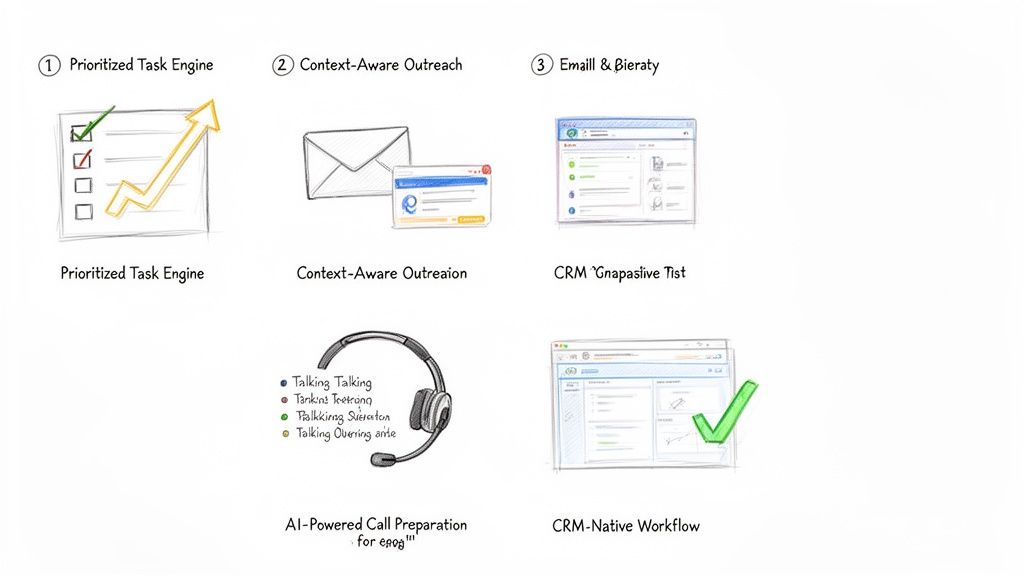
The real power here is the blend of clarity and context. The rep doesn't just see the "what" (call or email); they see the "why" (the buyer just did something important). That's what allows them to act decisively.
We all know it: generic, templated emails go straight to the trash. Real outreach needs to be relevant. But who has time to write dozens of highly personalized messages every single day? It's a massive time sink.
AI sales assistants fix this with context-aware AI outreach. The system connects directly to your CRM and pulls in key details—the prospect’s title, their industry, recent activities, or past account history—to draft hyper-relevant emails and call scripts on the fly. It's not just generating random copy; it's using your own data to make the message land.
Nothing kills a cold call faster than a rep who sounds like they're winging it. Fumbling for information or getting stumped by a basic objection destroys credibility in seconds. This is why the best platforms now include AI-powered call preparation.
Before a rep even picks up the phone, the assistant generates a quick, scannable brief. It includes key talking points, likely objections with suggested responses, and the latest company news or LinkedIn activity. If you want to go deeper on this, we've covered how to streamline your workflow with AI sales call prep automation in another guide. This feature turns what used to be a 15-minute research task into a 30-second review.
Finally, and this might be the most important part, is the CRM-native workflow. Too many sales tools force reps to live in a nightmare of open tabs: the CRM, the dialer, their email client, a research window. Every time they switch contexts, they lose a little focus and momentum. Worse, data gets lost along the way.
An AI sales assistant that lives inside your CRM—whether that's Salesforce or HubSpot—keeps reps in one place. They can click-to-call, send an AI-drafted email, and log every touchpoint without ever leaving the contact record. This simple change ensures every single activity is captured perfectly, which gives sales leaders a crystal-clear picture of what's working and keeps the CRM the undisputed source of truth.
Bringing new tech into the sales floor can feel like open-heart surgery. Productivity is on the line, reps are skeptical, and nobody has time for a three-month science project. But rolling out an AI sales assistant isn't like that. It’s less of a massive overhaul and more like giving your team a cheat sheet.
The key is to aim for quick, noticeable wins. We're not talking about a "rip and replace" of your CRM. This is about adding a layer of intelligence right on top of what you already use, making your SDRs smarter and faster from day one. A good rollout plan cuts through the noise and gets your team productive, fast.
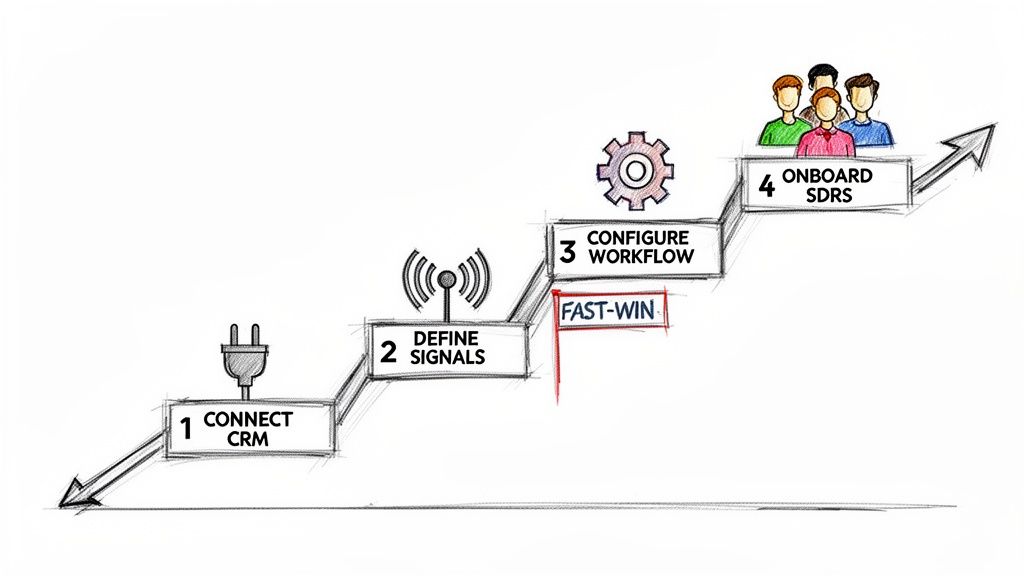
Here’s a simple, four-step playbook to get it done right.
Everything starts here. An AI sales assistant is only as good as the data it can access, which means it needs a solid, secure connection to your CRM—whether that’s Salesforce or HubSpot. Think of your CRM as the central nervous system of your sales motion; the assistant needs to plug directly into it.
Actionable Tip: Before connecting, perform a quick data audit. Check for duplicate contacts or outdated account information. Clean, reliable CRM data is the fuel for the AI engine; a bad connection or messy data will starve it before it can even get started. This part is usually simple, often using secure OAuth. Loop in your RevOps or IT team to confirm the tool gets read-and-write access to the right objects—Leads, Contacts, Accounts, and Activities.
Once you're connected, you have to tell the AI what to look for. What are the tell-tale signs that a prospect is ready for a conversation? Don't try to boil the ocean. Start with just a handful of high-impact triggers that are easy to spot and even easier to act on.
Actionable Tip: Pick signals that scream "intent" and map directly to a specific SDR action. Start with these three:
The goal is simple: turn your sales playbook's "if-then" logic into automated triggers. If a prospect does X, the AI creates a task for an SDR to do Y. This gets reps out of the business of manual monitoring for good.
Now it's time to build something. For your first workflow, pick a simple, high-impact use case that solves an SDR's biggest daily headache: figuring out who to call next. An AI-prioritized task list is the perfect place to start.
Actionable Tip: Configure the assistant to take the signals from Step 2 and automatically create and rank tasks. For example, a "Pricing Page Visit" signal should instantly generate a "High-Priority Call" task, complete with context about what that person looked at. This first workflow needs to feel like an immediate upgrade from a generic CRM task list. It’s a quick win that proves the tool's value by saving SDRs time and pointing them straight to the warmest leads. For a deeper look at how this fits into your tech strategy, check out the build vs. buy debate for your AI SDR stack.
A tool is only as good as its adoption. A great rollout starts with the "why," not the "how." Show your SDRs that this assistant is here to kill their most boring tasks so they can focus on what matters—and hit their numbers faster.
Look, any time you bring a new tool into the sales floor, the CFO is going to ask one question: "What's the ROI?" It's not enough to say the team feels more productive. You need to show leadership the hard numbers that connect the dots between the software and real business results.
To build a rock-solid business case, you have to move past vanity metrics. The trick is to track KPIs across three critical areas, showing a clear progression from daily rep activity all the way to bottom-line pipeline growth.
The first place you'll see a return is in pure, raw output. An AI sales assistant is built to kill the tedious, time-sucking tasks that drain an SDR's day. We're talking about removing the friction that keeps them from their most important job: selling.
Actionable Metrics to Track:
The real goal here is to quantify reclaimed time. If your AI assistant helps each SDR make 15 more calls and send 20 more emails every single day, you have a direct, powerful metric that proves its value from week one.
More activity is great, but smarter activity is what wins deals. This is where an AI sales assistant starts to separate itself from a simple dialer. It gives reps the context they need, right when they need it, so they can have truly relevant conversations.
Actionable Metrics to Track:
This is where the assistant's intelligence really pays off. It's arming your reps with AI-powered talking points and objection-handling tips, helping them turn more cold "hellos" into qualified meetings.
At the end of the day, every sales tool lives or dies by its ability to generate pipeline. This is the final, most important piece of the ROI puzzle. While more calls and better conversations are great leading indicators, new pipeline is the metric that gets executives to sign the check.
Actionable Metrics to Track:
Actionable Tip: Build a custom dashboard in Salesforce or HubSpot. Create a report that pits a group of SDRs using the assistant against a control group that isn't. Tracking their KPIs side-by-side creates a powerful, data-backed story that leaves no doubt about the tool's impact on the bottom line.
Even with all the excitement, it's smart to ask tough questions before bringing a new tool into your sales motion. Here are the straight answers to the questions sales and RevOps leaders ask us most.
Absolutely not. The real goal is to make your existing team better, not smaller. An AI sales assistant is like a co-pilot for each rep, handling the soul-crushing admin work that eats up their day—logging calls, updating fields, and basic research.
This frees your SDRs to do what humans do best: build real relationships, have smart conversations, and crush their quota. Think of it as giving every rep a personal operations assistant, allowing them to be more strategic and way more effective.
Yes, because they solve two different problems that actually feed each other. A Sales Engagement Platform (SEP) like Salesloft or Outreach is fantastic for building and managing long-term, pre-planned sequences. It’s a system for campaigns, but it forces reps to live in a separate tab, pulling them away from their CRM.
An AI sales assistant is the execution layer that sits inside your CRM and makes your SEP sequences even smarter. While your SEP runs the long-term plan, the assistant uses real-time buyer signals to tell reps the single most important action to take right now. It helps them execute that call or email instantly from within Salesforce or HubSpot and logs everything perfectly, closing the gap between your planned campaigns and the opportunities that pop up today.
The good ones don't use generic templates. The key is the data they pull from. Instead of working off a simple prompt, a modern AI assistant dives deep into your CRM, analyzing account history, buyer personas, recent company news, and past conversations.
The best platforms don't just spit out a finished email. They provide a smart first draft that the SDR can review and tweak in seconds. This preserves their unique voice and expertise while still saving a ton of time.
This ensures the outreach is hyper-relevant right from the get-go, not just another piece of generic spam.
You'll see an immediate ROI on pure efficiency, often in the first few weeks. This shows up as a jump in the number of outbound activities per rep, per day, and a massive improvement in your CRM data quality as tasks like call logging get automated.
The bigger, strategic ROI—the stuff your CFO cares about, like more pipeline and revenue—starts to become clear within one to two quarters. That's the result of your reps consistently connecting with more of the right people and turning those conversations into qualified meetings. We always suggest tracking the initial efficiency gains first, then mapping them directly to pipeline growth to build an undeniable business case.
Ready to stop the busywork and start building more pipeline? marketbetter.ai turns buyer signals into prioritized tasks and helps your SDRs execute instantly with an AI-powered dialer and email writer inside Salesforce and HubSpot. Learn more and book a demo.
Sumble has carved out an impressive niche in sales intelligence. Founded by Kaggle co-founders Anthony Goldbloom and Ben Hamner and backed by $38.5M from Coatue and Canaan Partners, it uses a knowledge graph of 2.6 million companies to surface technographic data — which tools companies use, what projects they're launching, and who to contact.
But Sumble isn't for everyone. If you're reading this, you've probably hit one of these walls:
Here are 7 alternatives worth evaluating, ranked by how well they solve the execution gap.
Best for: Teams that want visitor identification, dialer, email, AI chatbot, and a daily SDR playbook in one platform.
MarketBetter isn't just a Sumble alternative — it solves a fundamentally different problem. While Sumble tells you about accounts, MarketBetter tells your reps exactly what to do about them.
What sets it apart from Sumble:
What Sumble does better: Deeper technographic intelligence — Sumble's knowledge graph is more granular on specific tech stack data across departments.
Pricing: Usage-based, transparent. Book a demo for a custom quote.
G2 Rating: 4.97 / 5 — Top Performer across 15 lead generation categories.
Best for: Teams that need a massive B2B database alongside intent signals.
ZoomInfo combines one of the largest contact databases in B2B with website visitor identification (WebSights), intent data, and basic outreach tools. It's the incumbent in sales intelligence — big, broad, and expensive.
What sets it apart from Sumble:
Where it falls short:
Pricing: $14,995+/year for SalesOS. See our full ZoomInfo pricing breakdown.
Best for: Large enterprises running account-based marketing programs with big budgets.
6sense layers Bombora intent data with AI-driven account scoring to predict which accounts are in-market. It's enterprise-grade, comprehensive, and complex.
What sets it apart from Sumble:
Where it falls short:
Pricing: Custom enterprise. Typically $25,000–$100,000+/year. See our 6sense pricing breakdown.
Best for: Startups and small teams that need prospecting + outreach on a budget.
Apollo combines a 270M+ contact database with email sequencing and a basic dialer at a fraction of what ZoomInfo or 6sense charge. It's the value play in this category.
What sets it apart from Sumble:
Where it falls short:
Pricing: Free tier | Basic: $59/month | Professional: $99/month | Organization: $149/month. See our Apollo pricing breakdown.
Best for: Teams that want to consolidate buying signals from community, social, and product usage data.
Common Room takes a similar philosophy to Sumble — aggregate signals from across the web — but focuses on different sources: Slack communities, Discord, GitHub, Twitter, and product usage data. It's especially popular with product-led growth companies.
What sets it apart from Sumble:
Where it falls short:
Pricing: Starter: $1,000/month | Team: $2,500/month | Enterprise: custom. See our Common Room alternatives guide.
Best for: Enterprise B2B teams that combine account intelligence with targeted display advertising.
Demandbase merges account intelligence with B2B advertising capabilities, letting you both identify in-market accounts and serve them targeted ads. It's Sumble-like intelligence plus a media buying layer.
What sets it apart from Sumble:
Where it falls short:
Pricing: Custom enterprise pricing. Typically $30,000+/year. See our Demandbase comparison.
Best for: HubSpot customers who want native data enrichment and visitor identification.
Since being acquired by HubSpot, Clearbit's enrichment and identification capabilities are increasingly bundled into HubSpot's platform. If you're a HubSpot shop, this is the path of least friction.
What sets it apart from Sumble:
Where it falls short:
Pricing: Bundled with HubSpot. Standalone reportedly starts at $3,600/year. See our Clearbit comparison.
| Platform | Starting Price | Visitor ID | Smart Dialer | Daily Playbook | AI Chatbot | Email Automation |
|---|---|---|---|---|---|---|
| MarketBetter | Usage-based | ✅ | ✅ | ✅ | ✅ | ✅ |
| ZoomInfo | $14,995/year | ✅ | ❌ | ❌ | ❌ | ✅ |
| 6sense | $25K+/year | ✅ | ❌ | ❌ | ❌ | ✅ (limited) |
| Apollo.io | Free / $59/mo | ✅ (limited) | ✅ (basic) | ❌ | ❌ | ✅ |
| Common Room | $1,000/mo | ✅ (signals) | ❌ | ❌ | ❌ | ❌ |
| Demandbase | $30K+/year | ✅ | ❌ | ❌ | ❌ | ✅ (via ads) |
| Clearbit/HubSpot | $3,600/year | ✅ | ❌ | ❌ | ❌ | ✅ (via HubSpot) |
Try our AI Lead Generator — find verified LinkedIn leads for any company instantly. No signup required.
Every platform on this list gives you some form of sales intelligence. The question is: what happens after you get the data?
Sumble's knowledge graph is genuinely impressive — 2.6M companies, deep technographic insights, 550% YoY revenue growth. But it's a data platform. Your SDRs still need Outreach for sequences, Orum for calls, a chatbot vendor for website engagement, and a spreadsheet to prioritize their day.
If you want intelligence and execution in one platform — visitor identification, smart dialer, email automation, AI chatbot, and a daily SDR playbook — see how MarketBetter compares.
Related reads:
Sumble and MarketBetter both help B2B sales teams find and close deals — but they approach the problem from fundamentally different angles.
Sumble, founded by Kaggle co-founders Anthony Goldbloom and Ben Hamner, builds a knowledge graph of 2.6 million companies to surface technographic data: which tools companies use, who's making decisions, and what projects are being launched. It's backed by $38.5M in funding from Coatue and Canaan Partners, with angel investors including Marc Benioff and Nat Friedman.
MarketBetter identifies who's visiting your website right now — then gives your SDRs a prioritized daily playbook with built-in email, dialer, and AI chatbot to act on those signals immediately.
The core difference: Sumble tells you about accounts. MarketBetter tells your reps what to do next — and gives them the tools to do it.
Let's be fair about what Sumble does well:
Sumble's knowledge graph trawls the web, social media, job boards, company websites, and regulatory filings to build detailed profiles of what tools companies use across departments. If you need to know whether a target account uses Snowflake in their data engineering team or just deployed Vercel for their frontend — Sumble surfaces that.
This is genuinely useful intelligence. Knowing a company's tech stack tells you whether your product fits, what you're replacing, and who to target within the org.
Sumble offers an API, Sumble Enrich (bulk data enrichment), and Sumble Signals (real-time alerts when companies adopt new tools or launch projects). For enterprises building custom GTM workflows, these are powerful building blocks.
Sumble grows fast inside companies — reportedly going from 1 to 500 monthly active users in 6 months at some accounts. Their free web app lets anyone search, and insights spread through Slack channels. Brendan Short of The Signal newsletter called it "the most interesting sales tool I found last year."
This is the fundamental difference. Sumble aggregates public data from across the web. MarketBetter identifies who's visiting your website — giving you first-party intent signals that are dramatically more actionable than scraped technographic data.
When someone from a target account visits your pricing page, that's a buying signal Sumble can't provide. MarketBetter catches it in real time.
Sumble is intelligence. MarketBetter is intelligence plus action.
With Sumble, once you know a company is using a competitor's tool, you still need to:
With MarketBetter, all of this happens in one platform:
This is where the gap is widest. Sumble gives data. MarketBetter gives your reps a daily action plan.
The SDR Playbook combines website visitor data, intent signals, and engagement history into one prioritized task list. No more "20 tabs and a spreadsheet" workflow. Your rep opens MarketBetter, sees their playbook, and starts executing.
| Feature | MarketBetter | Sumble |
|---|---|---|
| Website visitor identification | ✅ First-party, real-time | ❌ Not available |
| Technographic data | ✅ Via intent signals | ✅ Deep knowledge graph (2.6M companies) |
| Smart dialer | ✅ Built-in | ❌ Not available |
| Email automation | ✅ AI-personalized sequences | ❌ Not available |
| AI chatbot | ✅ Real-time visitor engagement | ❌ Not available |
| Daily SDR playbook | ✅ Prioritized daily actions | ❌ Not available |
| API access | ✅ | ✅ |
| Bulk data enrichment | ✅ | ✅ (Sumble Enrich) |
| Real-time alerts | ✅ | ✅ (Sumble Signals) |
| Org chart mapping | ✅ Via contact identification | ✅ Deep org intelligence |
| Free tier | Demo available | ✅ Free web app |
| G2 rating | 4.97 / 5 | Not yet rated |
Sumble is a strong fit if you:
MarketBetter is the better fit if you:
This is ultimately the decision you're making:
Sumble is best-in-class at answering "what do we know about this account?" It builds a detailed map of a company's tech stack, projects, and contacts. But it's a data platform — your reps still need separate tools to act on those insights.
MarketBetter answers a different question: "what should my rep do right now?" It combines first-party website intent with built-in email, dialer, and an AI chatbot to create a complete execution loop.
For most B2B sales teams — especially those with 5-50 SDRs who are drowning in tools — the execution layer is what moves the needle.
Try our AI Lead Generator — find verified LinkedIn leads for any company instantly. No signup required.
See how MarketBetter's all-in-one approach compares to a data-only platform. Book a demo and we'll show you how the Daily SDR Playbook turns website visitors into pipeline.
Related reads: