2 posts tagged with "workflow automation"

View All Tags

Best Sales Productivity Tools for SDR Teams [2026]

· 20 min read
sunder
Founder, marketbetter.ai

Best sales productivity tools for SDR teams in 2026

The average SDR spends 65% of their time on tasks that aren't selling. Data entry. List building. Researching prospects. Switching between tabs. Updating the CRM. Attending meetings about updating the CRM.

That means a $60K/year SDR generates about $21K worth of actual selling activity. The rest is overhead.

Sales productivity tools exist to shift that ratio. But "productivity tool" has become a junk drawer category — it includes everything from CRM plugins to AI note-takers to Pomodoro timers. Most of those won't move the needle.

We focused on the tools that directly reduce time-to-first-touch, eliminate manual data entry, and help SDRs prioritize the right accounts. These are the 15 platforms that top-performing B2B SDR teams actually use in 2026.

What Actually Kills SDR Productivity?

Before buying tools, understand the problems:

Problem 1: Too many tabs. The average SDR switches between 8-12 tools daily — CRM, email, dialer, LinkedIn, enrichment tool, calendar, Slack, intent data platform. Each switch costs 23 minutes of refocus time (UC Irvine research). Over a day, that's hours lost to context-switching.

Problem 2: Manual research. SDRs spend 20-30 minutes per prospect researching company size, tech stack, recent news, and mutual connections. Multiply that by 50 prospects per day, and research alone consumes the entire workday.

Problem 3: No prioritization. Without intent signals, SDRs treat every lead equally. They work alphabetically, by import date, or by gut feel. Meanwhile, the prospect who visited the pricing page three times yesterday gets the same generic sequence as someone who downloaded a whitepaper six months ago.

Problem 4: Manual CRM updates. Reps hate updating CRMs because it takes time and delivers zero personal value. But managers need the data. This creates an adversarial dynamic where CRM data is always stale and incomplete.

The best productivity tools eliminate these problems at the root — not by adding another tab.

Related reading: Best AI SDR Tools 2026 · Best Sales Automation Software · Best Cold Email Software

Quick Comparison: 15 Sales Productivity Tools

ToolCategoryKey Time SaverStarting Price
MarketBetterAll-in-one SDR OSDaily playbook eliminates list-building$99/user/month
Apollo.ioProspecting + SequencesDatabase search → sequence in one clickFree–$119/user/mo
OutreachSales engagementMulti-step sequence automation~$100/user/mo
SalesLoftSales engagementCadence + Rhythm AI prioritization~$125/user/mo
GongConversation intelligenceAuto call notes + coaching insights~$100/user/mo
LavenderEmail coachingReal-time email scoring and rewriting$29/user/mo
LinkedIn Sales NavigatorSocial sellingAdvanced people/company search$99–$169/user/mo
CalendlyMeeting schedulingEliminates booking back-and-forthFree–$16/user/mo
ZoomInfoB2B intelligenceInstant contact data + intent signals~$15K+/yr
ClayData enrichmentWaterfall enrichment from 75+ sources$149–$800/mo
Chili PiperInbound routingInstant lead-to-meeting conversion$150–$300/mo
Close CRMCRM + dialerBuilt-in calling + SMS + email$29–$139/user/mo
Fireflies.aiMeeting notesAI transcription + action itemsFree–$29/user/mo
VidyardVideo prospectingPersonalized video at scaleFree–$59/user/mo
Troops/SalesforceCRM automationSlack-based CRM updates (no tab switch)Included in SFDC

1. MarketBetter — The Daily SDR Playbook

Category: All-in-one SDR operating system Time saved: 2-3 hours/day (eliminates list building, research, and prioritization)

Most productivity tools solve one piece of the SDR workflow. MarketBetter replaces the workflow entirely.

How it boosts productivity:

When an SDR logs in, they don't see a CRM dashboard they need to interpret. They see today's playbook — a ranked list of exactly who to contact, how, and why. Each task is backed by a specific signal:

  • "Call James at Acme Corp — visited pricing page 3x this week, company just raised Series B"
  • "Email Sarah at TechCo — her champion at your current customer just moved there"
  • "Follow up with Mike — opened your last email 4 times but hasn't replied"

This eliminates three massive time-sinks simultaneously:

  1. No list building — The platform identifies and prioritizes prospects automatically
  2. No research — Every lead is enriched with company data, signals, and context
  3. No tab-switching — Email, calling, and LinkedIn actions happen from one interface

The smart dialer is built directly into the platform. Click-to-call from the playbook, auto-log the outcome, and move to the next task. No switching to a separate dialer app, no manual call logging.

The AI chatbot handles website visitors 24/7 — qualifying leads, answering questions, and booking meetings while your SDRs sleep. Conversations are routed to the right rep based on territory and availability.

Real impact: MarketBetter customers report 70% less manual SDR work, 2x faster speed-to-lead, and 90% faster lead response times.

Pricing: $99/user/month, $1,500/mo (Growth, 5 seats), $3,000/mo (Scale, 10 seats).

G2 Rating: 4.97/5 — Top Performer across 15 lead generation categories.

See how the Daily Playbook works →

2. Apollo.io — Prospecting + Sequences in One

Category: B2B database with built-in sequencing Time saved: 1-2 hours/day (eliminates manual prospecting and list building)

Apollo is the Swiss Army knife for outbound SDRs. Search a 275M+ contact database, filter by any criteria imaginable, build a list, and drop prospects directly into an email sequence — without leaving the platform.

How it boosts productivity:

The database search eliminates the hours SDRs spend finding prospects manually. Filters include job title, company size, funding stage, tech stack, industry, and intent signals. Once you've built a list, one click drops the entire batch into a multi-step email sequence with personalization variables.

Apollo's Chrome extension pulls LinkedIn profile data directly into the platform, adding contacts to sequences while browsing LinkedIn. The email tracking shows opens, clicks, and replies in real-time.

Key limitation: Apollo is email-heavy. Phone and LinkedIn outreach require additional tools or manual effort. And there's no website visitor identification — you're finding new prospects, not leveraging existing website traffic.

Pricing: Free (10K email credits/mo). Basic $49/user/mo. Professional $79/user/mo. Organization $119/user/mo.

G2 Rating: 4.8/5

3. Outreach — Enterprise Sales Engagement

Category: Sales engagement platform Time saved: 1-2 hours/day (automates multi-step sequences across channels)

Outreach is the market leader in sales engagement for a reason — it handles the complexity of enterprise outbound at scale. Multi-step sequences combine email, phone, LinkedIn, and SMS into automated cadences that fire based on prospect behavior.

How it boosts productivity:

Sequences automate the follow-up process entirely. An SDR creates a sequence once, and Outreach handles the timing, channel selection, and personalization for hundreds of prospects simultaneously. The platform's analytics show which sequences perform best, which steps to optimize, and which prospects are engaging.

Outreach Kaia provides real-time conversation intelligence during calls — surfacing competitor mentions, objections, and talk-time ratios live, so reps can adjust on the fly.

Key limitation: Outreach is built for larger teams. The pricing reflects that — expect $100+/user/month with annual contracts. For teams under 10 reps, it may be overkill.

Pricing: Custom pricing. Typically $100-130/user/mo on annual contracts.

G2 Rating: 4.3/5

4. SalesLoft — Rhythm AI Prioritization

Category: Sales engagement platform Time saved: 1-2 hours/day (AI-prioritized task list across all channels)

SalesLoft's Rhythm feature is the closest any pure sales engagement tool gets to MarketBetter's playbook approach. Rhythm ingests signals from across your sales stack and generates a prioritized daily workflow — telling reps which actions to take first based on predicted impact.

How it boosts productivity:

Instead of working through sequences linearly, Rhythm dynamically reorders an SDR's task list based on real-time signals. If a high-value prospect just opened an email, that call moves to the top. If a deal's primary contact went dark, Rhythm surfaces the multithreading task.

The Deals dashboard gives managers visibility into pipeline health without reps manually updating stages. SalesLoft automatically captures activity data and maps it to deal stages.

Key limitation: SalesLoft's intelligence features require the full platform. Pricing has increased significantly (Vendr data shows $8K+ for 50 seats at the low end), and the add-on pricing for Deals, Conversations, and Analytics can push total cost above $200/user/mo.

Pricing: Custom pricing. Starting around $125-175/user/mo for full platform.

G2 Rating: 4.5/5

5. Gong — Conversation Intelligence

Category: Conversation intelligence and revenue intelligence Time saved: 30-60 minutes/day (eliminates manual note-taking, surfaces coaching insights)

Gong records, transcribes, and analyzes every sales conversation — calls, video meetings, and emails. The AI extracts key topics, competitor mentions, objections, next steps, and risk signals automatically.

How it boosts productivity:

SDRs stop taking notes during calls. Gong captures everything, generates a summary, and identifies action items. Managers use Gong to review calls at 2x speed, spot coaching opportunities, and understand why deals are winning or losing — without sitting in on every call.

The reality-based forecasting analyzes conversation patterns to predict which deals will close, independent of what reps put in the CRM. This eliminates the fiction of manually updated pipeline stages.

Key limitation: Gong is primarily useful for teams that do significant phone/video selling. If your SDR workflow is email-heavy, the ROI is lower. Pricing is also enterprise-focused — expect $100+/user/month.

Pricing: Custom pricing. Typically $100-150/user/mo.

G2 Rating: 4.8/5

6. Lavender — AI Email Coach

Category: Email writing assistant Time saved: 20-30 minutes/day (faster, better-performing emails)

Lavender sits inside your email client and scores every email before you send it. The AI analyzes subject line, length, reading level, personalization, and mobile readability, then suggests specific improvements. It's like having a writing coach for every email.

How it boosts productivity:

The average SDR sends 50+ emails per day. Lavender reduces writing time by providing real-time suggestions — shorter subject lines, simpler language, better opening lines. More importantly, it improves reply rates. Lavender claims their users see 2-3x higher reply rates from AI-scored emails.

The prospect research panel pulls LinkedIn data, recent news, and company info directly into the compose window, eliminating the research tab-switch.

Key limitation: Lavender helps you write better emails, but it doesn't automate sending or sequencing. It pairs well with Outreach, SalesLoft, or Apollo — it's not a standalone productivity solution.

Pricing: Free (5 emails/mo). Starter $29/user/mo. Team plans available.

G2 Rating: 4.9/5

7. LinkedIn Sales Navigator — Social Selling Intelligence

Category: Social selling and prospecting Time saved: 30-60 minutes/day (advanced search, lead recommendations, InMail)

Sales Navigator is a non-negotiable for most B2B SDR teams. Advanced search filters, lead and account alerts, and InMail access make it the primary tool for LinkedIn-based prospecting and research.

How it boosts productivity:

Lead recommendations surface prospects similar to your best customers. Account alerts notify you when key contacts change jobs, post content, or engage with your company's page. Saved searches automatically surface new prospects matching your ICP as they join LinkedIn.

The TeamLink feature shows warm paths to prospects through your colleagues' connections — turning cold outreach into warm introductions.

Key limitation: Sales Navigator is an intelligence tool, not an execution tool. You still need a separate platform to sequence, call, and manage leads. The data stays in LinkedIn — syncing to your CRM requires additional tools.

Pricing: Core at $99/user/month. Advanced at $149/user/mo. Advanced Plus at $169/user/mo.

G2 Rating: 4.3/5

8. Calendly — Meeting Scheduling

Category: Meeting scheduling automation Time saved: 15-30 minutes/day (eliminates scheduling back-and-forth)

Calendly seems simple, but the time savings compound. Every meeting booked without back-and-forth emails saves 5-10 minutes. For SDRs booking 5-10 meetings per week, that's 1-2 hours saved on scheduling alone.

How it boosts productivity:

Share a booking link in emails, sequences, or on your website. Prospects pick a time that works. Calendly handles timezone conversion, calendar conflicts, buffer time, and confirmation emails automatically. Round-robin scheduling distributes meetings across your team evenly.

The Routing feature (on Teams plan) qualifies leads via form questions and routes them to the right rep — turning inbound meeting requests into qualified, properly-routed demos.

Key limitation: Calendly is a point solution. It doesn't replace your CRM, sequencing tool, or dialer. But it eliminates one specific friction point so effectively that it's essentially mandatory.

Pricing: Free (1 event type). Standard $10/user/mo. Teams $16/user/mo. Enterprise custom.

G2 Rating: 4.7/5

9. ZoomInfo SalesOS — B2B Intelligence Platform

Category: B2B contact data + intent signals Time saved: 1-2 hours/day (eliminates manual research and data entry)

ZoomInfo is the enterprise standard for B2B contact and company data. Direct dials, verified emails, org charts, tech stack data, and intent signals — all searchable and exportable to your CRM.

How it boosts productivity:

Instead of manually researching each prospect, SDRs search ZoomInfo for contacts matching their ICP, export enriched records directly to CRM, and start sequencing immediately. Intent data shows which companies are actively researching your category, so SDRs focus on accounts that are actually in-market.

The Engage feature adds basic sequencing capabilities directly in ZoomInfo, though most teams pair it with Outreach or SalesLoft for execution.

Key limitation: ZoomInfo is expensive. Annual contracts typically start at $15,000+ and auto-renew. Data quality, while generally strong in the US, varies by region and industry. And the credit system means heavy users can burn through their allocation quickly.

Pricing: Custom. Typically $15,000-$30,000/year for small teams.

G2 Rating: 4.5/5

10. Clay — Waterfall Data Enrichment

Category: Data enrichment and workflow automation Time saved: 1-2 hours/day (automates multi-source research)

Clay is a data enrichment powerhouse. It connects to 75+ data providers and runs "waterfall" enrichment — trying multiple sources sequentially until it finds the data you need. Think of it as automated research that checks dozens of databases for each prospect.

How it boosts productivity:

Instead of an SDR manually checking LinkedIn, company websites, Crunchbase, and news sites for each prospect, Clay does it automatically. Import a list of companies, and Clay enriches them with contacts, emails, tech stack, funding data, recent news, and even AI-generated personalization snippets.

The table-based interface lets you build complex enrichment workflows visually. Add a column for "recent company news," another for "tech stack," and Clay populates both automatically.

Key limitation: Clay has a learning curve. The flexible interface means you need to build your own workflows, which takes time to set up. Credit-based pricing can also get expensive — heavy users report spending $500-800/mo on enrichment credits alone.

Pricing: Starter $149/mo. Explorer $349/mo. Pro $800/mo. Enterprise custom.

G2 Rating: 4.9/5

11. Chili Piper — Instant Inbound Routing

Category: Inbound lead routing and scheduling Time saved: Variable (eliminates lead response delay entirely)

Chili Piper's core insight: every minute between a form submission and a sales response reduces conversion probability. Their platform lets prospects book a meeting on the thank-you page immediately after submitting a form — cutting response time from hours to seconds.

How it boosts productivity:

When a lead fills out a form, Chili Piper qualifies them based on form responses, routes them to the right rep based on territory/round-robin rules, and presents available time slots immediately. No waiting for an SDR to review and respond. No lead sitting in a queue.

For SDR teams, this means fewer inbound leads slip through the cracks. The rep gets a qualified, scheduled meeting — not a cold lead they need to chase.

Key limitation: Chili Piper is specifically for inbound routing. It doesn't help with outbound prospecting, list building, or cold outreach. It's a focused tool that pairs with your CRM and marketing automation platform.

Pricing: Instant Booker at $150/mo. Handoff at $200/mo. Form Concierge at $300/mo. Distro at $150/mo.

G2 Rating: 4.6/5

12. Close CRM — Built for Inside Sales Speed

Category: CRM with native dialer Time saved: 1-2 hours/day (eliminates tool-switching between CRM and dialer)

Close CRM eliminates the biggest productivity killer for phone-heavy SDR teams: switching between CRM and dialer. The native Power Dialer auto-dials through a list, logs outcomes, and moves to the next call — all without leaving the CRM.

How it boosts productivity:

Smart Views create dynamic lead lists filtered by any criteria. The Power Dialer works through these lists automatically — dial, talk, log, next. The Predictive Dialer (Enterprise) dials multiple numbers simultaneously and connects reps only when someone answers, maximizing talk time.

Built-in SMS and email mean reps handle all communication channels from one interface. Activity logging is automatic — calls, emails, and SMS are tracked without manual entry.

Key limitation: Close is designed for inside sales teams doing high-volume calling. It lacks website visitor identification, advanced intent data, and the enterprise customization of Salesforce. For teams that don't do heavy phone outreach, it's overkill in some areas and light in others.

Pricing: Startup $29/user/mo. Professional $99/user/month. Enterprise $139/user/mo.

G2 Rating: 4.7/5

13. Fireflies.ai — AI Meeting Notes

Category: Meeting transcription and intelligence Time saved: 15-30 minutes per meeting (eliminates manual note-taking)

Fireflies joins your video calls, transcribes the conversation, and generates structured notes with action items, questions asked, and key topics discussed. For SDRs running 3-5 discovery calls per day, the time savings are significant.

How it boosts productivity:

No more typing notes during calls (which splits attention and makes you a worse listener). No more spending 10 minutes after each call writing up a summary. Fireflies does both automatically and pushes the summary to your CRM.

The AI search lets you find specific moments across hundreds of calls — "show me every time a prospect mentioned budget" or "find calls where competitors were discussed." This is gold for coaching and win/loss analysis.

Key limitation: Fireflies is a point solution for meetings. It doesn't help with prospecting, sequencing, or lead management. The transcription quality depends on audio quality and speaker accents.

Pricing: Free (800 min storage). Pro $10/user/mo. Business $19/user/mo. Enterprise $29/user/mo.

G2 Rating: 4.5/5

14. Vidyard — Video Prospecting

Category: Personalized video creation for sales Time saved: Variable (can increase reply rates 2-3x on targeted accounts)

Vidyard lets SDRs record and send personalized video messages embedded directly in emails. For high-value accounts where personalization matters, a 30-second video mentioning the prospect's name, company, and a specific insight dramatically outperforms text emails.

How it boosts productivity:

Record a video in your browser, and Vidyard generates a thumbnail, hosting link, and embed code automatically. Analytics show who watched, how long they watched, and whether they rewatched specific sections. Integration with Outreach, SalesLoft, and HubSpot embeds videos directly in sequences.

The AI script generator helps reps create personalized scripts quickly, and the teleprompter feature keeps them on track without looking scripted.

Key limitation: Video prospecting doesn't scale like email. It works best for high-value targets — using it for every prospect in a 500-person list isn't practical. The ROI depends heavily on your SDR team's comfort with video.

Pricing: Free (25 videos). Pro $29/user/mo. Plus $59/user/mo. Enterprise custom.

G2 Rating: 4.5/5

15. Troops (Salesforce Native) — CRM Updates from Slack

Category: CRM automation and Slack integration Time saved: 20-30 minutes/day (eliminates tab-switching to update CRM)

Troops (now part of Salesforce) brings CRM updates into Slack. Instead of switching to Salesforce to update a deal stage, log a call, or check pipeline — reps do it directly from Slack with structured prompts. Alerts notify teams when deals move, new leads arrive, or key metrics change.

How it boosts productivity:

The biggest CRM productivity killer is the tab switch. Reps don't want to stop what they're doing, open Salesforce, navigate to the right record, and update fields. Troops puts that workflow in Slack — where reps already live. Structured prompts make updates take seconds instead of minutes.

Revenue signals push alerts to relevant channels when deals need attention, reducing the lag between something happening in the pipeline and someone acting on it.

Key limitation: Troops is Salesforce-only. If you use HubSpot, Pipedrive, or another CRM, this isn't an option. It also requires Slack as your team communication tool.

Pricing: Included with Salesforce for basic features. Advanced features require Salesforce Premium or Enterprise editions.

See also: Best Sales Engagement Software · Best Sales Prospecting Tools · Best Lead Management Software

Building Your SDR Productivity Stack

No single tool solves every productivity problem. The goal is a stack that eliminates the four killers: tab-switching, manual research, no prioritization, and CRM data entry.

The Consolidated Approach

Use a platform that combines multiple capabilities instead of buying point solutions for each:

MarketBetter covers visitor identification, lead enrichment, prioritization (daily playbook), sequencing, dialing, and chatbot — eliminating the need for 4-5 separate tools. For teams that want to reduce stack complexity, this is the most efficient path.

The Best-of-Breed Approach

If you prefer specialized tools, here's the minimum viable SDR stack:

  1. CRM: HubSpot (free) or Salesforce (enterprise)
  2. Data: Apollo ($49/user/mo) or ZoomInfo ($15K+/yr)
  3. Engagement: Outreach ($100/user/mo) or SalesLoft ($125/user/mo)
  4. Scheduling: Calendly ($10/user/mo)
  5. Calling: Close ($99/user/month) or native dialer in engagement platform

Total cost per rep: $260-$350/month in tool costs alone, plus CRM.

Compare that to a consolidated platform at $100-300/user/month that covers all five capabilities. The economics of consolidation are compelling — and that's before accounting for the productivity gains from not switching between five separate tools.

The "Can't Afford Anything" Stack

Every tool below is free:

  1. Apollo Free — 10K email credits, basic sequences
  2. HubSpot Free — Contact management, email tracking
  3. Calendly Free — One event type scheduling
  4. Fireflies Free — 800 minutes of transcription
  5. Vidyard Free — 25 video messages

This stack costs $0/month and covers basic prospecting, CRM, scheduling, note-taking, and video. It's not ideal — you'll outgrow it fast — but it works for a solo SDR or very early-stage team.

The One Metric That Matters

Every tool on this list should be evaluated against one question: does it reduce the time between a buying signal and your SDR's first touch?

If a prospect visits your pricing page at 10am and your SDR doesn't reach out until 3pm, no amount of email optimization or CRM automation will overcome that 5-hour lag. Speed-to-lead is the single most correlated factor with conversion rates in B2B sales.

The tools that win in 2026 aren't the ones with the most features. They're the ones that detect signals faster and put actionable tasks in front of reps sooner.

Free Tool

Try our AI Lead Generator — find verified LinkedIn leads for any company instantly. No signup required.

Ready to Give Your SDRs a Daily Playbook?

MarketBetter consolidates visitor identification, lead enrichment, AI prioritization, sequencing, and dialing into one daily SDR workflow. No more 8-tab mornings.
Book a 15-minute demo →

A Practical Guide to Building Actionable Marketing Automation Workflows

· 26 min read

Imagine your marketing team had a secret weapon: a super-smart GPS for every single customer. That's what a good marketing automation workflow feels like. Instead of blasting everyone with the same generic map, you're giving each person precise, turn-by-turn directions—a timely email, a perfectly placed offer, or a helpful resource—right when they need it most.

What Are Marketing Automation Workflows, Really?

A diagram showing the flow of a marketing automation workflow, with icons representing user actions and automated responses.

Strip away the jargon, and a marketing automation workflow is just a series of actions you set up to run on autopilot. These actions kick off based on what someone does (or doesn't do), who they are, or simply after a certain amount of time has passed.

Think of it as a set of "if this happens, then do that" rules for your marketing. It’s a massive leap from the old way of doing things.

Instead of a marketer manually sending a one-off email blast to their entire database, a workflow sends a specific, relevant message to one person based on their unique behavior. For instance, if someone downloads your latest ebook, a workflow can instantly send a thank-you note, then follow up a few days later with a case study on a similar topic. Simple, but powerful.

The whole point is to stop thinking in terms of disconnected tasks and start building a smart, cohesive system that nurtures leads and builds real relationships around the clock. It’s your safety net, ensuring no opportunity slips through the cracks and every interaction feels personal.

The Contrast with Manual Marketing

To really get why this matters, let's put it side-by-side with the manual grind most of us are familiar with.

  • Manual Marketing: This is all about one-time campaigns. Think of a holiday sale email sent to your entire list. It’s incredibly labor-intensive, often generic, and a nightmare to scale. A real person has to build, schedule, and send every single message.
  • Automated Workflows: These are always on, running continuously in the background based on individual triggers. They're deeply personal, built to scale, and don't require constant babysitting. Once you build a solid workflow, it can engage thousands of people with tailored messages all at once.

A marketing automation workflow transforms your marketing from a series of broadcasts into a series of conversations. It listens for user signals and responds appropriately, creating a more dynamic and engaging customer journey.

Why This Is an Essential Strategy

The shift from manual to automated isn't just a small step up; it's a game-changer. The numbers don't lie. Companies that use automation to nurture leads see an 80% increase in the number of leads generated. Even more impressive, they see a 451% increase in qualified leads.

Why such a massive jump? Because workflows deliver the right message to the right person at the right time, consistently and at scale. It’s a level of personalization that’s just impossible to achieve manually.

This structured approach doesn't just save your team countless hours; it creates a more reliable and effective customer experience. It frees up your best people to focus on big-picture strategy and creative work instead of getting bogged down in repetitive tasks.

If you want to dig deeper into the core mechanics, this piece on What Is Workflow Automation is a great primer on how these systems work under the hood, even beyond marketing. At the end of the day, it's all about achieving better results with less manual effort.

The Building Blocks of Every Great Workflow

Think of a marketing automation workflow like a recipe. You don’t just start with a finished dish; you start with a few core ingredients. Combine them the right way, and you can create something incredible. The same goes for automation—every complex, elegant journey is built from just four simple parts.

If you can master these elements, you’re on your way to designing workflows that do more than just send messages. They guide customers intelligently.

Let's break them down.

Triggers: The Starting Gun

A trigger is what kicks off your workflow. It's the "if this happens..." part of the equation—the specific signal that tells your system, "Okay, go time." Without a trigger, your workflow just sits there, waiting. It's the starting gun for the race.

Triggers can be based on all sorts of things: what someone does, who they are, or even just the passage of time. A new user signing up for your newsletter? Classic behavioral trigger. A contract renewal date popping up on the calendar? That's a time-based trigger.

  • Actionable Tip: Choose a trigger that signals clear intent. A "downloads pricing guide" trigger is much stronger than a "visits homepage" trigger, allowing you to create a more relevant follow-up.

Actions: The Automated Response

If the trigger is the "if," then the action is the "then." An action is any task your workflow performs automatically once it's been triggered. This is where the machine does the work for you. Sending an email is the most common one, but modern platforms can do so much more.

Actions are the actual output. They can update a contact record in your CRM, ping a sales rep on Slack, or even add someone to a retar.geting audience on Facebook.

A rookie mistake is thinking workflows are just for email. A great workflow coordinates multiple actions—like updating a CRM and sending an SMS—to create a seamless experience for the user.

Delays: The Strategic Pause

Imagine signing up for a webinar and getting five emails in five minutes. You'd feel spammed, and it would come across as totally robotic. This is why delays are so important.

A delay is just a strategic pause you build between actions. It makes the whole conversation feel more natural and human-paced. It's a small detail, but it's critical. Delays give your contacts time to breathe, digest information, or take the action you want them to take.

  • Actionable Tip: Use "wait until a specific time" delays instead of fixed day delays. Sending an email at 9:00 AM in the recipient's time zone will perform better than sending it at 2:00 AM their time.

Conditions: The Intelligent Fork in the Road

This is where your automation goes from basic to brilliant. Conditions (sometimes called logic or branching) create personalized paths for different people inside the same workflow. It's the "if/then" logic that splits the journey.

For instance, a new lead from a Fortune 500 company probably needs a high-touch follow-up from sales. A lead from a small startup? They might be better served with some more educational content. Conditions make that kind of smart routing possible.

Here’s how it changes things:

Workflow ComponentWithout Conditions (Linear)With Conditions (Branched)
TriggerUser downloads an ebook.User downloads an ebook.
Action 1Send a generic follow-up email.Send a follow-up email.
LogicNoneIF user's company size > 500 employees...
Path A ActionN/ATHEN notify a sales rep to call.
Path B ActionN/AELSE add user to a long-term nurture sequence.

This branching logic is the key to creating experiences that feel truly relevant. Of course, to use conditions well, you need a solid grasp of who you're talking to. You can get a head start by exploring different customer segmentation strategies in our guide, which will help you figure out the best criteria for your workflow branches.

Essential Workflow Templates You Can Use Today

Alright, let's move from theory to action. This is where the real fun begins. Knowing what a workflow is is one thing; knowing which ones to build first is another. Instead of staring at a blank screen, you can start with proven blueprints that tackle your biggest marketing goals right out of the gate.

Think of these templates as recipes. They give you the core ingredients and steps, but you can always add your own spice.

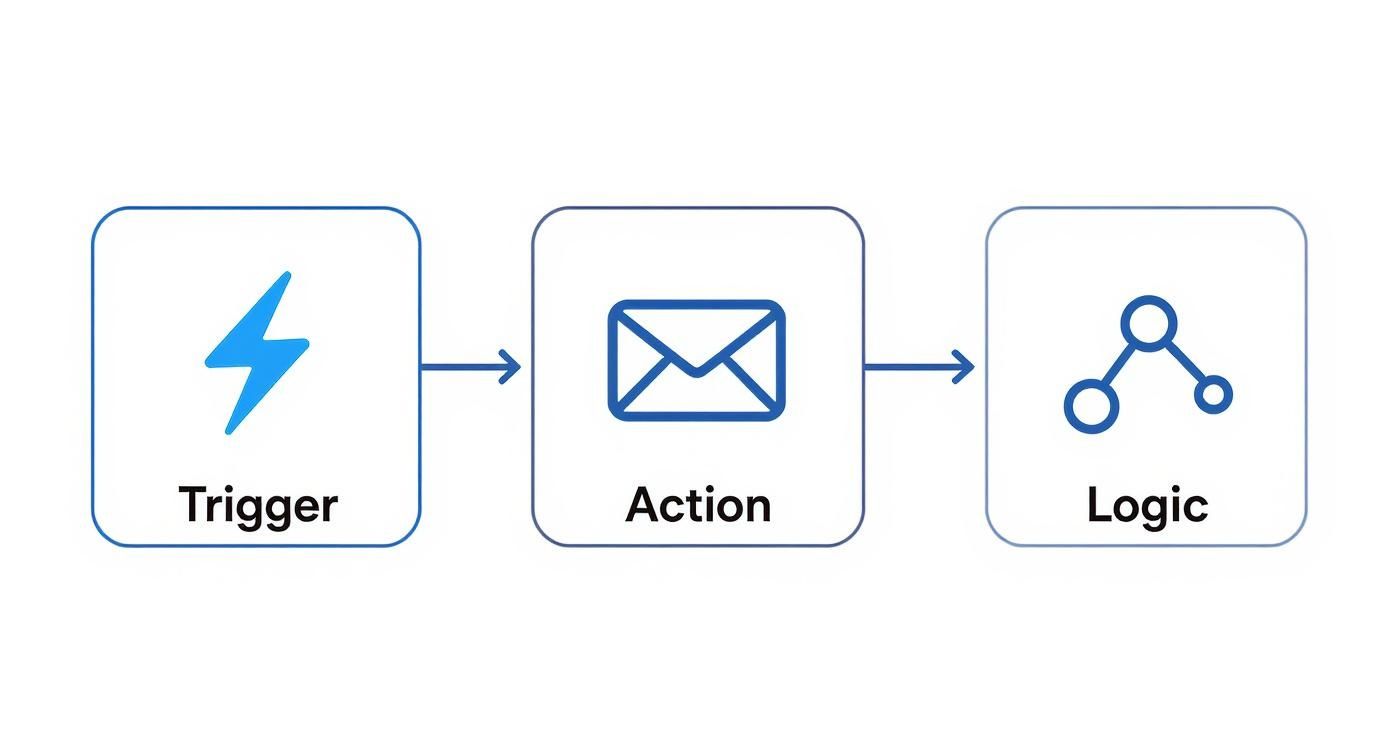
This infographic nails the basic pattern you’ll see in every workflow we talk about. It’s a simple, powerful loop: something happens, the system does a task, and then it makes a decision.

Infographic about marketing automation workflows

Get that rhythm down—trigger, action, logic—and you’re ready to build just about anything.

Here are four essential workflows that solve common business problems. I’ll break down what they are, who they’re for, and how to measure if they're actually working.

To make it even clearer, let's quickly compare these four foundational workflows side-by-side before we dive into the details of each.

Comparison of Essential Workflow Types

Workflow TypePrimary GoalTarget AudienceCommon TriggersKey Metric
WelcomeIntroduce the brand, set expectations, and drive initial engagement.New subscribers, trial users, first-time customers.Submitting a form (e.g., newsletter signup).Click-Through Rate (CTR)
Lead NurturingGuide interested prospects toward a sales conversation.Marketing-qualified leads (MQLs) who aren't sales-ready.Downloading mid-funnel content (e.g., case study).MQL-to-SQL Conversion Rate
Re-EngagementReactivate dormant contacts before they're lost for good.Subscribers who haven't opened or clicked in 90+ days.A time-based rule identifying an inactive contact.Re-Engagement Rate
Customer UpsellIncrease customer lifetime value by promoting related products.Existing customers who have made a recent purchase.A specific purchase event or product usage milestone.Repeat Purchase Rate

This table gives you the high-level view. Now, let’s get into the weeds on how to build each one.

The Welcome Workflow

First impressions matter. A lot. The welcome workflow is your handshake, your first hello. It’s your chance to greet new subscribers or customers, tell them what to expect, and get them to take that first small, valuable action. Honestly, if you build only one workflow, make it this one. Engagement is never higher than when someone first signs up.

Actionable Steps to Build It:

  • Trigger: User submits your "newsletter signup" form.
  • Immediate Action: Send a "Welcome & Thank You" email. Deliver the promised asset (like a guide or discount code) instantly.
  • Delay: Wait 2 days.
  • Action: Send a second email that points them to your greatest hits—your most popular blog posts, a helpful video, or a guide on getting started. You're building trust by being useful.
  • Delay: Wait 3 days.
  • Action: Send one last email with a low-commitment ask. Invite them to follow you on social media or check out a customer story.

The main thing to watch here is the click-through rate (CTR) on these first few emails. A high CTR means your new contacts are leaning in and paying attention.

The Lead Nurturing Workflow

Let’s be real: almost no one is ready to buy the second they download your ebook. The lead nurturing workflow is how you build a relationship over time. It’s designed to educate prospects, earn their trust, and gently move them along until they are ready to talk to sales. This isn't about a warm welcome; it's about strategic conversation.

Actionable Steps to Build It:

  1. Trigger: A contact downloads a case study.
  2. Immediate Action: Send them the case study. No delays.
  3. Delay: Wait 4 days. Let them digest it.
  4. Action: Follow up with a related blog post that digs into a pain point the case study solved.
  5. Delay: Wait 5 days.
  6. Action: Send an invitation to an upcoming product demo webinar.
  7. Condition: Did they click the registration link for the demo?
    • If Yes: Perfect. End this workflow and add them to a "Registered for Demo" list.
    • If No: No problem. Send one final, friendly follow-up with a powerful customer testimonial video.

Your north star metric here is the MQL-to-SQL conversion rate. Are these nurtured leads actually turning into real sales opportunities? That’s the only question that matters.

The Re-Engagement Workflow

It happens to the best of us. Over time, some contacts just go quiet. A re-engagement (or "win-back") workflow is your shot at waking them up before they churn for good. This is smart marketing—it costs way less to keep a contact you already have than to find a new one.

A re-engagement campaign isn't just about sending a "we miss you" email. It's a strategic attempt to remind subscribers of the value you offer and give them a compelling reason to stick around.

Actionable Steps to Build It:

  • Trigger: A contact has not opened or clicked an email in 90 days.
  • Action 1: Send an email with a compelling subject line like "Is this goodbye?" or "A special offer to win you back."
  • Delay: Wait 7 days.
  • Condition: Did they open or click the first email?
    • If No: Send a final email asking them to confirm they want to stay subscribed. If no action, automatically tag them for list cleanup.
    • If Yes: Add them back to your main mailing list and send a "welcome back" email with your latest popular content.

Success is measured by the re-engagement rate. It's the percentage of those sleepy contacts who open or click an email in the sequence, signaling they're back in the game.

The Customer Upsell Workflow

The sale is not the end of the relationship; it’s the beginning of the next phase. An upsell workflow focuses on your existing customers to increase their lifetime value (CLV). The goal is to introduce them to other products, premium features, or services that solve their next problem. This is totally different from lead nurturing—you're talking to happy customers, not skeptical prospects.

Actionable Steps to Build It:

  1. Trigger: A customer buys "Product A."
  2. Delay: Wait 14 days. Let them get value from their purchase first.
  3. Action: Send a helpful email with tips on getting the most out of Product A. Reinforce their smart decision.
  4. Delay: Wait 14 days.
  5. Action: Send an email showing how "Product B" is the perfect companion to Product A, perhaps with a short case study.
  6. Action: Follow up with a small, exclusive "thank you" discount on Product B for being a loyal customer.

Here, you’re tracking the repeat purchase rate or upgrade conversion rate. You want to see if your happy customers are willing to invest even more with you.

How to Build Your First Workflow Step by Step

Jumping into marketing automation can feel like trying to pilot a spaceship on your first day. You see all the dials and buttons, and the temptation is to build a complex, multi-layered beast right out of the gate.

Don't do it. The best approach is to start small, build something simple, and get a win on the board.

The goal isn't immediate perfection; it's about building a foundation you can improve upon. This straightforward, five-step process will guide you through launching a workflow that delivers real value without the overwhelm.

Step 1: Define One Clear Goal

Before you even think about logging into your automation tool, stop and ask: What do I actually want to achieve?

A vague goal like "nurture leads" is a recipe for a confusing, ineffective workflow. You have to get specific. What is the single, measurable action you want a contact to take by the end of this journey?

Clarity here is everything. A single, focused goal dictates every trigger, every action, and every piece of content you'll create.

Actionable Tip: Frame your goal using the SMART method (Specific, Measurable, Achievable, Relevant, Time-bound). For example, change "nurture leads" to "Increase demo bookings from blog subscribers by 15% in Q4."

Your goal is your North Star. If a step in your workflow doesn't directly contribute to achieving that goal, it probably doesn't belong there.

Step 2: Map the Customer Journey

Now that you have your destination, it's time to draw the map. Sketch out the ideal path a customer would take to get there.

Seriously, don't do this in your automation software yet. Grab a whiteboard, a notebook, or a simple flowchart tool. This forces you to think from the customer's perspective, not from the tool's limitations.

What are the key touchpoints? What information do they need at each stage? A simple journey map for converting trial users might look like this:

  1. User signs up for a free trial.
  2. They immediately get a welcome email with their login info.
  3. A few days later, they get a quick tip on using a key feature.
  4. After a week, they receive a case study showing what's possible.
  5. Near the end of the trial, an offer to upgrade lands in their inbox.

This process is critical for building marketing automation workflows that feel helpful and timely, not robotic and pushy.

Step 3: Identify Triggers and Segments

With your journey mapped out, it's time to get into the technical "if/then" logic. What specific event kicks off this whole process? This is your trigger. It has to be a clean, unambiguous signal.

Next, think about segmentation. Does everyone who enters this workflow really need the exact same experience? Maybe a trial user from a huge enterprise needs a different message than a user from a two-person startup.

Let's compare two approaches for a simple welcome workflow.

ApproachLinear (No Segmentation)Segmented (Conditional Logic)
TriggerUser signs up for the newsletter.User signs up for the newsletter.
PathAll users get the same three emails.Users are split based on a stated interest (e.g., "sales" vs. "marketing").
ContentGeneral company info and popular blog posts.Each segment receives content tailored to their specific interest.
OutcomeDecent engagement, but feels pretty generic.Higher click-through rates and a far more relevant experience.

Starting with a linear path is perfectly fine for your first workflow. You can always add segmentation later once you start gathering data.

Step 4: Create Your Content and Assets

This is where you build the actual "stuff" your workflow will deliver. We're talking emails, landing pages, forms, or even internal notifications for your sales team.

It's time to write your email copy, design your visuals, and get everything loaded up and ready to go.

Focus on value above all else. Each piece of content should help the user take the next logical step. The adoption of marketing automation is soaring for a reason; recent data shows 79% of marketers automate their customer journey to some extent. This shift is all about creating more efficient and personalized communication at scale.

Step 5: Build, Test, and Launch

Alright, now it's time to jump into your automation software. Recreate the journey you mapped out in Step 2, using the triggers from Step 3 and the content from Step 4.

But before you hit "activate," you have to test it rigorously.

Actionable Checklist for Testing:

  • Enroll Yourself: Use a test email address to go through the workflow from the beginning.
  • Check All Links: Click every single link in every email.
  • Review Delays: Do the pauses between steps feel natural?
  • Verify Personalization: Make sure personalization tokens (like {\{first_name\}}) are pulling in the right data.
  • Test Logic: If you have conditional splits, test each path to ensure they work as expected.

Once you're confident, launch it. And remember, this is just version one. The real magic comes from measuring its performance and making smart improvements over time. As technology evolves, you'll find more ways to make these processes even smarter. For a deeper look, check out our guide on how AI is transforming marketing automation for a glimpse into what's next.

How to Measure and Optimize Your Workflows

A screenshot from HubSpot's marketing automation software, showing a visual workflow editor with branching logic and performance metrics.

Getting your first marketing automation workflow live is a massive win, but it's the starting pistol, not the finish line. The real magic—and the real growth—happens next.

Think of your workflow not as a static, "set it and forget it" tool, but as a living system that needs a little attention to hit its stride. By constantly measuring what’s working and tweaking what isn’t, you turn a simple tactic into a legitimate growth engine. This is where you shift from just building workflows to perfecting them.

Identifying Your Key Performance Metrics

Before you can make anything better, you have to know what you’re measuring. The right metrics are tied directly to whatever goal you set for that workflow in the first place. Tying your analysis back to that original objective is the only way to know if you're actually succeeding.

Start with these four foundational metrics:

  • Email Open Rate: The percentage of people who actually opened your email. It’s your first and best signal for a killer subject line and brand recognition.
  • Click-Through Rate (CTR): The percentage of openers who clicked a link. This tells you if your message and call-to-action were compelling enough to get someone to act.
  • Conversion Rate: The percentage of contacts who completed the workflow's main goal—like booking that demo or making a purchase. This is the number that really matters.
  • Unsubscribe Rate: The percentage who opted out. A sudden spike here can mean your content is off-target or you're sending emails too often.

But these are just the beginning. To really understand the impact, you need to connect your automation to business results. That's why Return on Investment (ROI) is the ultimate scoreboard. It's not just a vanity metric; over half of businesses expect to see a positive ROI within the first year. And the numbers back it up—research shows the average ROI for marketing automation can climb as high as 544% over three years.

For a deeper dive, our guide on tracking key marketing performance metrics will help you connect the dots between your efforts and the bottom line.

The Art of A/B Testing

So, how do you actually improve those numbers? The single best tool in your optimization toolkit is systematic A/B testing. It's simple: you create two versions of one thing (an A and a B) and show them to different segments of your audience to see which one performs better.

A/B testing is how you take the guesswork out of your strategy. Instead of running on gut feelings, you’re making data-backed decisions that create small, compounding improvements over time.

The key is to test one thing at a time. If you change the subject line and the CTA, you’ll never know which one made the difference.

Here are a few high-impact elements to test right away:

  • Subject Lines: Try a direct, no-nonsense subject line against one that sparks a little curiosity.
  • Email Copy: Test a short, punchy message against a more detailed, story-driven version.
  • Calls-to-Action (CTAs): Does "Book Your Demo" work better than "Learn More"? Test it and find out.
  • Timing and Delays: Experiment with sending emails on different days or changing the delay between steps from three days to five.

Analyzing Reports and Fixing Bottlenecks

Most marketing automation platforms give you detailed reports that show exactly how people are flowing through your sequences. This visual data is a goldmine.

You’re looking for the bottlenecks—the steps with a massive drop-off rate. This is where people are getting stuck or losing interest.

For example, if you see a great open rate on email #1 but a terrible CTR, the problem isn't your subject line; it's the email's content or CTA. If everyone seems to bail after email #2, take a hard look at that message. Is it actually helpful, or just another sales pitch?

By systematically finding these friction points and using A/B tests to smooth them out, you can continuously level up your workflow performance. Companies that nail this kind of intelligent automation have seen productivity jump by 20-30% and customer acquisition costs drop by up to 25%. These aren't small wins; they're game-changers.

Free Tool

Try our Marketing Plan Generator — generate a complete AI-powered marketing plan in minutes. No signup required.

A Few Common Questions About Marketing Workflows

Once you start mapping out your own automations, a few questions always pop up. It's just part of the process. Getting good, practical answers to these can be the difference between a workflow that just… runs, and one that actually gets results.

This isn't about textbook definitions. Let's tackle the most common questions marketers have with some real-world advice you can put to work right away.

How Many Emails Should I Put in a Nurturing Workflow?

There's no magic number here, but a great place to start for most nurturing sequences is somewhere between 3-5 emails. The goal isn't to hit a specific number; it's to build momentum and deliver value without becoming a nuisance.

The real answer comes from watching your engagement. If you see a massive drop-off after email #3, your sequence is probably too long or your content isn't hitting the mark. On the flip side, if people are still clicking and opening by the end, you might have room to add another helpful touchpoint.

Think of it like this:

ApproachShort & Punchy (3 Emails)Extended Nurture (5+ Emails)
Best ForLower-commitment goals like getting someone to a webinar or downloading an ebook.Higher-commitment goals, like getting a prospect to book a demo or sign up for a trial.
PacingTighter spacing between sends (maybe 2-3 days apart).More breathing room between emails (like 4-6 days) to avoid burnout.
Content FocusEvery email has one clear job and a single call-to-action.You’re building a story, introducing a few different ideas, and offering a variety of resources.

The takeaway: Start with three. Keep a close eye on your click-through rates and, more importantly, your goal conversions. If folks are still with you at the end, test adding a fourth email that handles a common objection or showcases a quick case study.

What's the Biggest Mistake People Make?

Easy. Overcomplicating it right out of the gate. It happens all the time. Marketers get excited about all the cool things automation can do and immediately try to build a monster workflow with a dozen different branches and "if/then" splits.

While that kind of complexity can be powerful down the road, it's a nightmare to build, test, and fix when you're just starting. This "go big or go home" mindset usually ends with a workflow that's either broken or so tangled that nobody on the team knows what it's actually doing.

The smartest move is to start with a dead-simple, linear workflow that solves one specific problem. Nail the basics. Once that first simple automation is running smoothly and you have some real data, then you can start layering in more complexity and personalization based on how your audience actually behaves.

Can I Use Workflows for More Than Just Email?

Absolutely. In fact, you have to. If you're only thinking about email, you're leaving a huge opportunity on the table. Modern automation tools are built to connect channels, which creates a much more seamless experience for your customers.

Thinking beyond the inbox lets you show up where your customers are. For example, when a high-value lead clicks on your pricing page, a workflow can do a lot more than just send another email.

Here are a few simple, non-email actions to get you started:

  • Update a CRM Property: Automatically change a contact's status from "Lead" to "Marketing Qualified Lead."
  • Notify a Sales Rep: Ping the right sales rep on Slack or via an internal email the moment their lead revisits the pricing page.
  • Manage Ad Audiences: Add a contact to a Facebook Custom Audience for retargeting, or pull them out of it once they buy.
  • Send an SMS Message: Use text messages for urgent things like event reminders or flash sale alerts where you need to cut through the noise.

This is what turns a basic email sequence into a truly smart automation engine.

How Do I Know If My Workflow Is Actually Working?

Success isn't about open rates. The only way to know if your workflow is doing its job is to measure it against the specific goal you set for it in the first place.

If the goal was lead nurturing, your number one metric is the goal conversion rate—what percentage of people who entered the workflow actually completed the final action (like requesting a demo)? If it was a re-engagement campaign, you're looking at the percentage of dormant contacts who clicked a link and came back to life.

Here’s a quick breakdown of what to track for different types of workflows:

Workflow TypePrimary Success MetricSecondary Metrics to Watch
Welcome SeriesClick-through rate on the first few emails.Engagement over the whole series, unsubscribe rate.
Lead NurturingGoal Conversion Rate (e.g., MQL to SQL).Where people are dropping off, what content they click.
Re-EngagementRe-engaged Rate (% who click a link).Unsubscribe rate, positive replies.

Always start by defining what "winning" looks like for that specific campaign. When you track your goal conversion rate alongside your standard email metrics, you get the full story of your workflow's performance and its real impact on the business.


Ready to stop building campaigns from scratch and start scaling your marketing with intelligence? marketbetter.ai provides an integrated AI platform to create, manage, and optimize your workflows faster than ever before. From generating high-performing email copy to personalizing entire customer journeys, our tools are designed to drive real results.

Discover how marketbetter.ai can transform your marketing automation strategy.