37 posts tagged with "visitor-identification"

View All Tags

Snitcher Pricing Breakdown 2026: What You'll Actually Pay (Per Plan + Hidden Costs)

· 6 min read

Snitcher's pricing is refreshingly simple compared to most B2B sales tools. No feature gating, no hidden add-ons, no "call sales for pricing" on their core plans. You pay based on how many companies you identify per month, and every customer gets every feature.

But "simple" doesn't mean there's nothing to analyze. The difference between monthly and annual billing is 38%. The per-identification math matters more than the sticker price. And the cost of Snitcher in context — what you'll need alongside it — is where the real budget conversation happens.

Here's the full breakdown.


Snitcher Plans at a Glance

PlanMonthly PriceAnnual PriceTrial
Free Trial$0-14 days, full access
Premium$79/mo$49/mo-
Agency$79/mo$49/mo-

That's it. Two paid plans (Premium and Agency), both the same price. The difference is functionality:

  • Premium is for individual companies identifying their own website visitors
  • Agency is for agencies managing multiple client accounts with centralized billing

What Every Plan Includes

Snitcher doesn't gate features behind enterprise tiers. Every paying customer gets:

  • Unlimited websites
  • Unlimited users
  • Unlimited history
  • Contact enrichment
  • Visitor activity tracking
  • Exports and all integrations (HubSpot, Salesforce, Pipedrive, Slack, Zapier, API)
  • GA4 enricher
  • Looker Studio connector
  • Campaign tracking
  • Real-time alerts
  • Real-time identifications
  • LinkedIn Ads targeting
  • Custom reporting
  • B2B web analytics
  • Automated workflows
  • Customer support

This is genuinely competitive. Most competitors (Leadfeeder, Warmly, 6sense) reserve features like API access, advanced integrations, or workflow automation for higher-tier plans.


How Snitcher's Pricing Actually Works

The sticker price ($49 or $79/mo) is the starting price. Your actual cost depends on how many unique companies Snitcher identifies visiting your site each month.

Key Pricing Mechanics

One company = one count. If 50 employees from Acme Corp visit your site 200 times, that's still one identification. Snitcher counts unique companies, not visits.

Automatic filtering. ISPs, bots, and irrelevant traffic are filtered out before counting. You only pay for real company identifications.

Tiered scaling. As your traffic (and identifications) grow, you move to a higher tier. Snitcher's pricing page uses a slider model — the more identifications, the higher the monthly cost.

Estimated Cost Per Tier

While Snitcher uses a slider (exact tiers aren't publicly listed), based on typical B2B traffic volumes:

Monthly IdentificationsEstimated Monthly Cost (Annual)Cost Per ID
Up to 100~$49/mo$0.49
100-300~$79/mo$0.26-0.79
300-500~$119/mo$0.24-0.40
500-1,000~$179/mo$0.18-0.36
1,000-2,500~$299/mo$0.12-0.30
2,500+CustomDecreasing

Note: These are estimates based on available data. Contact Snitcher for exact tier pricing at your traffic volume.

The cost-per-identification drops as volume increases, which is standard for usage-based SaaS. For a B2B company with 5,000-10,000 monthly website visitors, expect to identify 500-2,000 companies depending on traffic mix (B2B vs B2C, US vs international).


Monthly vs Annual: The 38% Difference

This is one of the largest monthly-to-annual discounts in the visitor ID category:

BillingPremium PriceAnnual Savings
Monthly$79/mo ($948/yr)
Annual$49/mo ($588/yr)$360/yr (38% off)

If you're committed to using visitor identification (and you should be — the data compounds over time), annual billing is a no-brainer. That $360 savings effectively gives you 4.5 free months.


What Snitcher Doesn't Include (Hidden Costs)

Snitcher is a visitor identification tool. It identifies, enriches, and alerts. It does not:

1. Person-Level Identification

Snitcher reveals companies, not the specific people visiting. To find the right contact at an identified company, you'll need a separate tool:

  • Apollo: $49-119/user/mo
  • ZoomInfo: $15K+/year
  • Lusha: $49-79/user/mo

Added cost: $50-300/mo per user

2. Outreach and Engagement

After identifying a company, you need to actually reach out. Snitcher doesn't send emails, make calls, or run sequences:

  • Outreach/SalesLoft: $100-150/user/mo
  • Instantly: $30-78/mo
  • Smartlead: $39-94/mo

Added cost: $30-150/mo per user

3. Live Engagement (Chat)

Snitcher identifies visitors after they leave (or in real time via alerts). It doesn't engage them while they're on your site:

  • Intercom: $74-150/mo
  • Drift (SalesLoft): ~$2,500/mo
  • HubSpot Chat: Included in HubSpot

Added cost: $74-2,500/mo

4. Calling

No built-in dialer. If your team needs to call identified visitors:

  • Aircall: $40-70/user/mo
  • Dialpad: $27-35/user/mo
  • Nooks: ~$400/user/mo

Added cost: $27-400/mo per user

Total Cost of a Snitcher-Centered Stack

For a team of 3 SDRs:

ComponentMonthly Cost
Snitcher (500 IDs)~$179/mo
Contact enrichment (Apollo)$297/mo (3 users)
Email sequences (Instantly)$94/mo
Dialer (Aircall)$210/mo (3 users)
Total~$780/mo

And that's without a chatbot, without a daily playbook, and without pre-meeting briefs. Each rep still has to jump between 4+ tools.

For comparison: MarketBetter at $99/user/month includes visitor ID, enrichment, email automation, and an AI chatbot . At $99/user/month, it adds the daily playbook and smart dialer.


Snitcher vs Competitors: Pricing Comparison

ToolStarting PricePerson-Level IDAction EngineAll Features Included
Snitcher$49/mo
Leadfeeder$99/mo❌ (limits on free)
RB2BFree✅ (US only)❌ (tiered)
Warmly~$700/mo❌ (tiered)
MarketBetter$99/user/month⚠️ (all features included)
6sense~$25K/yr⚠️❌ (tiered)

Snitcher is the clear price leader for company-level identification. No other tool matches its combination of low price + full feature access.


Who Snitcher Pricing Works Best For

Great fit:

  • Marketing teams analyzing which companies engage with campaigns
  • Early-stage startups ($0-5M ARR) that need data but can't justify $500+/mo
  • Agencies reporting visitor data to clients
  • Demand gen teams building LinkedIn Ads retargeting audiences

Consider alternatives if:

  • You need person-level identification (look at RB2B or MarketBetter)
  • Your SDRs need an action engine that prioritizes their day (look at MarketBetter or Warmly)
  • You want one platform instead of 4+ tools stitched together
  • You're spending $500+/mo on the Snitcher stack anyway — a consolidated platform might be cheaper

The Bottom Line

Snitcher offers the best pure-play visitor identification pricing in the market. $49/mo for unlimited users, unlimited websites, and every feature is genuinely hard to beat. Their no-gating approach means you're never hit with "upgrade to unlock API access" surprises.

The real cost question isn't Snitcher's price — it's what you'll spend building the rest of the stack around it. If you're already using Outreach and Apollo, adding Snitcher for $49/mo is easy. If you're starting from scratch, compare the total stack cost against an all-in-one platform.

Best for: Teams that already have outreach tools and just need the identification layer.

Consider MarketBetter if: You want visitor ID + daily playbook + email + chatbot + dialer in one platform starting at $99/user/month. Book a demo →

Try Snitcher: 14-day free trial, no credit card required →

Breakout vs MarketBetter: AI Chatbot Comparison for B2B Sales Teams

· 11 min read
MarketBetter Team
Content Team, marketbetter.ai

If you're evaluating AI chatbots for your B2B sales team, two names keep coming up in different contexts: Breakout (getbreakout.ai) and MarketBetter. Both use AI to help sales teams convert more website visitors. But they approach the problem from very different angles.

Breakout positions itself as "The Inbound AI SDR" — a focused chatbot and visitor identification tool designed to turn anonymous traffic into qualified leads. MarketBetter is a full-cycle sales intelligence platform that includes an AI chatbot alongside a smart dialer, email automation, daily playbook, and buying signal detection.

This comparison will help you figure out which one fits your team's needs. We'll be fair to both — because the right choice depends on what you're actually trying to solve.


What Is Breakout?

Breakout is an AI-powered inbound sales tool focused on your website. Their core promise: turn your website into a lead generation machine by identifying visitors, engaging them with AI chatbot blocks, and triggering sales workflows when someone shows buying intent.

Breakout's Core Features

AI Chatbot Blocks Breakout deploys conversational AI widgets on your website that engage visitors contextually. Instead of a generic "How can I help?" bot, Breakout's chatbot adapts its messaging based on the page the visitor is on, their behavior patterns, and (when identifiable) their company and role.

Anonymous Visitor Identification This is Breakout's headline feature. They identify anonymous website traffic — turning "unknown visitor from Acme Corp" into a named contact with company, title, and intent signals. They claim to identify visitors that traditional form-based approaches miss entirely.

Personalized Website Content Based on who's visiting, Breakout can dynamically adjust website content — headlines, CTAs, case studies — to match the visitor's industry, company size, or use case. A VP of Sales from a mid-market SaaS company sees different messaging than a Marketing Director from an enterprise.

GTM Workflow Triggers When a visitor hits certain intent thresholds (viewed pricing page, spent 3+ minutes on product pages, returned for a third visit), Breakout triggers workflows: Slack alerts to the sales team, CRM record creation, automated follow-up sequences.

Rep Routing and Follow-ups Breakout routes qualified leads to the right rep based on territory, account ownership, or round-robin rules. It also handles personalized follow-up emails after a chat interaction.

What Breakout Claims

  • 40% lift in website conversions
  • 10x engagement compared to traditional chatbots
  • Anonymous traffic → known leads pipeline
  • CRM enrichment with visitor data

These are strong claims, and early users in the B2B SaaS space have reported positive results, particularly around visitor identification accuracy and chatbot engagement rates.


What Is MarketBetter?

MarketBetter is a full-cycle B2B sales intelligence platform. While it includes an AI chatbot, the chatbot is one component of a much broader system designed to help SDR and sales teams across the entire sales process — not just the website visit.

MarketBetter's Core Features

AI Chatbot MarketBetter's chatbot engages website visitors with contextual, AI-driven conversations. Similar to Breakout's approach, it adapts based on visitor behavior and identified company data. The chatbot qualifies leads, books meetings, and hands off to human reps when appropriate.

Website Visitor Identification MarketBetter identifies anonymous website visitors at both the company and person level, enriching records with firmographic data, job titles, LinkedIn profiles, and contact information. This data feeds directly into MarketBetter's outreach tools.

Smart Dialer This is where MarketBetter diverges significantly from Breakout. MarketBetter includes a built-in smart dialer that lets SDRs call identified prospects directly from the platform. The dialer prioritizes calls based on buying signals — visitors who just viewed your pricing page get called first.

Email Automation MarketBetter automates personalized email sequences triggered by visitor behavior, buying signals, or sales team actions. Emails are AI-generated based on the prospect's company, role, and the pages they visited.

Daily Playbook Every morning, each SDR gets a prioritized list of actions: "Call this prospect who visited pricing yesterday. Email this lead who downloaded a case study. Follow up with this account showing increased activity." It's a signal-based selling workflow built into the platform.

Buying Signal Detection MarketBetter monitors multiple signals beyond just website visits: job changes, company funding rounds, technology adoptions, content engagement, and social activity. These signals feed into lead scoring and prioritization.


Feature-by-Feature Comparison

AI Chatbot

Breakout: Purpose-built chatbot with strong contextual awareness. The chatbot block approach (different bots for different pages/contexts) is well-executed. Personalization based on visitor identity is a standout feature.

MarketBetter: Full-featured AI chatbot that integrates with the rest of the platform. The advantage here is that chatbot interactions feed directly into the smart dialer queue, email sequences, and daily playbook. A chatbot conversation that doesn't convert immediately still creates a warm lead that gets followed up on through other channels.

Verdict: Breakout's chatbot may have a slight edge in pure chatbot sophistication — it's their entire focus. MarketBetter's chatbot wins on what happens after the conversation, because it connects to outbound tools.

Visitor Identification

Breakout: Strong visitor identification with anonymous traffic de-anonymization. Company-level identification is reliable; person-level identification depends on their data partnerships and matching algorithms.

MarketBetter: Visitor identification at both company and person level, with enrichment from multiple data sources. The identified visitor data flows into every other MarketBetter feature — dialer, email, playbook.

Verdict: Both platforms handle visitor identification well. The difference is in what you do with the data. With Breakout, you export it or trigger workflows. With MarketBetter, the data automatically powers outbound sales actions.

Outbound Sales Tools

Breakout: Does not include outbound sales tools. Breakout is focused on inbound — converting website visitors. For outbound, you'll need separate tools (Outreach, Salesloft, Apollo, etc.).

MarketBetter: Includes a smart dialer, email automation, and a daily sales playbook. SDRs work from a single platform: see who visited the website, call them, email them, track the deal. No switching between tools.

Verdict: MarketBetter wins this category by default. Breakout doesn't compete here — it's outside their scope. But for sales teams, this is a critical consideration. If you need outbound tools anyway, using MarketBetter eliminates 2–3 other subscriptions.

Personalization

Breakout: Website content personalization is a unique feature. Dynamically changing headlines, CTAs, and content based on visitor identity is powerful for conversion optimization. This goes beyond chatbot personalization into the website experience itself.

MarketBetter: Personalization is applied across outreach — emails, call scripts, chatbot responses. The personalization is based on a broader set of signals (not just website behavior, but buying signals from multiple sources).

Verdict: Different types of personalization. Breakout personalizes the website. MarketBetter personalizes the outreach. Both are valuable. If your website is your primary conversion channel, Breakout's approach is compelling. If your sales team does significant outbound, MarketBetter's approach covers more ground.

Workflow and Automation

Breakout: GTM workflow triggers, Slack alerts, CRM enrichment, auto follow-ups. Well-designed for notifying sales teams and keeping CRM data current. Integrates with standard GTM tools.

MarketBetter: Automation is built into the platform rather than triggered outward. The daily playbook is essentially an automated workflow engine: it prioritizes actions, surfaces insights, and tells reps exactly what to do next. Less "alert and integrate" — more "do the work for you."

Verdict: Breakout is better if you already have a sales engagement stack and want to plug in a visitor intelligence layer. MarketBetter is better if you want a single platform that handles the workflow end-to-end.


The Real Question: Website Tool or Sales Platform?

Here's the core difference, stripped of marketing language:

Breakout is a website optimization tool for inbound sales. It makes your website smarter at identifying visitors, engaging them, and converting them. Everything happens on (or triggered by) the website. If a visitor doesn't come to your site, Breakout can't help you reach them.

MarketBetter is a full-cycle sales platform that includes website intelligence. The website is one input. Buying signals, intent data, smart dialing, email automation, and a daily playbook extend the platform's value to the entire sales process — before, during, and after the website visit.

When Breakout Makes More Sense

  • You already have a sales engagement platform (Outreach, Salesloft, etc.) and just need better website conversion
  • Your primary bottleneck is website → lead conversion, not outbound prospecting
  • You want website content personalization as a core capability
  • Your sales motion is heavily inbound — most leads come through the website
  • You have a small team and want to maximize the website as a sales channel without adding more tools

When MarketBetter Makes More Sense

  • You need both inbound and outbound capabilities in one platform
  • Your SDRs do phone outreach and need a smart dialer with AI-driven prioritization
  • You want to reduce tool sprawl — replace chatbot + dialer + email tool + intent data with one platform
  • Your sales team needs a daily playbook that tells them exactly who to call, email, and follow up with
  • You want buying signals beyond just website visits — job changes, funding, tech adoptions
  • You're building an AI SDR tech stack and want a single foundation

Pricing Considerations

Breakout positions itself as a premium inbound tool. Pricing is typically based on website traffic volume and feature tier. Contact their sales team for current pricing at getbreakout.ai.

MarketBetter offers full-platform pricing that includes chatbot, visitor identification, smart dialer, email automation, and the daily playbook. For teams that would otherwise need separate tools for each of these functions, the consolidated pricing is typically more cost-effective.

The real cost comparison isn't Breakout vs. MarketBetter in isolation. It's:

  • Breakout + your dialer + your email tool + your intent data provider vs.
  • MarketBetter (all-in-one)

When you factor in the full stack cost, MarketBetter's platform approach often comes out ahead for teams that need outbound capabilities.


Integration and Implementation

Breakout integrates with CRMs (Salesforce, HubSpot), Slack, and standard GTM tools. Implementation is primarily a JavaScript snippet on your website plus CRM configuration. You can be up and running in a day or two.

MarketBetter integrates with the same CRMs and adds direct integrations for calling (built-in dialer) and email. Implementation includes website tracking, CRM connection, dialer setup, and email configuration. Slightly more involved than Breakout because there's more to set up — but you're replacing multiple tools, not adding one.


Free Tool

Try our AI Lead Generator — find verified LinkedIn leads for any company instantly. No signup required.

The Bottom Line

Both Breakout and MarketBetter are strong products solving related but different problems.

Choose Breakout if your primary challenge is converting website visitors into leads and you already have the rest of your sales stack in place. Breakout does one thing — inbound visitor conversion — and does it well. The website personalization features are a genuine differentiator.

Choose MarketBetter if you want a platform that covers the full sales cycle. Website visitor identification is the starting point, but the smart dialer, email automation, buying signals, and daily playbook extend the value far beyond the website. For teams that are currently stitching together 3–5 tools, MarketBetter consolidates the stack.

The trend in B2B sales is moving toward platform consolidation. SDR teams are drowning in tabs — switching between their chatbot, their dialer, their email tool, their CRM, their intent data provider. Tools that combine these functions into a single workflow don't just save money — they save the cognitive overhead that kills SDR productivity.

That said, if your inbound machine is your growth engine and you've already solved outbound, Breakout's focused approach is a legitimate choice. Not every team needs the full platform.

Want to see how MarketBetter's full-cycle approach works for your team? Book a demo and bring your current stack — we'll show you exactly what consolidation looks like in practice.


Related reading:

12 Best Website Visitor Identification Tools in 2026 (We Tested Match Rates — Most Vendors Lie)

· 31 min read
sunder
Founder, marketbetter.ai

Comparison of the 12 best website visitor identification tools for B2B teams in 2026

98% of your website visitors leave without filling out a form. They read your pricing page, compared you to competitors, and vanished.

Website visitor identification software reveals who those anonymous visitors are — company name, contact info, even which pages they viewed — so your sales team can reach out while intent is hot.

But here's what the vendors won't tell you: "80% match rate" usually means 80% of companies identified, not people. Person-level identification is much harder, and most tools quietly inflate their numbers by mixing the two. We tested 12 platforms and tracked the real match rates across company-level and person-level identification, with actual pricing for each.

This guide covers the 12 best tools for 2026, with honest match rates, real pricing, and which ones actually turn identified visitors into booked meetings.

⚡ Quick Pick Guide

Limited budget (<$200/mo): RB2B free tier or Leadfeeder free SMB wanting person-level ($100-500/mo): RB2B Pro, Leadpipe, or Snitcher Mid-market teams ($500-2K/mo): Warmly or Koala (PLG) Want action, not just data: MarketBetter — book a demo → Enterprise ABM ($50K+/yr): 6sense or Demandbase Already in HubSpot: Clearbit Breeze Already in ZoomInfo: WebSights add-on Already in Instantly: Instantly Pixel (built-in)


Table of Contents

  1. How Website Visitor Identification Actually Works
  2. The Remote Work Problem Nobody Talks About
  3. Comparison Table: All 12 Tools
  4. MarketBetter | Warmly | Leadfeeder | RB2B | Koala | 6sense | ZoomInfo | Clearbit Breeze | Demandbase | Instantly | Leadpipe | Snitcher
  5. The Real Question: Data vs Action
  6. How to Calculate ROI
  7. Implementation Guide
  8. How to Choose
  9. FAQ

How Website Visitor Identification Actually Works

Before we compare tools, let's get honest about what these products can (and can't) do.

The Three Identification Methods

  1. IP-to-Company Matching

    • Matches visitor IP addresses against databases of known business networks
    • Identifies the company, not the individual person
    • Works best for corporate office traffic; struggles with remote workers
    • Most mature technology — nearly every tool uses this as a baseline
  2. First-Party Cookie + Data Enrichment

    • Combines browsing behavior with third-party data to infer contact identity
    • Can identify specific people at visiting companies
    • Match rates vary wildly (5-40% depending on traffic source)
    • Privacy regulations increasingly limit cookie-based tracking
  3. Reverse Email Lookup / Identity Graph

    • When visitors have previously engaged (clicked an email, filled a form), systems track return visits
    • Some tools use cross-site identity graphs to match visitors to known profiles
    • Most reliable method, but limited to known contacts or opted-in users
    • B2C-oriented tools (like Leadpipe) lean heavily on this approach

Match Rate Reality Check

Don't believe vendors claiming 80%+ match rates. Here's what's actually achievable in 2026:

Identification LevelRealistic Match RateNotes
Company-level30-65%Corporate traffic only; remote workers much lower
Person-level5-20%US traffic typically higher than international
Combined (company + person fallback)60-80%What most tools actually deliver

Key insight: Anyone promising 80%+ contact-level identification is likely counting company matches, not individual people. Always ask vendors: "What percentage of my traffic will you identify to a specific person with an email address?"

What Most Guides Get Wrong

Most comparison articles rank tools by feature count or vendor claims. That's backwards. What actually matters:

  1. Match rate for YOUR traffic — A tool that matches 30% of US enterprise traffic might match 5% of international SMB traffic
  2. Data quality — 1,000 accurate identifications beat 5,000 stale contacts
  3. What happens next — Does the tool just show you names, or does it tell your SDR what to do?
  4. Time to value — An enterprise ABM platform that takes 3 months to deploy isn't "better" than a tool that works in 30 minutes

The Remote Work Problem Nobody Talks About

Here's the elephant in the room that every visitor ID vendor avoids discussing: remote work has fundamentally broken IP-based identification.

Before 2020, most B2B website visitors browsed from corporate office networks. These networks have static IP addresses mapped to company names. Identification was straightforward.

In 2026, over 60% of knowledge workers are remote or hybrid. They browse from home networks, coffee shops, and coworking spaces. These IP addresses map to ISPs like Comcast or AT&T — not their employer.

What This Means for Your Match Rates

Traffic SourceExpected Company-Level Match RateWhy
Enterprise visitors from offices50-65%Static corporate IPs well-mapped
SMB visitors from offices30-45%Smaller firms have less IP coverage in databases
Remote workers at enterprise companies10-20%VPN traffic may still resolve; otherwise lost
Remote workers at SMBs5-10%Residential IPs rarely map to employers
International traffic15-30%US databases are richest; EU/APAC much sparser

The implication: If your target market is SMB companies with remote teams, pure IP-based tools will underperform. You need tools that layer person-level identification (cookies, identity graphs, data enrichment) on top of IP matching.

How Top Tools Handle Remote Work

  • RB2B and Leadpipe: Use identity graphs and cross-site matching to identify individuals regardless of IP
  • Warmly: Stacks 20+ data providers in a "data waterfall" to compensate for IP gaps
  • 6sense and Demandbase: Add third-party intent data (what companies are researching elsewhere) to supplement weak on-site identification
  • MarketBetter: Combines visitor identification with daily playbook intelligence — even when you can't identify every visitor, the AI prioritizes the ones you can identify and tells your SDR exactly what to do with them

Best Website Visitor Identification Tools: Comparison Table

ToolBest ForID LevelStarting PriceMatch RateSDR Workflow
MarketBetterSDR teams wanting actionCompany + Contact + TasksCustomVaries by source✅ Full
WarmlyReal-time chat engagementCompany (65%) + Person (15%)$700/mo15-25% person⚠️ Partial
LeadfeederEuropean companiesCompany onlyFree / €99/mo10-15%❌ No
RB2BFreemium person-levelPerson (US only)Free / $79/mo10-20% person❌ No
KoalaPLG companiesCompany + Product signalsCustomVaries⚠️ Partial
6senseEnterprise ABMCompany + Intent~$55K/yr median10-20%⚠️ Partial
ZoomInfoEnterprise data teamsCompany + Intent$15K+/yr15-30%⚠️ Partial
Clearbit BreezeHubSpot usersCompany + EnrichmentCredit-based15-20%❌ No
DemandbaseEnterprise ABMCompany + Intent$18K+/yr<30%⚠️ Partial
InstantlyOutbound-first teamsCompany + Contact$37/mo (CRM plan)Varies⚠️ Partial
LeadpipePerson-level at scalePerson + Company$98/moClaims 35%+ person❌ No
SnitcherBudget-friendly company IDCompany only$39/mo30-50% company❌ No

SDR Workflow column explained: ✅ Full = prioritized task lists, AI outreach, dialer built in. ⚠️ Partial = some automation but requires other tools. ❌ No = data only, requires separate tools for execution.


1. MarketBetter

Best for: SDR teams who want to ACT on visitor data, not just view it

Most visitor identification tools stop at "Company X visited your pricing page." Then your SDR has to:

  • Research the company
  • Find the right decision-maker
  • Prioritize against dozens of other signals
  • Write personalized outreach
  • Actually make the call

That's 15-30 minutes of work per visitor — which means 90% of visitor data goes unused.

MarketBetter takes a fundamentally different approach. We don't just identify WHO visited. We identify them, find the decision-maker, score the opportunity, and create a prioritized task for your SDR — complete with AI-generated outreach and a click-to-dial button.

Key Features

  • Website visitor identification via IP-to-company + contact enrichment
  • Daily SDR Playbook with AI-prioritized tasks (not just a dashboard)
  • AI-generated email sequences and call scripts personalized to each prospect
  • Smart dialer with call recording and coaching
  • AI chatbot that qualifies visitors and books meetings 24/7
  • CRM sync with HubSpot and Salesforce
  • Chrome extension for LinkedIn prospecting and real-time enrichment

What Makes It Different

When your SDR opens MarketBetter each morning, they see exactly:

  • Who to call (prioritized by fit + intent)
  • Why they're a fit (company size, tech stack, recent activity)
  • What to say (AI-drafted outreach based on their browsing behavior)

No research. No prioritization paralysis. Just execute.

"MarketBetter tells you WHO + WHAT TO DO. Other tools just tell you WHO."
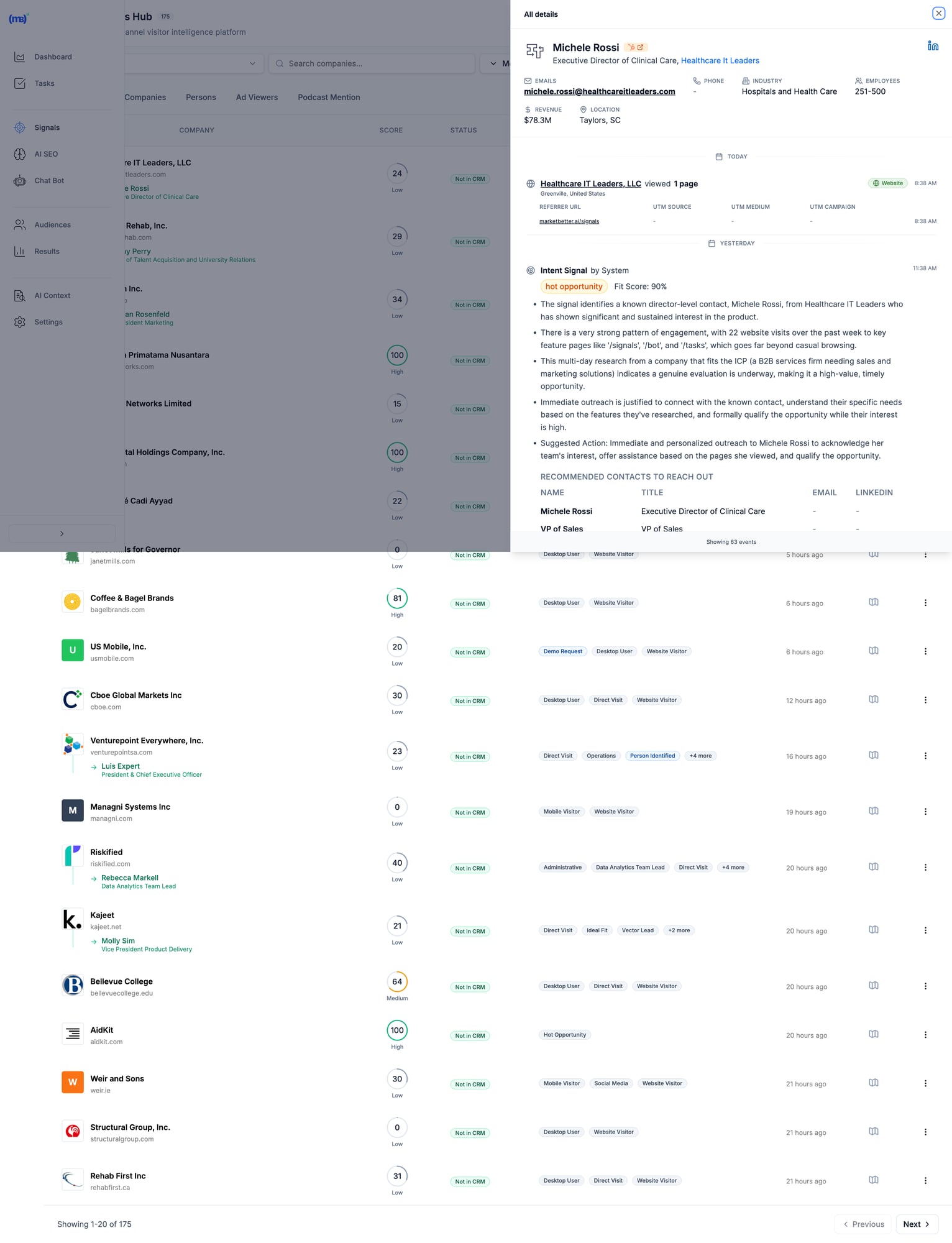
MarketBetter Signals Hub showing visitor intelligence with contact details, intent scores, and recommended actions MarketBetter's Signals Hub shows AI-prioritized visitor signals with intent scoring, identified contacts, and suggested actions — all in one view.

Pricing

Custom based on team size and volume. Transparent pricing — no hidden fees or long-term contracts. Book a demo →

When MarketBetter Is Better

✅ You have an SDR team that needs to execute, not analyze ✅ You want one platform instead of 5+ tools stitched together ✅ Visitor data currently sits unused in dashboards ✅ You care about pipeline, not just "visibility" ✅ Speed-to-lead matters (90% faster lead response)

When To Look Elsewhere

⚠️ You only need raw data for your existing ABM stack ⚠️ Enterprise with 6sense/Demandbase already deployed and working ⚠️ Pure marketing use case with no SDR execution

Read more: MarketBetter vs Warmly | MarketBetter vs Apollo | MarketBetter vs ZoomInfo | MarketBetter vs 6sense


2. Warmly

Best for: Companies wanting real-time visitor engagement via chat

Warmly bundles visitor identification with AI chatbot engagement. Their strength is catching visitors while they're still on your site and starting conversations immediately. In 2026, they've expanded with an "AI Data Agent" tier that automates more of the outreach workflow.

Key Features

  • 65% company-level identification (claimed) via 20+ data providers in a "data waterfall"
  • 15-25% person-level identification via enrichment partnerships
  • AI chatbot for real-time visitor engagement
  • Slack/Teams alerts for high-intent visitors
  • Bombora intent data integration
  • Video calling widget for live sales conversations on-site
  • Orchestrator for automated outreach sequences

Pricing

PlanPriceWhat You Get
Free$0500 visitors/mo, 10 Bombora signals/week
Startup~$700/moHigher limits, basic automation
Business$1,440-1,740/mo10K-100K visitors, full features
AI Data Agent$10,000/yrAdvanced AI features, automated outreach

When Warmly Is Better

✅ Real-time chat engagement is your primary use case ✅ You already have outbound tools (Outreach, Apollo) and need signals ✅ Catching visitors while they're on-site matters most ✅ Budget of $700+/mo for a dedicated visitor ID tool

When To Look Elsewhere

⚠️ You need a full SDR workflow (no smart dialer, no daily task prioritization) ⚠️ Budget under $700/mo (free tier is very limited) ⚠️ You want person-level at scale (15-25% may not be enough) ⚠️ You need multi-channel execution beyond chat

Read more: MarketBetter vs Warmly Comparison | Warmly Review 2026 | Warmly Pricing Breakdown | Best Warmly Alternatives


3. Leadfeeder (Dealfront)

Best for: European companies prioritizing GDPR compliance

Dealfront (the merger of Leadfeeder and Echobot) focuses on the European market with strong GDPR compliance. Solid company-level identification with good CRM integrations at a reasonable price. They've been in the visitor ID game longer than most, which means deep integration partnerships.

Key Features

  • Company-level visitor identification (IP-to-company)
  • GDPR-compliant data handling — a real differentiator for EU companies
  • Strong European company database (best coverage outside US)
  • CRM integrations with Salesforce, HubSpot, Pipedrive
  • Lead scoring and filtering by company attributes
  • Google Analytics integration for enhanced insights

Pricing

PlanPriceWhat You Get
Free€0100 companies/mo, 7-day data retention
Paid€99-165/moUnlimited companies, 365-day retention

Annual billing gives 40% discount. The free tier is genuinely useful for testing.

When Leadfeeder Is Better

✅ European market focus (best EU company database in the category) ✅ GDPR compliance is non-negotiable for your team ✅ Budget-conscious teams wanting basic visitor ID to test the concept ✅ Already using Pipedrive or European CRMs

When To Look Elsewhere

⚠️ You need person-level identification (company-only) ⚠️ US market focus (weaker coverage than US-focused tools) ⚠️ You want SDR workflow, not just data and dashboards ⚠️ You need real-time alerts for high-intent visitors


4. RB2B

Best for: Freemium person-level identification (US traffic)

RB2B has become the go-to for teams wanting to test person-level identification without a big commitment. Their free tier is genuinely generous, and the Slack integration makes it easy to see results immediately. Founded by Adam Robinson, they've built strong community momentum on LinkedIn.

Key Features

  • Person-level identification targeting 10-20% match rate
  • Slack notifications with LinkedIn profiles (the "killer feature")
  • Simple setup (just add a script tag — 5 minutes)
  • Free tier with 150 credits/month
  • Demandbase partnership for company-level fallback
  • Coworker filtering on Pro plans (remove known contacts)

Pricing

PlanPriceWhat You Get
Free$0150 credits/mo, company-level only, LinkedIn profiles
Starter$79/moPerson-level identification, basic integrations
Pro$349+/moBusiness emails, all integrations, coworker filtering

Match Rates (Honest Assessment)

  • Person-level: 10-20% (US traffic only)
  • Company-level: 70-80% when combined with Demandbase fallback
  • International: Not supported for person-level — this is a US-only tool

When RB2B Is Better

✅ You want to test person-level ID before committing serious budget ✅ US-focused B2B traffic (mandatory — doesn't work internationally) ✅ You have existing outreach tools and just need the names ✅ PLG company wanting LinkedIn profiles of engaged users

When To Look Elsewhere

⚠️ International traffic (US-only for person-level identification) ⚠️ You need workflow, not just names dropped in Slack ⚠️ Business emails required (need Pro at $349+/mo — significant jump) ⚠️ You want a complete SDR platform, not a point solution


5. Koala

Best for: PLG companies tracking product intent signals

Koala stands out by combining website visitor identification with product usage signals. If you have a freemium or trial product, Koala shows you which trial users are showing buying intent — a capability most visitor ID tools completely lack.

Key Features

  • Website + product activity tracking in one unified platform
  • Account scoring based on engagement patterns and product usage
  • Real-time Slack alerts for high-intent accounts
  • CRM sync with automatic enrichment
  • Built for PLG motions (trial → paid conversion signals)
  • ICP scoring to filter noise and focus on fits

Pricing

Custom pricing based on volume. Free trial available. Generally positioned between SMB tools and enterprise platforms.

When Koala Is Better

✅ You have a freemium/trial product (PLG motion is your core GTM) ✅ Product engagement signals matter more than just website visits ✅ You want to identify which trial users are ready for a sales conversation ✅ Engineering resources to implement product-level tracking

When To Look Elsewhere

⚠️ No freemium/trial product (pure sales-led GTM) ⚠️ You need full SDR workflow (no dialer, no sequences built in) ⚠️ Enterprise ABM programs (better options exist at that budget) ⚠️ Non-technical team (requires dev work to instrument product events)


6. 6sense

Best for: Large marketing teams running enterprise ABM programs

6sense is a full ABM platform with visitor identification as one component of a broader intent data suite. Powerful but complex — built for large marketing teams with dedicated ops resources. In 2026, they've added AI-powered "Revenue AI" features, though the core platform remains enterprise-focused.

Key Features

  • Account identification via IP + intent signals
  • Predictive buying stage scoring (Awareness → Decision) — genuinely useful for ABM
  • Third-party intent data (Bombora + proprietary 6sense data)
  • Multi-channel ABM orchestration (ads, email, sales activation)
  • AI account summaries and recommendations (Revenue AI)
  • Deep CRM integrations with Salesforce, HubSpot
  • Audience creation for targeted advertising

Pricing

6sense doesn't publish pricing. Based on Vendr and third-party data:

TierTypical CostWhat You Get
Free$050 credits/mo, Chrome extension
Team~$25K-50K/yrBasic platform, limited seats
Growth~$55K/yr (median)Full platform, intent data
Enterprise$100K-200K+/yrAdvanced features, custom integrations

Source: Vendr reports median buyer pays $55,211/year. Implementation takes 1-3 months.

When 6sense Is Better

✅ Enterprise budget ($50K+ annually) and you can justify the ROI ✅ Marketing-led ABM programs where you're running coordinated campaigns ✅ You have ops resources to manage the platform (RevOps or dedicated admin) ✅ Multi-channel orchestration across ads + email + sales is the goal

When To Look Elsewhere

⚠️ SMB or mid-market budget (minimum ~$25K/yr) ⚠️ Sales-first teams (6sense is marketing-first, sales activation is secondary) ⚠️ You want simplicity (3-6 month implementation typical) ⚠️ Contact-level identification priority (6sense is company/account-level)

G2 reviewer feedback:

"My problem with 6sense is that the tool's visitor identification reveals only companies and not individuals."

Read more: MarketBetter vs 6sense | 6sense Review 2026 | 6sense Pricing Breakdown | Best 6sense Alternatives


7. ZoomInfo WebSights

Best for: Enterprise GTM teams already using ZoomInfo data

ZoomInfo is the 800-pound gorilla of B2B data. WebSights is their visitor identification product, plugging into their massive database of 320M+ contacts and 100M+ company profiles. If you're already paying for ZoomInfo, WebSights is a natural add-on. If you're not, the total cost makes this an enterprise play.

Key Features

  • Account-level visitor identification with deep company intel
  • Buyer intent signals (1B+ monthly data points)
  • Deep CRM/MAP integrations (native Salesforce, HubSpot, Marketo)
  • Form enrichment for progressive lead capture
  • DSP integration for retargeting ads to identified accounts
  • Copilot AI for account research and outreach drafting

Pricing

ZoomInfo bundles WebSights with their core platform. Expect:

ComponentTypical Cost
SalesOS$15,000-25,000/yr starting
WebSights add-onIncluded or ~$5K extra
Intent data$9K-20K additional
Engage (sequences/dialer)~$15K additional

Total cost for full suite: $40K-100K+/yr depending on seats and features. Annual contracts, difficult to exit mid-term.

When ZoomInfo Is Better

✅ Already a ZoomInfo customer (marginal cost is low) ✅ Enterprise data needs where database size matters ✅ Budget for $15K+ annually ✅ Dedicated ops team to manage the platform

When To Look Elsewhere

⚠️ SMB budget (minimum $15K/yr for the base platform) ⚠️ You want SDR workflow, not just data enrichment ⚠️ Quick implementation needed (enterprise complexity and training required) ⚠️ Contact data accuracy concerns (G2 reviews flag stale data as #1 issue)

Read more: MarketBetter vs ZoomInfo | ZoomInfo Review 2026 | ZoomInfo Pricing Breakdown | Best ZoomInfo Alternatives


8. Clearbit Breeze (HubSpot)

Best for: HubSpot users wanting native enrichment

Now owned by HubSpot, Clearbit excels at form enrichment and real-time company identification. If you're already in the HubSpot ecosystem, it's the most seamless option — no integration work, no data syncing issues. The rebranding to "Breeze Intelligence" has been a bit confusing, but the core product remains strong.

Key Features

  • Real-time form enrichment (shorter forms, same data)
  • Company and contact data appending to existing CRM records
  • Native HubSpot integration (zero setup if you're already a customer)
  • Reveal for anonymous visitor identification at account level
  • API for custom enrichment workflows (developers love this)
  • Auto-enrichment triggers based on lifecycle stage changes

Pricing

Credit-based system integrated into HubSpot. Contact HubSpot for details. Historically:

  • Enterprise plans include Clearbit/Breeze credits
  • Standalone was $12,000+/yr before acquisition
  • Credits consumed per enrichment (form fill, reveal, or API call)

When Clearbit Is Better

✅ You're committed to the HubSpot ecosystem (this is a natural extension) ✅ Form enrichment is the priority (reduce form fields, increase conversions) ✅ You want seamless CRM data without export/import workflows ✅ Marketing-first use case with existing HubSpot workflows

When To Look Elsewhere

⚠️ Not a HubSpot user (ecosystem lock-in makes this pointless) ⚠️ Person-level visitor identification priority (better options exist) ⚠️ You need SDR workflow beyond enrichment (no dialer, no task lists) ⚠️ Budget-conscious (credit system can get expensive at scale)


9. Demandbase

Best for: Enterprise ABM with advertising + sales intelligence

Demandbase is a full ABM platform competing with 6sense at the enterprise level. Their strength is combining account identification with ABM advertising capabilities — if you're running targeted ads to identified accounts, Demandbase's DSP integration is best-in-class.

Key Features

  • Account identification (AI-powered anonymous visitor reveal)
  • Identity graph (cookies, IP, device IDs, cross-channel matching)
  • Intent data + engagement scoring with proprietary signals
  • ABM advertising platform with native DSP
  • Sales intelligence with account insights and buyer journey mapping
  • GDPR-safe global reach (better international coverage than 6sense)

Pricing

Demandbase doesn't publish pricing. Based on Vendr and third-party data:

TierTypical Cost
Minimum$18,000+/yr
Median~$65,000/yr
Enterprise$100K+/yr

When Demandbase Is Better

✅ Enterprise budget ($50K+ annually) ✅ ABM advertising is part of your strategy (best DSP integration) ✅ Global reach with GDPR compliance matters (stronger internationally than 6sense) ✅ Marketing + sales alignment on target accounts

When To Look Elsewhere

⚠️ SMB or mid-market budget ⚠️ Person-level identification priority (company/account-level focus) ⚠️ Quick implementation needed (enterprise onboarding) ⚠️ You need SDR workflow, not marketing dashboards


10. Instantly Pixel

Best for: Outbound-first teams already using Instantly for cold email

Instantly — best known as a cold email platform — has added website visitor identification via their "Instantly Pixel." If you're already using Instantly for outbound sequences, adding visitor ID data into the same workflow is seamless. It's not the deepest visitor ID tool, but the workflow integration is hard to beat for existing customers.

Key Features

  • Website visitor identification via pixel tracking
  • Built into Instantly CRM — visitor data flows directly into your outreach workflows
  • Custom views for filtered visitor segments (e.g., pricing page visitors only)
  • Contact enrichment from Instantly's B2B database
  • Automated sequence enrollment — identified visitors auto-added to campaigns
  • Multi-channel (email + call + SMS from one platform)

Pricing

Visitor identification is included in Instantly's CRM plans:

PlanPriceWhat You Get
Growth CRM$37/moBasic CRM + visitor tracking
Hyper Growth CRM$97/moAI features + advanced sequences

Note: You may also need a sending plan ($30-78/mo) for the outreach side. Total cost: $67-175/mo for the full stack.

When Instantly Is Better

✅ Already using Instantly for cold email (natural extension, no new tools) ✅ Outbound-first GTM where visitor ID supplements cold outreach ✅ Budget-conscious (cheapest "all-in-one" option at $67-175/mo total) ✅ Want email + calling + visitor ID in one platform

When To Look Elsewhere

⚠️ Visitor ID is your primary need (Instantly's pixel is secondary to their email product) ⚠️ You need deep visitor analytics and segmentation (basic compared to Warmly or 6sense) ⚠️ Enterprise-grade identification with intent data (not their strength) ⚠️ Inbound-first GTM (Instantly is built for outbound)


11. Leadpipe

Best for: Person-level identification at scale with aggressive pricing

Leadpipe is a newer entrant focused on high-volume person-level identification. They claim 35%+ person-level match rates — aggressive but worth testing. Their pricing model is credit-based and straightforward, making it easy to forecast costs.

Key Features

  • Person-level identification — names, emails, phone numbers, LinkedIn profiles
  • Company + contact enrichment in one view
  • Real-time visitor tracking with page-level behavior data
  • Automated list building — identified visitors auto-exported to your email tool
  • Simple pixel installation (similar to RB2B)
  • No contract — month-to-month pricing

Pricing

PlanPriceCredits
Starter$98/mo100 identified visitors
Growth$147/mo500 identified visitors
Scale$248/mo1,000 identified visitors
Pro$398/mo2,000 identified visitors
Business$819/mo5,000 identified visitors
Enterprise$1,579/mo10,000 identified visitors

Per-credit cost: $0.16-0.98 depending on volume. 200 free credits to test.

When Leadpipe Is Better

✅ Person-level identification is the priority (not just company names) ✅ You want transparent, predictable pricing per identified visitor ✅ High-traffic site where per-credit pricing scales well ✅ Need email addresses + phone numbers for outreach (not just LinkedIn profiles)

When To Look Elsewhere

⚠️ You need SDR workflow (data-only, no task management or dialer) ⚠️ International traffic (US-focused, like most person-level tools) ⚠️ Enterprise security requirements (newer vendor, less established) ⚠️ You want intent data beyond just page visits


12. Snitcher

Best for: Budget-friendly company-level identification

Snitcher is a straightforward, no-frills company identification tool starting at just $39/month. No person-level ID, no intent data, no AI — just solid IP-to-company matching with clean reporting. Sometimes simple is exactly what you need.

Key Features

  • Company-level visitor identification via IP matching
  • Google Analytics integration (enhances existing GA data)
  • CRM integrations (Salesforce, HubSpot, Pipedrive)
  • Custom alerts based on company attributes or page visits
  • Clean dashboard with session-level detail
  • GDPR-compliant (EU-based, privacy-first approach)

Pricing

Usage-based starting at $39/month, scaling with identified companies. Affordable option for teams testing the visitor ID concept before committing to larger platforms.

When Snitcher Is Better

✅ Budget under $200/mo and you want to test visitor identification ✅ Company-level is sufficient (you have separate tools for contact finding) ✅ European company wanting GDPR-compliant solution (EU-based) ✅ Clean, simple tool without enterprise complexity

When To Look Elsewhere

⚠️ You need person-level identification (company-only) ⚠️ You want SDR workflow or outreach automation ⚠️ US-focused team (US-centric tools have better North American coverage) ⚠️ Need intent data or buying stage signals


The Real Question: What Happens AFTER Identification?

Here's what most comparison guides won't tell you:

Identifying visitors is the easy part.

The hard part is turning that data into action. Most SDRs don't have time to:

  • Research every identified company
  • Find the right decision-maker
  • Write personalized outreach
  • Prioritize who to contact first
  • Actually make the call

That's why 90% of visitor ID data goes unused. It sits in a dashboard. Nobody acts on it. And the tool becomes shelfware within 3 months.

The "Data vs Action" Gap

Data-First ToolsAction-First Tools
Show you WHO visitedShow you WHO + WHAT TO DO
Require manual researchAuto-enrich with decision-makers
Leave prioritization to youAI-prioritize by fit + intent
Integrate with your sequence toolsInclude sequences + dialer
Dashboards for analysisTasks for execution
Value depends on SDR disciplineValue is built into the workflow

Most tools on this list are data-first. They give you visibility. What happens next is your problem.

MarketBetter is action-first. We turn every visitor into a prioritized task with AI-drafted outreach and click-to-dial. Your SDR opens a list and executes. No research required, no prioritization paralysis.

The Multi-Tool Problem

Here's how most teams cobble together a visitor ID workflow today:

  1. Visitor identification (RB2B or Warmly) → $79-700/mo
  2. Contact enrichment (Apollo or ZoomInfo) → $49-$15,000/yr
  3. Email sequences (Outreach or Salesloft) → $100-150/seat/mo
  4. Dialer (Orum or Nooks) → $150-200/seat/mo
  5. CRM (HubSpot or Salesforce) → $50-150/seat/mo

Total: $500-2,000+/mo per SDR across 5 different tools, with manual data transfer between each one.

MarketBetter replaces tools 1-4 in one platform. Visitor identification, enrichment, sequences, and dialer — with AI connecting them so data flows into action automatically.

See how it works →


How to Calculate Visitor Identification ROI

Before investing in any visitor ID tool, run these numbers:

Step 1: Estimate Your Identifiable Traffic

MetricYour Number
Monthly website visitors_______
× Realistic match rate (use 15% for company-level)× 0.15
= Identified companies per month_______

Step 2: Estimate Pipeline Impact

MetricYour Number
Identified companies per month_______
× % that fit your ICP (use 20%)× 0.20
= ICP-fit leads_______
× Outreach-to-meeting rate (use 5%)× 0.05
= Meetings booked per month_______

Step 3: Calculate Revenue

MetricYour Number
Meetings per month_______
× Demo-to-close rate (use 20%)× 0.20
= New customers per month_______
× Average deal size× $_______
= Monthly revenue from visitor ID$_______

Example Scenario

MetricExample
10,000 monthly visitors
× 15% company match rate= 1,500 identified
× 20% ICP fit= 300 ICP leads
× 5% meeting rate= 15 meetings/month
× 20% close rate= 3 new customers
× $15,000 ACV= $45,000/month revenue

Even at conservative rates, a tool costing $500-2,000/month that generates $45,000 in monthly revenue is a 20-90x return. The math almost always works — the question is whether your team will actually act on the data.


Implementation Guide: Getting Started in Under 30 Minutes

No matter which tool you choose, here's how to get maximum value fast:

Week 1: Install and Baseline

  1. Add the tracking pixel/script — Every tool on this list requires adding a JavaScript snippet to your site. Most take under 5 minutes.
  2. Connect your CRM — Sync identified visitors with your existing pipeline. HubSpot and Salesforce integrations are standard.
  3. Set up alerts — Configure Slack or email notifications for high-intent page visits (pricing page, demo page, comparison pages).
  4. Establish your baseline — How many visitors does the tool identify in the first week? What's your actual match rate?

Week 2: Prioritize and Filter

  1. Define your ICP filter — Set company size, industry, and geography filters so you only see relevant visitors. Without filters, your SDR drowns in noise.
  2. Set up lead scoring — Prioritize visitors by behavior: pricing page > blog > homepage. Multiple visits > single visit.
  3. Test outreach on 20 leads — Manually reach out to the first batch. Measure response rates. Refine your messaging.

Week 3-4: Automate and Scale

  1. Build sequences — Create automated email sequences triggered by visitor identification events.
  2. Assign territory rules — If you have multiple SDRs, set up round-robin or territory-based lead routing.
  3. Measure pipeline — Track how many identified visitors become meetings, opportunities, and closed deals.

Common Mistakes to Avoid

Contacting every identified visitor — Most are researchers, not buyers. Filter by ICP and intent signals. ❌ Mentioning you tracked them — "I saw you visited our pricing page" is creepy. Frame outreach around their company's challenges. ❌ Setting and forgetting — Review match rates and outreach results monthly. Adjust ICP filters as you learn. ❌ Buying enterprise tools for SMB problems — A $55K/yr platform won't help if your team has 2 SDRs and 5,000 monthly visitors. ❌ Expecting person-level magic — Realistic person-level match rates are 5-20%. If your traffic is low, the absolute number of identified individuals will be small. Supplement with company-level identification + manual prospecting.


How to Choose the Right Visitor ID Tool

After evaluating all 12 tools, here are the three questions that matter:

1. Do You Need Data or Action?

If you have a mature ops team that can turn visitor data into SDR workflows (research, enrich, prioritize, sequence, call), tools like ZoomInfo, 6sense, or Warmly give you rich data to feed those workflows.

If you want visitors to become prioritized SDR tasks automatically — no manual research, no tool-switching — look at MarketBetter.

2. Company-Level or Person-Level?

  • Company-level (30-65% match rate) = table stakes, every tool on this list does this
  • Person-level (5-20% match rate) = harder, consider RB2B, Leadpipe, Warmly, or MarketBetter

If person-level is critical, verify the vendor's methodology. Many claim high rates by counting company matches in their headline number.

3. What's Your Budget?

BudgetBest Options
Free/$0RB2B free, Leadfeeder free
Under $200/moSnitcher ($39), RB2B Starter ($79), Leadpipe Starter ($98)
$200-500/moRB2B Pro ($349), Leadpipe Growth ($147-248)
$500-2,000/moWarmly ($700+), MarketBetter, Instantly stack ($67-175)
$2,000+/moMarketBetter, Warmly Business
$25K+/yr6sense, ZoomInfo
$50K+/yr6sense Enterprise, Demandbase, ZoomInfo Enterprise

Decision Framework

Choose MarketBetter if your SDRs need a daily playbook that tells them who to call, why, and what to say — not another dashboard to monitor.

Choose Warmly if real-time chat engagement while visitors are on-site is your highest priority.

Choose RB2B or Leadpipe if you just need person-level data piped into Slack and you'll handle outreach separately.

Choose 6sense or Demandbase if you're running enterprise ABM programs with $50K+ budgets and dedicated RevOps.

Choose ZoomInfo if you already have their data platform and want to add visitor ID as an incremental capability.

Choose Snitcher or Leadfeeder if you want affordable company-level identification to test the concept before scaling up.

Choose Instantly if you're already running cold email campaigns and want to layer in visitor identification without adding another vendor.


Frequently Asked Questions

What is the best free website visitor identification tool?

RB2B offers the best free tier for person-level identification (US traffic only, 150 credits/month with LinkedIn profiles). Leadfeeder offers free company-level identification (100 companies/month, 7-day retention). Both are limited but useful for testing the concept before committing budget.

What is a realistic match rate for visitor identification?

Expect 30-65% for company-level identification and 5-20% for person-level. Rates are higher for corporate office traffic and lower for remote workers. Any vendor claiming 80%+ contact-level match rates is likely counting company matches. Always ask: "What percentage of my traffic will you identify to a specific person with a verified email?"

Do I need visitor identification if I have Google Analytics?

Google Analytics shows you anonymous traffic patterns — pages visited, time on site, traffic sources, conversion funnels. Visitor identification reveals who those visitors are (company names, sometimes individual contacts with emails). They serve completely different purposes. Most teams use both: GA4 for marketing analytics, visitor ID for sales activation.

Is website visitor identification GDPR compliant?

It depends on the method. IP-to-company matching is generally compliant as it identifies organizations, not individuals. Person-level identification tools must ensure proper consent mechanisms and legal basis for processing. European-focused tools like Leadfeeder (Dealfront) and Snitcher prioritize GDPR compliance. If you operate in the EU, consult your legal team and look for tools with explicit GDPR documentation.

What's the difference between visitor identification and intent data?

Visitor identification tells you WHO visited your website specifically — first-party data. Intent data tells you WHO is researching your category across the web — third-party signals from publishers, review sites, etc.

Some tools (6sense, Demandbase, Warmly) combine both. Others focus on one or the other. Intent data is broader but noisier; visitor identification is narrower but higher-signal (they're on YOUR site, not just reading about the category).

How long does implementation take?

  • Simple tools (RB2B, Leadpipe, Snitcher): 5-30 minutes (add a script tag)
  • Mid-market tools (Warmly, Koala, MarketBetter): 1-2 weeks (includes CRM setup and workflow configuration)
  • Enterprise tools (6sense, Demandbase, ZoomInfo): 1-3 months (training, custom integrations, change management)

Can I use multiple visitor ID tools together?

Yes, and many teams do. A common stack: RB2B for person-level identification (free tier) + Leadfeeder for company-level (free tier) to test both approaches. Then consolidate into one paid tool once you know which data type (person vs company) drives more pipeline for your specific business.

What's the biggest mistake teams make with visitor identification?

Buying the tool without a plan for what happens after identification. 90% of visitor ID data goes unused because there's no workflow to turn "Company X visited" into "SDR calls Jane at Company X with this pitch." Before choosing a tool, define your process: Who reviews the data? How fast do they act? What do they say? If you can't answer those questions, the tool won't help — you need a workflow-first platform like MarketBetter that handles this automatically.

Should I care about AI features in visitor ID tools?

In 2026, every tool has slapped "AI" on their marketing. What actually matters: AI for prioritization (which visitors to contact first), AI for personalization (writing outreach based on visitor behavior), and AI for automation (auto-enrolling high-intent visitors into sequences). Skip tools where "AI" just means a chatbot that answers FAQ. Look for AI that saves your SDRs 15-30 minutes per lead.


Free Tool

Try our AI Lead Generator — find verified LinkedIn leads for any company instantly. No signup required.

The Bottom Line

Website visitor identification is only valuable if someone acts on it.

The best tools don't just show you dashboards of anonymous visitors turned into company names. They turn those visitors into prioritized tasks your SDRs execute every day.

Ask yourself: Do you need another dashboard? Or do you need more booked meetings?

If the answer is booked meetings, you need a tool that bridges the gap between "identified visitor" and "SDR picks up the phone." That's what separates a data product from a revenue product.


Ready to turn anonymous visitors into pipeline?

Book a demo with MarketBetter →

We'll show you how visitor identification becomes SDR execution — not just another data source collecting dust.

Related reading:

MarketBetter vs RB2B: Website Visitor ID vs SDR Workflow [2026]

· 8 min read
sunder
Founder, marketbetter.ai

RB2B pioneered contact-level website visitor identification. Drop in their script, and within minutes you're getting Slack notifications: "John Smith from Acme Corp just visited your pricing page."

That's powerful. But it's also where RB2B stops.

What happens next? Your SDR has to:

  • Research John's company
  • Figure out if Acme is even in your ICP
  • Find the right decision-maker (maybe John's just a researcher)
  • Write personalized outreach
  • Decide whether to email, call, or connect on LinkedIn
  • Actually reach out before the lead goes cold

That workflow takes 15-30 minutes per visitor. With hundreds of notifications per day, most RB2B leads end up ignored.

MarketBetter takes a different approach. We don't just identify who visited—we turn every visitor into a prioritized task with AI-generated outreach, decision-maker contacts, and a click-to-dial button.

🎯 Quick Summary
  • Choose RB2B if: You want simple, affordable visitor identification and have the bandwidth to work leads manually
  • Choose MarketBetter if: You want visitor identification PLUS the SDR workflow to actually convert those visitors into meetings

What Each Tool Actually Does

RB2B: Person-Level Visitor Identification

RB2B is a specialist. They do one thing well: identify anonymous website visitors at the contact level (not just company level) and push that data to Slack.

How it works:

  1. Install a tracking script on your website
  2. RB2B matches visitors against their database (US only)
  3. Get Slack notifications with LinkedIn profiles and company info
  4. Export to CRM or use integrations to trigger workflows

What you get:

  • Visitor's name and LinkedIn URL
  • Company information
  • Page visit history
  • Email addresses (on paid plans)

What you don't get:

  • Prioritization (which visitor matters most?)
  • Outreach templates
  • Follow-up workflows
  • Calling capabilities
  • AI research or personalization

MarketBetter: Visitor ID + SDR Workflow

MarketBetter combines visitor identification with an AI-powered SDR command center. We identify visitors AND turn that data into action.

How it works:

  1. Identify company and contact visiting your website
  2. AI scores the opportunity against your ICP
  3. Find decision-makers at that company (not just the visitor)
  4. Create a prioritized task for your SDR
  5. Generate personalized outreach based on AI research
  6. SDR clicks "call" or "send"—done

What you get:

  • Everything RB2B offers (visitor ID, company data)
  • AI-prioritized task list
  • Decision-maker discovery (beyond the visitor)
  • AI-generated, personalized outreach
  • Built-in dialer with click-to-call
  • Email sequences and LinkedIn tracking
  • Chatbot with live handoff
  • Pre-meeting intelligence briefs

Feature-by-Feature Comparison

FeatureRB2BMarketBetter
Website Visitor ID✅ Contact + Company✅ Contact + Company
Person-Level Identification✅ US only (15-45% coverage)✅ Via intent data partners
Company-Level Identification✅ Global (via Demandbase)✅ Global
LinkedIn Profile Enrichment
Email Enrichment✅ Paid plans only
Slack/Teams Notifications
CRM Integration✅ HubSpot, Salesforce, Zapier✅ HubSpot, Salesforce (bidirectional)
ICP Filtering✅ Hot Leads feature✅ AI scoring
High-Intent Page Tagging✅ Hot Pages✅ Intent signals
AI Prioritization
Decision-Maker Discovery
AI-Generated Outreach
Built-in Dialer
Email Sequences
Chatbot
Pre-Meeting Briefs
SDR Task Management

Pricing Comparison

RB2B Pricing (2026)

PlanMonthly PriceResolutions/MonthKey Features
Free$0150Company-level only, Slack only
Starter$79300Person-level, LinkedIn URLs, no email/integrations
Pro$149600Email addresses, all integrations
Pro+$199600Premium coverage (35-45%), up to 3 additional contacts
Scale$299-$8491,250-12,500Volume pricing

Overage fees: $0.25-$0.45 per resolution beyond plan limits.

Note: RB2B's free tier no longer includes contact-level identification—that requires at least the $79/mo Starter plan.

MarketBetter Pricing

MarketBetter uses custom pricing based on team size and volume. Contact for a quote, but expect:

  • Higher starting price than RB2B's basic plans
  • Better ROI when you factor in SDR time saved
  • No per-resolution caps—focus on qualified leads, not credit counts

The ROI math: If RB2B costs $199/mo but each lead takes 20 minutes of SDR time to work, you're paying in time instead of money. A $3,000/month SDR working 50 RB2B leads per day is spending 16+ hours on lead research alone.


When to Choose RB2B

RB2B is the right choice if:

✅ You're bootstrapped or testing visitor ID for the first time Their free tier (company-level) and $79/mo starter plan let you prove the concept before investing more.

✅ You already have a robust sales tech stack If you're using Clay, Apollo, Instantly, or HeyReach, you can pipe RB2B data into your existing workflows.

✅ Your SDRs have the bandwidth for manual research If you're getting fewer than 50 qualified visitors per week, manual follow-up is manageable.

✅ You only need US person-level identification RB2B excels at US contact identification. International is company-level only.

✅ You want Slack-first notifications RB2B's Slack integration is excellent. If your sales team lives in Slack, it's a natural fit.


When to Choose MarketBetter

MarketBetter is the right choice if:

✅ You want ACTION, not just data Visitor identification without a workflow is just noise. MarketBetter turns every qualified visitor into a prioritized, actionable task.

✅ Your SDRs are drowning in tabs The average SDR uses 7+ tools daily. MarketBetter consolidates visitor ID, outreach, dialing, and CRM into one workflow.

✅ You need SDR onboarding speed New SDRs can be productive in days, not months. Just follow the AI-generated tasks.

✅ You want AI-powered personalization at scale Writing personalized emails for every visitor isn't sustainable. Our AI researches each prospect and drafts outreach that sounds human.

✅ You need more than visitor ID MarketBetter includes chatbot, dialer, email sequences, and meeting prep—everything an SDR needs, not just one signal.

✅ You're measuring meetings booked, not leads identified RB2B measures "resolutions." MarketBetter measures pipeline generated.


The Workflow Difference

Here's what happens when someone visits your pricing page:

With RB2B:

  1. Slack notification: "Jane Doe from TechCorp visited /pricing"
  2. SDR opens LinkedIn, researches Jane
  3. SDR searches CRM—is TechCorp a known account?
  4. SDR finds Jane is a marketing coordinator (not a decision-maker)
  5. SDR searches for the VP of Sales at TechCorp
  6. SDR writes a personalized email
  7. SDR sends email, maybe connects on LinkedIn
  8. SDR logs activity in CRM

Time spent: 20-30 minutes per visitor

With MarketBetter:

  1. Visitor identified: Jane Doe, Marketing Coordinator at TechCorp
  2. AI scores TechCorp (ICP fit: 87%)
  3. AI identifies decision-maker: Mike Chen, VP of Sales
  4. Task created for SDR: "Call Mike Chen at TechCorp — pricing page visit"
  5. Task includes: AI-generated email, Mike's direct dial, LinkedIn URL
  6. SDR clicks "Call"—or approves the email with one click
  7. Activity logged automatically

Time spent: 2-3 minutes per visitor

That's 10x efficiency—which means your SDR can work 10x more leads.


What Real Users Say

RB2B Reviews (G2)

Pros mentioned:

  • "Easy setup—literally 5 minutes"
  • "LinkedIn integration is seamless"
  • "Free tier is generous for testing"
  • "Slack notifications are instant"

Cons mentioned:

  • "Match rates vary—sometimes as low as 10%"
  • "Data quality weaker for SMBs and international"
  • "Still need other tools to actually reach out"
  • "No way to prioritize which visitors matter most"

MarketBetter Reviews (G2)

Pros mentioned:

  • "Finally, one tool for everything"
  • "SDR onboarding time cut by 70%"
  • "AI outreach is surprisingly good"
  • "29% positive reply rate"
  • "Best support I've experienced"

Cons mentioned:

  • "Higher price point than point solutions"
  • "Takes time to configure ICP filters"

Common Questions

Can I use both together?

Technically yes, but it's redundant. MarketBetter already includes visitor identification. Adding RB2B means paying twice for the same signal.

Is RB2B really free?

The free tier gives you 150 company-level resolutions per month (no person-level). For contact identification, you need at least $79/mo.

Does MarketBetter work outside the US?

Yes. Company-level identification is global. Person-level varies by region and data partner.

Which has better match rates?

Match rates depend on your traffic source, not the tool. Both use similar underlying data. The difference is what happens AFTER identification.

Is RB2B GDPR compliant?

RB2B's person-level identification is US-only, avoiding GDPR. Company-level (via Demandbase) works globally but requires consent tools.


The Bottom Line

RB2B solves the identification problem. It's affordable, easy to set up, and does one thing well.

MarketBetter solves the pipeline problem. Identification is table stakes—what matters is converting visitors into meetings.

If you're evaluating visitor identification tools, ask yourself: Do I need more data, or do I need more meetings?

RB2B gives you data. MarketBetter gives you meetings.


Free Tool

Try our AI Lead Generator — find verified LinkedIn leads for any company instantly. No signup required.

Try MarketBetter

See how MarketBetter turns visitor identification into booked meetings:

👉 Book a Demo

We'll show you exactly how much SDR time you're currently wasting—and how to get it back.

How to Track Website Visitors: 8 Methods From Free to Enterprise [2026]

· 24 min read

If you want to track website visitors effectively, you need more than just a tool like Google Analytics. You need a game plan. It's not about watching pageview counters spin; it’s about piecing together the entire user journey, from the first click to the final handshake, and then taking action on what you find.

Why Tracking Website Visitors Matters

Professional marketer analyzing website visitor data and user analytics at modern office desk

Before you even think about dropping a tracking script on your site, let's get the 'why' straight. This isn't about hoarding data. It's about turning raw numbers into a clear story of how real people interact with your brand online. When you learn how to track website visitors, you stop making guesses and start making smart, informed decisions that directly impact your bottom line.

This stuff didn't just appear overnight. Back in the 1990s, the best we could do was scan server log files to count 'hits'—which were really just file requests. By the late '90s, the game changed with JavaScript-based tracking. Suddenly, we could see browsers, screen sizes, and the actual paths people took through a site. That leap forward set the stage for the powerful platforms we rely on today.

Distinguishing Between Data and Insights

At its core, website tracking is about one thing: separating anonymous traffic from identified leads.

Anonymous traffic is everyone who visits your site whose name you don't know. But you can still learn a ton from their behavior—what pages they look at, how long they stay, and where they came from.

Identified leads are the people who raise their hand. They fill out a form, subscribe to a newsletter, or request a demo. They give you a direct line of contact.

Understanding this difference is the first step to personalizing their experience and tightening up your marketing funnel. The entire goal is to guide those anonymous visitors toward an action that turns them into a known contact.

What You Can Genuinely Learn

When your tracking is set up correctly, you unlock a treasure trove of information that directly shapes your strategy. You move beyond surface-level metrics and start seeing the real patterns.

Here's what you can actually uncover:

  • Popular Content and Dead Ends: Pinpoint which pages are your superstars and which ones are causing people to hit the back button and leave for good. Actionable Step: Use this data to feature your popular content more prominently and create an improvement plan for underperforming pages.
  • User Journey Mapping: Trace the exact steps someone takes, from landing on a blog post via Google to filling out your demo request form. This is pure gold. Actionable Step: Identify common drop-off points in the journey and optimize those pages to keep users moving toward conversion.
  • Audience Demographics: Get a clear picture of your visitors' locations, the devices they prefer (mobile vs. desktop), and even their browsers. This helps you optimize your site's design and performance where it counts. Actionable Step: If 70% of your traffic is mobile, prioritize a mobile-first redesign.

This table breaks down some of the most critical metrics and why they should be on your radar.

Key Visitor Metrics and Their Business Impact
Metric
Sessions
Bounce Rate
Average Session Duration
Pages per Session
Conversion Rate

Tracking these metrics gives you the hard data you need to not only improve your website but also to justify your marketing spend.

By connecting specific visitor actions to real business outcomes, you can confidently calculate what’s working and what isn’t. Our guide on how to calculate marketing ROI dives much deeper into this crucial process.

When you focus on these foundational concepts, you'll build a tracking strategy that delivers real growth—not just a dashboard full of vanity metrics.

Comparing Core Website Tracking Methods

Deciding how to track visitors on your website isn't a simple, one-size-fits-all choice. The right approach really depends on what you're trying to achieve, your tech stack, and how seriously you take user privacy. Getting a handle on the core methods is the first real step toward building a tracking strategy that gives you data you can actually trust.

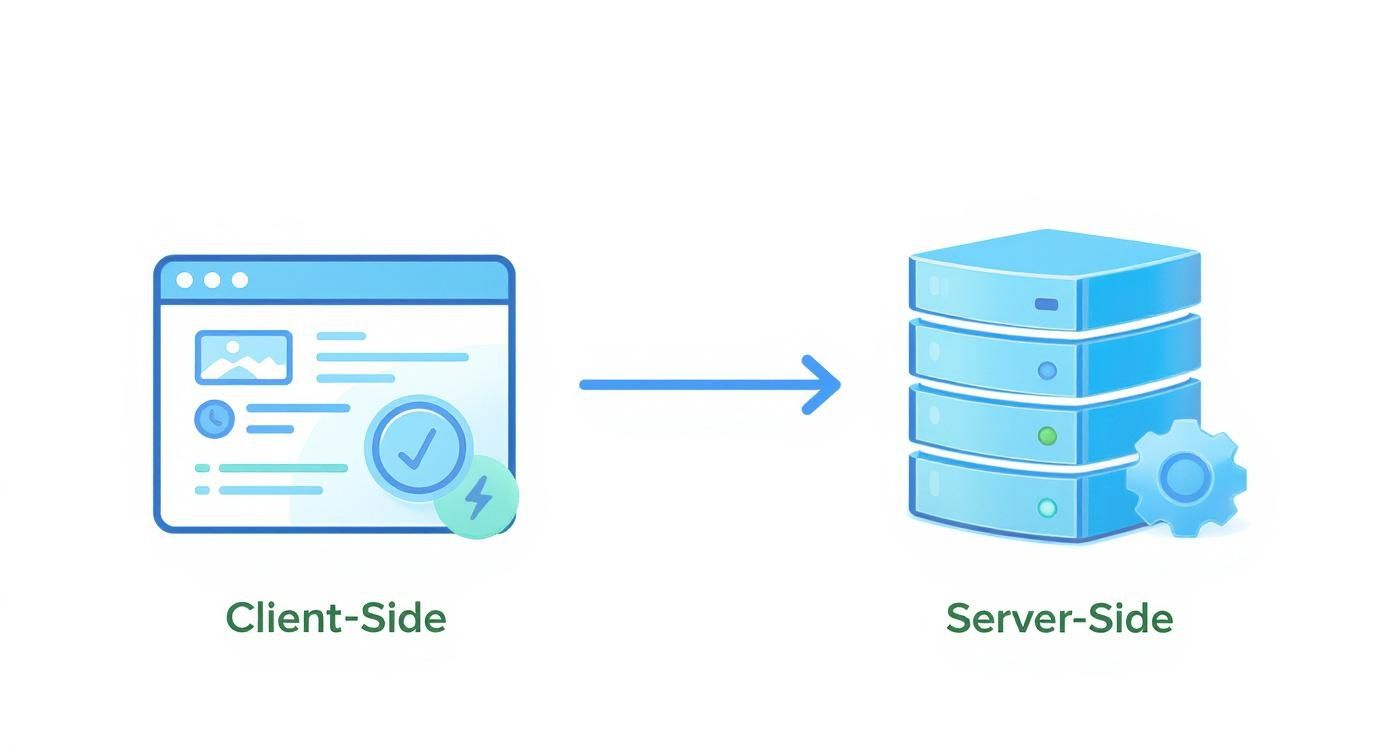
Most people start with client-side tracking. It's the classic setup you get out of the box with tools like Google Analytics. A little snippet of JavaScript runs in your visitor's browser (the "client"), collects info, and sends it straight to the analytics platform. It's pretty easy to set up and great for capturing rich, real-time user interactions like mouse clicks and form entries.

But this approach has some serious weaknesses. Because it all happens in the browser, it's easily blocked. Ad-blockers and privacy-first browsers can stop your script from ever loading, making a chunk of your audience completely invisible. And it's not a small chunk—recent data shows nearly 43% of internet users worldwide use an ad-blocker. That's a massive blind spot.

Server-Side Tracking for a Truer Picture

This is where server-side tracking comes in. Instead of running everything in the user's browser, you move the data collection process to your own web server. When a visitor does something on your site, their browser sends a request to your server first. Then, your server forwards that information to your analytics tools. It creates a much more direct and controlled data stream.

This method is just inherently more reliable. It’s completely immune to browser-based ad-blockers and sidesteps many of the cookie restrictions that trip up client-side scripts. The result is a far more complete and accurate dataset, giving you a much truer picture of your actual website traffic.

Key Takeaway: Server-side tracking puts you back in control of your data. By processing information on your own server before passing it to third-party tools, you can filter, enrich, and manage what gets shared—boosting both accuracy and privacy.

To make it more concrete, here’s how these two methods really stack up against each other.

Client-Side vs Server-Side Tracking A Practical Comparison

This table directly compares the two primary tracking methodologies to help you decide which approach, or combination of approaches, is right for your needs.

FeatureClient-Side Tracking (e.g., GA4 via Browser)Server-Side Tracking (e.g., via GTM Server Container)
ImplementationEasier and quicker to set up; often just adding a script to your site's header.More complex setup requiring a server environment and technical configuration.
Data AccuracySusceptible to ad-blockers, browser restrictions, and network issues, leading to data loss.Highly accurate and resilient to ad-blockers, providing a more complete dataset.
Site PerformanceCan slow down page load times by adding multiple third-party scripts to the browser.Minimal impact on site speed as the heavy lifting is done on the server, not the user's device.
Data ControlData is sent directly from the user's browser to third-party vendors with less oversight.You control the data flow, allowing for filtering and enrichment before sending it to vendors.
CostGenerally lower initial setup cost, often included with free analytics tools.Involves server hosting costs, which can vary based on traffic volume.

Ultimately, many teams find a hybrid approach works best, using server-side for core analytics and client-side for specific user experience tools. For a deeper dive into how different platforms handle this, there's a great resource offering a detailed comparison of Sitecore CDP Personalize and Google Analytics.

Don't Forget Pixels and UTMs

Beyond these core architectures, two other tools are absolutely essential for any serious marketer: tracking pixels and UTM parameters.

  • Tracking Pixels: These are tiny, invisible 1x1 pixel images placed on your website. When a page with a pixel loads, it "fires" and sends data back to an ad platform like Meta or LinkedIn. They are absolutely critical for tracking ad conversions and building retargeting audiences.

  • UTM Parameters: Think of these as simple tags you tack onto the end of a URL to see how your campaigns are performing. By tagging links from emails, social posts, or paid ads, you can tell your analytics tool exactly where a visitor came from. This is fundamental for figuring out which channels are actually driving results and which are just noise.

Connecting all these dots to correctly attribute conversions is a huge challenge. To get a better handle on how to build a cohesive picture from these data points, check out our guide on multi-touch attribution models. Choosing the right mix of these methods will be the difference between guessing and knowing what works.

Getting Started with Google Analytics 4

Let's be honest: setting up website tracking usually starts with Google Analytics 4. It’s the industry gorilla for a reason, but a sloppy setup is a fast track to messy, unreliable data. If you get one thing right, make it the initial configuration.

It's no secret that Google Analytics is everywhere—more than 50 million websites use it to understand what visitors are doing. The latest version, GA4, gives you a granular look at user behavior, from session counts and page views to actual conversion rates. For context, the average session duration on most sites is around 2-3 minutes, though that number swings wildly depending on your industry. If you want to dive deeper into the different tools out there, Tidio.com has some good insights on visitor tracking tools.

This guide will walk you through the three main ways to get the GA4 tracking tag on your site. The goal is to start collecting clean, actionable data from the moment you flip the switch.

First, Create Your GA4 Property

Before you can track anything, you need a home for your data. In GA-speak, this is your "property."

  1. Sign in to Google Analytics: If you’re new, you’ll be walked through creating an account.
  2. Head to the Admin section: Look for the gear icon in the bottom-left corner.
  3. Create a new property: Give it a sensible name (like "YourCompany Website"), pick your reporting time zone and currency, and just follow the prompts.

After you create the property, Google will prompt you to set up a "data stream." This is the pipeline that funnels data from your website into your GA4 property. Here, you'll find your Measurement ID, which is a unique code that looks like G-XXXXXXXXXX.

The basic flow of information is pretty simple: it goes from the user's browser (client-side) to your backend systems and analytics platforms (server-side).

Diagram showing client-side browser interface connecting to server-side database infrastructure with arrow

Understanding this helps you pick the right installation method, letting you balance how easy the setup is with how accurate you need your data to be.

Choosing Your Installation Method

You’ve got three main options for getting the tracking code live. Your choice really boils down to your technical comfort level and what platform your website is built on.

Installation MethodBest ForProsCons
Direct HTML InsertionSimple, static websites or developers who want direct control.Fast and straightforward; no extra plugins needed.Requires editing code; can be overwritten by theme updates.
CMS Plugin (e.g., WordPress)Beginners and users of platforms like WordPress, Shopify, or Wix.Very easy to install; no coding required and often includes extra features.Adds another plugin to manage; may have limited customization options.
Google Tag Manager (GTM)Marketers and teams who manage multiple tracking scripts (e.g., GA4, Meta Pixel).The most flexible and scalable method; centralizes all tags.Steeper learning curve; initial setup is more involved.

For most marketing pros, my recommendation is almost always Google Tag Manager. Yes, it takes a bit more effort upfront, but the long-term payoff is huge. It lets you add, edit, and remove tracking codes for all your marketing tools without ever having to file a ticket with a developer. You get full control.

Pro Tip: As soon as you set up your GA4 property, go to Data Settings > Data Retention. Change the event data retention from the default of 2 months to 14 months. This is critical for doing any kind of year-over-year analysis later on.

Key Configuration Settings to Check

Once your tag is installed and data starts flowing, a couple of initial settings are crucial for keeping that data clean.

  • Enable Google Signals: This one is a must. It collects aggregated, anonymous data from users who are signed into their Google accounts and have Ads Personalization on. This is how GA4 pieces together cross-device user journeys, giving you a much clearer picture of how a single person interacts with your site on their phone, then their laptop, then their tablet.
  • Define Internal Traffic: You and your team are visiting your site all the time. To avoid skewing your data, create a filter to exclude traffic from your office IP addresses. This keeps your reports focused on actual customers and prospects.

By taking these first steps thoughtfully, you’re building a solid foundation. You'll go from having zero visibility into your site’s performance to having a reliable system for tracking visitors and gathering the insights you need to make smarter business decisions.

Tracking Actions That Actually Drive Growth

Person using tablet to track conversions with checkmarks on digital interface for website analytics

Knowing someone landed on your site is one thing. Knowing what they did once they got there is where the money is. If you want to track website visitors in a way that actually sharpens your strategy, you have to look past simple page views and start monitoring the specific interactions—or events—that signal real intent.

It's the difference between knowing someone walked into your store versus knowing they picked up a product, read the label, and headed for the checkout counter. One is a vanity metric; the other is a qualified lead staring you in the face.

Setting Up Meaningful Event Tracking

This is where Google Tag Manager (GTM) becomes your best friend. Think of it as a middleman that lets you set up tracking for specific user actions without constantly bugging your developers to edit the site's code. Instead of just firing a tag on a page load, you can configure triggers for the actions that truly matter.

Here are a few high-value events you should be tracking yesterday:

  • Button Clicks: Not all clicks are created equal. Focus on the ones that move people down your funnel, like "Request a Demo" or "Download Case Study."
  • Form Submissions: This is the classic conversion. Tracking completions for lead forms, contact forms, or newsletter signups is absolutely non-negotiable.
  • Video Engagement: Did someone watch 75% of your product demo? That's a massive buying signal. You can set up triggers to fire at key completion milestones (25%, 50%, 75%, 100%).
  • File Downloads: When a visitor grabs a PDF whitepaper or your pricing sheet, they're signaling serious interest. This is a critical micro-conversion.

For example, to track a specific button click in GTM, you’d create a trigger that listens for a click on an element with a specific CSS ID, like id="demo-request-button". You then wire that trigger up to a GA4 event tag, which sends clean, actionable data right into your analytics property.

From Events to Conversions: The Final Step

Capturing events is only half the job. The most crucial part is telling Google Analytics which of these events actually define success for your business. You do this by flagging specific events as conversions right inside the GA4 interface.

By marking an event like "demo_request_form_submit" as a conversion, you elevate it from a simple interaction to a key performance indicator. This is what allows GA4 to attribute these valuable actions back to the specific marketing channels that drove them.

This simple toggle transforms your analytics from a passive data dump into a powerful optimization tool. You can finally see which blog posts, ad campaigns, or social channels are generating actual leads—not just empty clicks.

Of course, once you know what's converting, the next question is always about profitability. It helps to understand the difference between ROI vs ROAS to connect your conversion data to real financial outcomes.

Comparing High-Intent vs. Low-Intent Actions

Let's be clear: not all events carry the same weight. You have to distinguish between actions that show casual interest and those that scream "I'm ready to buy." This distinction is what helps you prioritize your efforts and focus your budget.

Action TypeLow-Intent ExampleHigh-Intent Example
EngagementScrolling 50% down a blog postWatching 75% of a product demo video
ContentDownloading an introductory guideDownloading a detailed pricing sheet
ContactSubscribing to a general newsletterSubmitting a "Contact Sales" form

By focusing your analysis on these high-intent conversions, you get a much cleaner signal of what’s actually working. This is how you turn your website tracking from a passive report into an active growth engine, empowering you to double down on the channels that attract your most valuable customers.

Staying Compliant in a Cookieless World

Knowing how to track visitors is only half the battle. Doing it ethically and legally is where the real work begins. Privacy isn't a checkbox anymore; it’s a core requirement for building trust and ensuring your whole tracking strategy doesn't get wiped out by the next browser update.

Regulations like GDPR in Europe and CCPA in California aren't just suggestions. They're enforceable laws that hand control back to the user.

This isn’t just about government mandates, either. The entire industry is finally moving on from third-party cookies, the tech that powered cross-site tracking for decades. Major browsers are pulling the plug, forcing a pivot toward more transparent, consent-based data collection.

This new reality is forcing businesses to adapt, and fast. The future is being built on first-party data and server-side tracking, with over 70% of businesses expected to adopt server-side methods just to stay in the game. It’s a massive shift toward privacy-first solutions.

The first line of defense is a proper consent banner. A lazy, vague "By using this site, you accept cookies" banner just won't cut it anymore. You absolutely need a modern consent management platform (CMP) to give visitors real, granular control.

A compliant banner must:

  • Clearly state what you track and why. Ditch the legal jargon. Explain in plain language what data you're collecting and how it helps you.
  • Offer a simple 'Accept' and 'Reject' option. The button to opt-out needs to be just as easy to find and click as the one to opt-in. No dark patterns.
  • Allow granular control. Let users choose which types of tracking they're okay with (e.g., Analytics, Marketing, Functional) instead of forcing an all-or-nothing decision.

Key Takeaway: Consent is an active agreement, not a passive assumption. Your tracking tags should not fire until a user has explicitly given you the green light. Anything less is a direct risk to your business.

Just having a banner isn’t enough; it has to actually do something. This is where Google Tag Manager's Consent Mode becomes your best friend. It acts as a gatekeeper, changing how your Google tags (like GA4 and Google Ads) behave based on what the user chooses.

When a user says yes, the tags fire normally. When they say no, Consent Mode sends anonymous, cookieless pings to Google. This clever workaround allows you to model conversion data from non-consenting users without stomping all over their privacy choices. It’s a vital middle ground that helps you fill in reporting gaps ethically.

Adopting Future-Proof Tracking Methods

To get ahead of the curve, you have to look beyond the browser. Two key strategies are paving the way for a compliant, cookieless future.

StrategyHow It WorksKey Benefit for Compliance
Server-Side TrackingInstead of data going from the user's browser straight to Google, it hits your server first. Your server then decides what to forward to third parties.It gives you absolute control. You can strip out sensitive info before it ever leaves your environment, which massively boosts privacy.
Privacy-First AnalyticsThese are alternatives like Fathom or Plausible built from day one to be cookieless and GDPR-friendly. They only focus on essential, aggregated metrics.These tools offer a dead-simple, ethical way to see traffic trends without ever collecting personally identifiable information (PII). Compliance is automatic.

The most durable path forward is combining these tactics with a solid first-party data strategy. Every email you collect from a form or every account created on your site becomes that much more valuable. Getting all that data into one place is critical; our guide on customer data platform integration breaks down how this creates a single, powerful view of your audience.

By respecting user privacy, you're not just following the law—you're building a brand people actually trust.

Free Tool

Try our AI Lead Generator — find verified LinkedIn leads for any company instantly. No signup required.

Answering Your Most Common Visitor Tracking Questions

Even with the best tools in place, some questions always pop up when you're getting serious about tracking visitors. Moving from setup to analysis is a big step, and a few key concepts can trip anyone up.

Getting these fundamentals right is the difference between staring at a dashboard full of numbers and seeing a clear story about what's working. This is your go-to guide for those common sticking points.

What’s the Real Difference Between Users, Sessions, and Pageviews?

It's so easy to glance at these three metrics and think they're basically the same thing. They're not. Understanding the hierarchy is the key to knowing what your traffic reports are actually telling you.

Let’s use a simple analogy. Think of your website as a local coffee shop.

  • A User: This is a single, unique person. We'll call him Dave. Dave is one user, no matter how many times he comes in for a latte.
  • A Session: This is a single visit to the coffee shop. Dave might stop by on his way to work Monday morning (that’s one session). He might come back Wednesday afternoon for a meeting (that’s a second session). In the web world, a session usually times out after 30 minutes of inactivity.
  • Pageviews: These are the individual things Dave does during his visit. On Monday, maybe he just looks at the menu and orders a coffee (two pageviews). On Wednesday, he looks at the menu, orders a coffee, checks out the pastry case, and then looks at the Wi-Fi login page (four pageviews).

So, in our coffee shop story, we have one user (Dave), two sessions (his Monday and Wednesday visits), and a total of six pageviews. Seeing the difference helps you understand not just how many people are showing up, but how often they return and what they do when they’re there.

Can I Actually Track Visitors Without Using Cookies?

Yes, you absolutely can. Cookieless tracking isn't some fringe tactic anymore; it's quickly becoming the standard for any business that takes user privacy seriously. As browsers phase out third-party cookies, having alternatives is non-negotiable.

The most reliable method is server-side tracking. Instead of depending on the visitor's browser to store and send data, you log activity directly on your own web server. This approach is totally immune to cookie blockers and ad blockers, giving you a much more accurate picture of who’s on your site.

Beyond that, a new wave of privacy-first analytics tools has emerged. Platforms like Fathom and Plausible were built from the ground up to give you the essential website insights you need without using a single cookie or collecting personal data. This makes complying with regulations like GDPR a whole lot simpler.

Setting up a server-side container in Google Tag Manager is another fantastic way to reduce your reliance on browser cookies. It gives you direct control over what data gets collected and where it goes, effectively future-proofing your entire analytics stack.

How Do I Know Which of My Marketing Campaigns Are Actually Working?

This is the million-dollar question, and the answer is refreshingly simple: UTM parameters. Think of them as little tracking codes you tack onto the end of your URLs to tell your analytics platform exactly where a visitor came from.

By adding tags like utm_source, utm_medium, and utm_campaign, you can trace every single click back to its origin—whether that's a specific ad, a social media post, or an email newsletter.

For example, a link from a LinkedIn ad campaign might look like this: yourwebsite.com/landing-page?utm_source=linkedin&utm_medium=cpc&utm_campaign=q4_promo

When you look at your "Traffic acquisition" report in Google Analytics 4, you'll see a perfectly clean breakdown of which sources, mediums, and campaigns are driving traffic. More importantly, you'll see which ones are driving conversions. It’s the single most reliable way to measure your marketing ROI.

Why Does My Website Traffic Data Look... Wrong?

If your numbers just don't feel right, you're probably looking at a configuration issue. Bad data is worse than no data—it can send you on a wild goose chase fixing problems that don't exist while you miss out on real opportunities.

Here are the usual suspects when your data seems off:

  • Missing or Duplicate Tracking Code: Your analytics script needs to be on every single page, but only once. A duplicate tag will double-count pageviews and sessions, while a missing tag creates a black hole in your data where users just disappear.
  • Forgetting to Filter Internal Traffic: If you haven't excluded IP addresses from your own office (or your remote team), you're counting your own activity. This will kill your conversion rates and make your engagement metrics look much better than they really are.
  • Bot Traffic: Unfiltered bots and web crawlers can generate thousands of fake sessions, often with a 100% bounce rate. Most analytics platforms have a simple "bot filtering" checkbox—make sure it's turned on.
  • A Bad Cookie Consent Setup: If your consent banner is set up incorrectly, it might be blocking your tracking tags from firing for a huge chunk of your audience. If users don't interact with the banner, they become invisible.

A great first diagnostic step is to use the Google Tag Assistant browser extension. It lets you go page by page and see exactly which tags are firing, which are blocked, and why.


By turning raw data into actionable insights, marketbetter.ai helps you understand not just who your visitors are, but what they need next. Our AI-powered platform optimizes your content and campaigns to engage users at every stage of their journey, turning website traffic into measurable growth. Discover how you can activate your data with marketbetter.ai.

How to Identify Anonymous Website Visitors: 7 Methods Ranked by Match Rate [2026]

· 20 min read

If you've ever stared at your website analytics, you know the feeling. You see a flood of traffic, but most of it vanishes without a trace. The first step to fixing this is to stop thinking of that traffic as just a number and start seeing it for what it is: a massive, untapped goldmine.

The process is about connecting the dots—using the right tools and a smart strategy to turn anonymous data points like IP addresses and browsing behavior into real company names and actionable sales intelligence. This guide provides an actionable framework to do just that.

The Hidden Value in Your Anonymous Traffic

A magnifying glass hovering over a website analytics chart, symbolizing the process of identifying anonymous visitors.

It’s a familiar frustration for any marketer or sales leader. That analytics dashboard shows thousands of visitors, but almost none of them fill out a form. They come, they click around, and they leave.

The hard truth is that 97-98% of your website traffic is completely anonymous. They never give you a name, an email, or any sign of who they are. That staggering number represents a huge pool of missed opportunities. And with privacy shifts from Apple, Mozilla, and now Google's phase-out of third-party cookies, this challenge is only getting tougher. You can get a deeper dive into this trend over at listkit.io.

The Real Cost of Anonymity

Letting all that traffic walk away isn't just about missed leads; it's actively costing you money and holding your business back. When you're operating in the dark, the consequences are very real. Let's compare two scenarios:

Scenario A: Operating BlindScenario B: With Visitor Identification
Wasted Ad Spend: You drive accounts to your site but can't prove ROI because you don't know who arrived.Actionable Ad Spend: You identify which target accounts from your ad campaigns are landing on your site, proving ROI and enabling immediate sales follow-up.
Ineffective Personalization: Every visitor gets the same generic pitch, tanking engagement.Actionable Personalization: You tailor the website experience for returning companies, showing them relevant case studies and content to boost conversion rates.
Missed Sales Opportunities: High-intent buyers from your dream accounts visit your pricing page, and your sales team is completely clueless.Actionable Sales Opportunities: Your sales team gets a real-time alert the moment a target account hits the pricing page, allowing them to engage at the peak of buyer intent.

The real challenge isn't just about lead capture. It's about understanding intent. Knowing which companies are actively researching your solutions lets you engage them at the perfect moment, turning a passive website visit into a real sales conversation.

Shifting from Passive to Active Intelligence

It's time for a mindset shift. Your website isn't just a digital brochure; it needs to become an active intelligence-gathering machine. By putting the right tech and strategies in place, you can start to ethically unmask this anonymous traffic.

This guide will walk you through the practical, no-fluff methods to identify who's on your site. We’ll cover how to connect those anonymous visits to real companies, analyze their on-site behavior to figure out who's serious, and build workflows that feed these hot leads straight to your sales team. This is how you turn anonymous data into a powerful, predictable pipeline.

Choosing Your Visitor Identification Technology

Trying to pick a visitor identification platform can feel like walking through a funhouse. Every vendor promises the world, but it's crucial to look past the flashy marketing and understand what’s actually running under the hood. The tech you choose will make or break your results.

The most basic tools still rely on reverse IP lookup, a method that matches a visitor's IP address to a company's known IP range. It’s a decent starting point, but its reliability has tanked with the rise of remote work. An IP address might point to a company, but it just as easily could be a coffee shop or a home office.

Deeper Than an IP Address

This is where more advanced platforms create separation. They use sophisticated identity graph technology, which is a fancy way of saying they connect billions of digital breadcrumbs—device IDs, hashed emails, cookies, and more—to build a persistent, unified profile of a user. The result? You get a much clearer picture of who is on your site, often down to the specific person. You can get a full breakdown of how this works in our guide to person-level visitor identification.

Good identification is only half the battle, though. The real magic happens when that data is enriched. Tools that integrate B2B data enrichment layer on crucial firmographic and demographic details, turning an anonymous signal into a highly qualified, actionable lead for your sales team.

To make sense of the options, it helps to see them side-by-side. Each technology serves a different purpose, and what's right for a startup won't be enough for a enterprise team.

Comparison of Visitor Identification Technologies

Technology TypeTypical AccuracyHow It WorksBest ForActionable Use Case
Reverse IP LookupLow to MediumMatches visitor IP address to a known company IP block.Small businesses needing basic company-level insights on a tight budget.Identifying large companies visiting your site to inform broad marketing trends.
Cookie MatchingMediumUses third-party cookies to sync visitor data across different websites.B2C marketing or retargeting campaigns where individual behavior is key.Retargeting a specific user with ads for a product they viewed.
Identity GraphHighConnects billions of data points (device IDs, hashed emails) to create a persistent user profile.B2B companies focused on ABM, sales intelligence, and high-value lead generation.Triggering a real-time alert to a sales rep when a specific decision-maker from a target account visits the pricing page.
Form SubmissionsVery HighCaptures user-provided information directly from forms on your site.Nurturing known leads and converting inbound interest into direct conversations.Enrolling a user in a specific email nurture sequence after they download a whitepaper.

Ultimately, the best approach often combines these technologies. An identity graph gives you the initial signal, enrichment adds context, and a form submission confirms direct interest.

Accuracy Is Everything

Here's the brutal truth: the single most important metric is accuracy, and the gap between the best and the rest is staggering. The 2025 State of the Website Visitor Identification Industry Report found that two-thirds of providers tested had abysmal accuracy rates of just 5-30%.

Think about that. Your team could be chasing ghosts 95% of the time.

In sharp contrast, top-tier solutions hit accuracy rates between 65-85%. The best platforms typically identify 15-40% of total B2B traffic with a company match accuracy of 85-95%. You can read the full report on data accuracy to see the data for yourself.

A tool with low accuracy doesn't just give you bad data—it actively misleads your sales team, torching their time and your budget on dead-end leads. Verified accuracy isn't a "nice to have"; it's the only way to get a positive ROI.

When you're vetting vendors, you need to be direct. Don't let them hide behind vague talk of "proprietary algorithms." Get answers to these questions:

  • Actionable Step: Ask Vendors to Define Their Metrics. During a demo, ask: "Can you please differentiate your identification rate from your accuracy rate?" A good vendor will answer clearly. A vague answer is a red flag.
  • Data Sources: Where, specifically, does your identity graph data come from?
  • Match Rate: What percentage of our total website traffic can you realistically identify?
  • Accuracy Rate: What is your verified accuracy for matching a visit to the correct company and the right person?
  • Compliance: How do you ensure compliance with privacy laws like GDPR and CCPA?
  • Integrations: How clean is the integration with our CRM and marketing automation stack?

Choosing the right tool comes down to weighing these factors against your goals. If you're just dipping your toes in, a simple IP lookup tool might seem fine. But if you’re serious about strategic, account-based marketing, you need the precision that only a high-quality identity graph can deliver.

Decoding Visitor Intent with Behavioral Analysis

A digital dashboard showing user behavior pathways and engagement metrics on a website. Okay, knowing the company name behind a visit is a huge win. But the real magic happens when you figure out why they’re on your site at all. This is where you graduate from identification to interpretation, shifting the focus from "who" to "what do they actually want?"
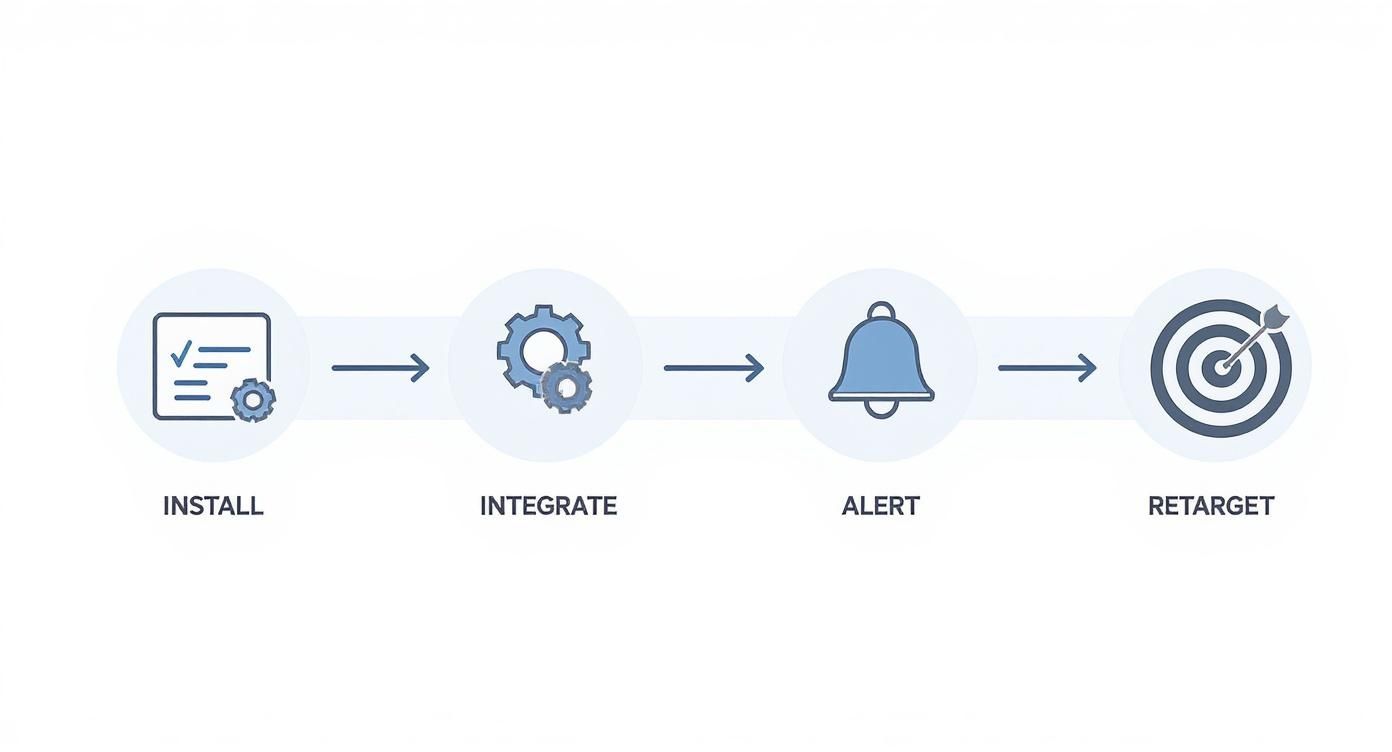
Actions always speak louder than anonymous data. When you start tracking what visitors do—the pages they hit, the content they consume—you can read their intent and spot buying signals long before a form ever gets filled out. It’s about translating clicks into a clear story about a prospect's needs.

From Clicks to Clues

Think of it as digital body language. Every click, scroll, and download is a breadcrumb that tells you something about where they are in their buying journey. A single click is just noise, but a pattern of clicks reveals a clear narrative.

You can learn to spot high-intent accounts by watching for a few key actions. These are the behaviors that signal genuine, active interest.

Some of the most telling moves include:

  • Pricing Page Visits: Anyone repeatedly checking your pricing page isn't just window shopping. They're in evaluation mode.
  • Case Study Engagement: Time spent on success stories means they're trying to picture themselves using your solution to solve their own problems.
  • Key Content Downloads: Grabbing a technical whitepaper or a deep-dive buyer's guide shows a much deeper level of research and commitment.
  • Demo Video Views: If someone watches more than 75% of your product demo, that’s one of the strongest buying signals you can possibly get.

Once you start analyzing these patterns, you can begin to truly identify anonymous website visitors who are actively in-market, which lets you focus your team's energy where it matters most. For more on this, the team at Lift AI offers some great research on how user actions signal intent.

Building a Behavioral Scoring Model

The next step is to make all this insight actionable. A behavioral scoring model is just a system that assigns points to different on-site actions, automatically flagging the accounts that show the most promise. This isn't guesswork; it's a data-driven way to surface your hottest leads.

Setting up a basic model is pretty straightforward. You simply assign higher scores to actions that are more closely tied to a purchase. Here’s a quick way to think about it:

Low-Intent Behavior (Lower Score)High-Intent Behavior (Higher Score)Actionable Next Step for Sales
Visited the blog homepageRead three articles on a specific topicAdd to a topic-specific nurture email sequence.
Clicked on the "About Us" pageVisited the "Integrations" pageSend a targeted email mentioning how your tool integrates with their tech stack.
Spent 30 seconds on the homepageSpent over 3 minutes on a product pageTrigger an alert for the account owner to review their activity.
Downloaded a top-of-funnel eBookWatched a full demo videoImmediately route to sales as a Marketing Qualified Lead (MQL) for direct follow-up.

This scoring system works quietly in the background, building a prioritized list of accounts for your sales team. Instead of having them blast out cold calls to a massive list, they can zero in on prospects who have already raised their hands with their behavior.

Imagine your sales team getting an instant alert: "An account from your target list just watched the entire demo video and is now on the pricing page." That's the power of behavioral analysis—it turns your website into a proactive lead generation engine.

This approach also drives smarter, more relevant conversations. Knowing what a prospect actually cares about lets your team craft outreach that hits the mark every time. For more on this, check out our guide on developing effective marketing personalization strategies. This is how you stop guessing and start turning raw data into closed deals.

Putting Your Visitor Identification Workflow Into Action

Okay, so you've picked your tech and you're getting a feel for reading the digital body language of your visitors. Now for the fun part: making that intelligence do something. A powerful tool collecting dust is just an expensive dashboard. The real value is unlocked when you weave this data directly into the daily rhythm of your sales and marketing teams.

It all starts with a simple piece of code. Your visitor identification provider will hand you a small tracking script, usually just a snippet of JavaScript. This is typically a one-time setup. You can either pop it directly into your website's header or, if you're using one, deploy it through a tag manager. Quick and simple.

Think of this script as the central nervous system for your entire identification strategy. It’s what collects the raw data that fuels everything else. As soon as it goes live, your platform will start connecting the dots between those anonymous visits and real-world company profiles.

Create a Seamless Data Flow

With data pouring in, the immediate priority is getting it to your team where they already work. This means setting up clean integrations with the tools they live in every day—most importantly, your Customer Relationship Management (CRM) platform.

Top-tier identification platforms offer native integrations with CRMs like Salesforce and HubSpot. This is huge. It allows you to automatically push rich, identified company data straight into your system of record. Instead of your sales reps manually digging for new leads, the insights just appear right where they manage their pipeline. This is non-negotiable for building a scalable process, and you can get a deeper look at connecting these systems in our guide on effective customer data platform integration.

The goal here is to eliminate friction. The easier it is for your team to access and act on this intelligence, the more deals you'll actually close from it.

Your identification tool is the scout that spots an opportunity. Your CRM is the command center where the plan of attack gets organized. If the link between them is broken, the message never gets through.

Light Up Real-Time Sales Alerts

One of the most powerful things you can do with this data is create real-time alerts. These are automated pings that fire the instant a high-value account does something meaningful on your website.

Here are a few high-impact alert workflows you can build right away:

  • Actionable Workflow 1: Target Account Alert. Trigger: A company on a rep’s named account list visits any page. Action: Send an instant Slack message to that account owner with a link to the company's activity log.
  • Actionable Workflow 2: High-Intent Behavior Alert. Trigger: Any identified company with >50 employees spends more than 60 seconds on the pricing page. Action: Automatically create a "High-Intent" task in your CRM for the appropriate rep to follow up within 24 hours.
  • Actionable Workflow 3: Competitive Alert. Trigger: A known competitor's domain is identified on your site. Action: Send a summary email to a specific list of marketing and sales leaders.

These alerts flip the switch for your sales team, moving them from reactive to proactive. They can now engage prospects at the absolute peak of their interest.

Finally, don't forget about marketing. This data is gold for your ad campaigns. You can build dynamic audiences based on the companies your platform identifies, allowing you to launch razor-sharp retargeting campaigns on platforms like LinkedIn. Suddenly, you're serving ads only to companies that just showed they're interested. This closes the loop, turning anonymous traffic into a warm, engaged audience you can nurture and win.

Using Visitor Data Ethically and Building Trust

The power to identify anonymous visitors isn't just a sales tactic; it's a huge responsibility. How you handle this data is the difference between building a lasting relationship and completely eroding customer trust. One wrong move and your brand’s reputation takes a serious hit.

The guiding principle here is simple: use what you learn to create a better, more relevant experience. The goal is helpful personalization, not creepy surveillance. It all comes down to being upfront about what you're collecting and giving visitors clear control over their information.

Let's be clear: privacy isn't optional anymore. Rules like GDPR in Europe and CCPA in California have drawn sharp lines in the sand for how businesses handle personal data. Ignoring them can lead to massive fines and a public relations nightmare.

Making sure you're on the right side of the law is critical, especially when navigating global privacy regulations. And while B2B data is often viewed differently than consumer data, the core principles of transparency and consent are non-negotiable.

Here’s a practical checklist to keep your visitor identification program ethical and compliant:

  • Actionable Step: Update Your Privacy Policy. Spell it out. Clearly state that you use technology to identify visiting companies for B2B marketing. Explain what data you collect (like IP addresses and browsing behavior) and what you do with it.
  • Actionable Step: Implement Clear Consent. No ambiguous language. Use cookie banners that give users a real choice to opt-in or opt-out, especially in regions where the law demands it. Compare your banner's language to industry leaders. Is it as clear and simple as theirs?
  • Actionable Step: Anonymize When You Can. Not every insight needs to be tied to a specific person. For broader trend analysis, use aggregated or anonymized data whenever possible.

This infographic breaks down the typical flow of processing visitor data, from the initial tracking all the way to taking action.

Infographic about identify anonymous website visitors

Think of each step in this process as a checkpoint where you need to double-down on data ethics to maintain trust.

From Compliance to Customer Confidence

Just ticking the legal boxes isn't the goal. The real win is earning genuine confidence from your audience. When visitors trust that you're using their data to actually help them, they're far more likely to engage.

Transparency is the new currency of marketing. When you're open about how you identify anonymous website visitors, you're not just complying with the law—you're demonstrating a respect for your audience that builds loyalty and long-term value.

This philosophy has to trickle down to your sales and marketing outreach. Ditch the generic "I saw you were on our website" line. Instead, lead with value based on the content they viewed. Compare these two approaches:

Creepy & IneffectiveHelpful & Actionable
"Hi, I saw someone from your company was looking at our pricing page.""Hi, I'm reaching out because companies in the manufacturing space are often evaluating solutions like ours for [solve X problem]. I thought you might find this case study on how [Peer Company] achieved [Y result] useful."

The second approach turns a potentially invasive interaction into a helpful, relevant conversation. You're respecting their intelligence and privacy, and in doing so, turning ethical data use into a powerful competitive advantage.

Free Tool

Try our AI Lead Generator — find verified LinkedIn leads for any company instantly. No signup required.

Unpacking The Details: Common Questions About Visitor Identification

Jumping into visitor identification always brings up a few critical questions. Is this even legal? How good is the data, really? And once I have it, what am I supposed to do with it? Let's get those sorted out so you can build a strategy that’s not just effective, but also trustworthy.

Yes, for B2B marketing, it’s generally legal—but with a huge asterisk. You have to operate strictly within privacy regulations like GDPR and CCPA.

It all comes down to transparency. Your website's privacy policy needs to be crystal clear, stating that you use technology to identify visiting companies, which is usually based on their IP addresses. If you're dealing with jurisdictions that demand explicit consent, your site has to get a clear opt-in from users before any tracking kicks off.

Most B2B tools work by matching an IP address to a company profile, which is considered public business information and typically keeps you in the clear. Still, it's absolutely crucial to work with a reputable provider who lives and breathes this stuff and puts legal compliance first.

How Accurate Are Visitor Identification Tools?

This is the make-or-break question, and the answer is: it varies wildly. Accuracy is everything.

A lot of the cheaper, low-end tools have frankly dismal accuracy rates, sometimes landing as low as 5-30%. Using data like that just sends your sales team on wild goose chases and burns their trust. It’s one of the most important things to grill a vendor on when you're comparing options.

On the other end of the spectrum, the top-tier platforms that use advanced identity graphs can hit 65-85% accuracy when identifying the actual person and up to 95% accuracy matching a visit to the right company. The difference is night and day.

A pro tip when you're vetting a vendor: always ask them to separate their identification rate (how many visitors they can put a name to) from their accuracy rate (how often that name is actually correct). Get it in writing, then run a trial to see the data quality for yourself. Don't take their word for it.

What Should I Do with the Data Once I Identify a Visitor?

Data sitting in a dashboard is worthless. You have to put it to work. The information you get from visitor identification should immediately plug into your sales and marketing workflows to turn those insights into actual revenue.

Here’s where the rubber meets the road:

  • Actionable Step: Enrich and Route Leads. The first step is to take the identified company data and enrich it with contact info for the right decision-makers. Then, get those hot leads routed straight to the right sales rep in your CRM. No delays.
  • Actionable Step: Set Up Real-Time Alerts. This is a game-changer. Create automated Slack or email pings for your sales team the moment a target account hits a key page—think pricing, case studies, or a demo request. This lets them jump in with immediate, relevant outreach.
  • Actionable Step: Personalize the Experience. Use the data to tailor what returning visitors see. If a company from the manufacturing industry comes back, show them a case study from a peer. It’s a simple way to show you’re paying attention.
  • Actionable Step: Launch Targeted Ads. Finally, use this data to build custom audiences for razor-sharp ad campaigns on platforms like LinkedIn. You'll stop wasting ad spend on companies that have zero interest and focus only on those already checking you out.

Ready to stop guessing and start converting your anonymous traffic into a real sales pipeline? marketbetter.ai uses an advanced, AI-powered identity graph to pinpoint high-intent accounts on your site and deliver actionable insights straight to your team. See what you're missing at https://www.marketbetter.ai.