
Customer Data Platform Integration: Connect Your Stack in 30 Days (Step-by-Step) [2026]
Connecting a Customer Data Platform (CDP) to your other business tools is how you create that single, unified source of truth about your customers. It’s a synchronization process. You pull data from everywhere—your CRM, email service, analytics platforms—and then push consistent, enriched profiles right back out to those same tools. This actionable loop allows for smarter marketing and much better decision-making.
Why a Unified Customer View Isn't Just a "Nice-to-Have"
Disconnected data isn't some abstract technical headache; it’s a direct roadblock to growth. When your marketing, sales, and support teams are all working from different scripts, the customer experience falls apart.
Think about it. A customer gets a promo email for a product they just bought. Or they have to explain an issue to three different support agents because no one knows another department already solved it. These little moments of friction add up, eroding trust and sending people straight to your competitors.
The real enemy here is data silos. Your email platform knows who opens your campaigns. Your e-commerce system tracks every purchase. Your CRM logs all the sales calls. Without integration, these are just random chapters of a story nobody can read from start to finish. A customer data platform integration is the binding that pulls it all together into one coherent narrative: the single customer view.
Turning Disconnected Data into Real Business Impact
Here’s a classic scenario. A high-value customer hasn't bought anything in 90 days, but in the last week, they've visited your pricing page three times and downloaded a case study.
In a siloed world, the marketing team sees the website visits, but the sales team—the one who actually owns the relationship—is completely in the dark. That’s a massive opportunity just floating away.
With an integrated CDP, this behavioral data automatically flows into the customer's CRM profile. This is the actionable part: you can set up a workflow that triggers an instant alert for the account manager to reach out with a perfectly timed, relevant offer. This isn't just about better marketing; it’s about running a smarter business. You're turning random data points into actionable intelligence that drives revenue.
A unified customer view means you're no longer guessing what customers want. You're responding to what their actions tell you they need, creating a more relevant experience that builds loyalty and increases lifetime value.
The Tangible Returns on a Unified Strategy
Connecting your data systems is a strategic investment with real, measurable returns. The research is pretty clear on this. A 2024 Treasure Data survey found that 53% of advertisers now see CDPs as absolutely essential for creating a consistent omnichannel experience.
Even more critically, a 2023 report revealed that companies using CDPs are 2.5 times more likely to blow past their revenue goals. You can dig into more of these CDP market trends and impacts if you want to see the numbers for yourself.
To truly tap into this potential, businesses should explore the process of unifying customer experience with omnichannel solutions. At the end of the day, a CDP integration isn't about merging databases for the sake of it. It's about creating seamless journeys that make every customer feel understood and valued, no matter how they interact with you.
Mapping Your Data Ecosystem Before You Begin
Jumping into a customer data platform integration without a clear map is like setting off on a road trip with no destination. A successful project always begins with a blueprint—a thorough audit of your entire marketing and data technology stack.
Before you even think about connecting a single system, you need to know exactly what you’re working with. This means identifying every single place your customer data currently lives. And I mean everywhere.
Think beyond the obvious. Your CRM (like Salesforce) and analytics tools (like Google Analytics) are a given, but what about your email service provider, e-commerce platform, customer support software, and even offline spreadsheets? Each one holds a unique piece of the customer puzzle.

Identifying Data Types And Flow
Once you have your list of sources, the real work begins. You need to understand the specific type of data each one holds. Is it behavioral data from website clicks? Transactional data from your payment processor? Or demographic data from a sign-up form?
Mapping the flow of this information is just as critical. A new lead might first appear in your marketing automation tool, then move to your CRM upon qualification, and finally generate purchase history in your e-commerce system. Visualizing these journeys reveals dependencies and potential breakpoints you'll need to address head-on during the integration.
To help you get started, here's a table outlining common systems and where they typically fall in the priority line.
Common Data Sources and Integration Priorities
| System Type | Example Tools | Data Captured | Integration Priority | Actionable Tip |
|---|---|---|---|---|
| CRM | Salesforce, HubSpot | Contact info, sales activity, account status, lead source | High | Start here. This is the backbone of your customer relationships. |
| Analytics | Google Analytics, Mixpanel | Website behavior, user journeys, conversion events | High | Integrate this early to capture real-time user intent. |
| E-commerce | Shopify, Magento | Purchase history, order value, abandoned carts | High | Transactional data is key for LTV and segmentation. |
| Email/Marketing Automation | Mailchimp, Marketo | Campaign engagement, email opens/clicks, list membership | Medium | Connect this after core systems to enrich profiles with engagement data. |
| Customer Support | Zendesk, Intercom | Support tickets, chat history, customer satisfaction | Medium | This data provides crucial context on customer health. |
| Ad Platforms | Google Ads, Facebook Ads | Ad impressions, clicks, audience segments | Medium-Low | Use this to improve ad targeting with first-party data. |
| Offline Data | Spreadsheets, Event Lists | In-person event attendance, direct mail responses | Low | Integrate this last. Standardize formats before uploading. |
This audit gives you a practical roadmap, ensuring you're not just collecting data for the sake of it, but focusing on the systems that drive real business value.
A common mistake is assuming all data is created equal. I've seen teams get bogged down integrating low-impact sources first. Prioritize the data streams that have the biggest impact on customer experience—like purchase history and support tickets—to ensure your integration delivers value from day one.
Building Your Data Dictionary And Identity Rules
With a clear picture of your sources and flows, you can now create a simple data dictionary. This isn't just busywork; it's a foundational document that defines key data points (e.g., "customer_LTV," "last_purchase_date") and ensures everyone in the organization speaks the same language. It prevents the chaos that arises when marketing calls something a "lead" while sales calls it a "prospect."
This leads directly to the most important part: establishing clear identity resolution rules. How will you stitch together a single customer profile from a dozen different sources?
- Your Primary Key: The most common approach is using a universal identifier, like an email address or a unique customer ID. This becomes the "golden record" key that links every other piece of data to a specific person.
- Your Fallback Keys: What happens if an email isn't available? You might use a phone number or even a combination of name and address as a secondary option.
Defining these rules upfront is non-negotiable for data integrity. If you want to go deeper on this, our guide on achieving person-level identification provides some actionable strategies.
This initial audit isn't a solo mission. You absolutely have to get marketing, IT, sales, and customer support in the same room (virtual or otherwise). Involving all key stakeholders ensures every important data source and use case is accounted for, building a comprehensive strategy that sidesteps the most common and costly integration failures right from the start.
Choosing Your CDP Integration Method
Alright, you’ve mapped your data ecosystem. Now for the really critical part: how are you going to plug everything together?
This isn't just a technical detail—it’s a decision that will directly control the speed, cost, and flexibility of your entire CDP integration. Getting this right means your tech execution will actually line up with your business goals. There are three main ways to connect your tools to a CDP, and each one comes with its own set of trade-offs.
Native Connectors: The Fast Lane
Think of native connectors as the plug-and-play option. These are pre-built, out-of-the-box integrations that your CDP vendor provides for popular tools like Shopify, Salesforce, or Google Analytics.
They're incredibly fast to set up, usually just needing a few clicks and an API key. This is by far the least technical and most cost-effective way to get started.
The catch? You sacrifice flexibility. You're stuck with the data fields and sync schedules the connector was built for, which might not cover every weird, custom thing your business does. But if your use case is standard—like connecting a Shopify store to sync orders and customer profiles—a native connector is a no-brainer.
API-Based Integrations: The Custom Route
What happens when a native connector doesn't exist, or it just doesn't cut it? You turn to API integrations.
This is where your developers write custom code to connect your CDP to another tool's API (Application Programming Interface). It gives you total control. You can define exactly which data points to send, how to transform them, and how often they should sync. If you’re running on a custom-built CRM or have unique data needs, an API integration is pretty much your only option.
The trade-off, of course, is a much bigger investment in developer time and money.
The decision between native and API often comes down to a simple question: Is our use case standard or unique? If it's standard, use the connector. If you have specific data needs or a custom system, you'll need the control an API provides.
For real-time data needs, which are the cornerstone of a great CDP setup, it's worth digging into more advanced techniques. This guide on Mastering Change Data Capture (CDC) is a fantastic resource for understanding how to keep data perfectly synchronized.
Webhooks: The Real-Time Trigger
Finally, there are webhooks. These are lightweight, event-driven integrations. Instead of your CDP constantly asking another system if there's new data (a process called polling), a webhook just sends a little packet of data over the moment something happens.
It’s perfect for real-time triggers. For example, if you want to send a welcome email the instant a user signs up on your website, a webhook is the tool for the job. It immediately pushes the new user's info to the CDP.
They're not built for syncing huge historical datasets, but for those instant, event-based actions, they’re ideal. The good news is that many platforms are expanding their webhook capabilities, like the ones we covered in our recent product announcement.
Comparing CDP Integration Methods
To make the choice clearer, here’s a quick breakdown of the three methods. Think of this as your cheat sheet for conversations with your technical team.
| Integration Method | Best For | Effort & Cost | Flexibility | Key Takeaway |
|---|---|---|---|---|
| Native Connectors | Standard, common platforms where speed is the priority. | Low. Minimal developer time needed. | Low. You're limited to pre-defined data schemas. | The fastest and cheapest way to get started with popular tools. |
| API Integrations | Custom systems, unique data needs, or when full control is required. | High. Requires significant developer resources and ongoing maintenance. | High. You can build exactly what you need. | The most powerful and flexible option, but also the most expensive. |
| Webhooks | Real-time, event-driven actions like sign-ups or purchases. | Low to Medium. Simple to set up but not for bulk data. | Medium. Great for specific triggers, but not full syncs. | The best choice for instant actions that kick off a workflow. |
Each method has its place. Most mature CDP setups I've seen use a mix of all three—native connectors for the easy wins, APIs for the custom heavy lifting, and webhooks for the real-time magic.
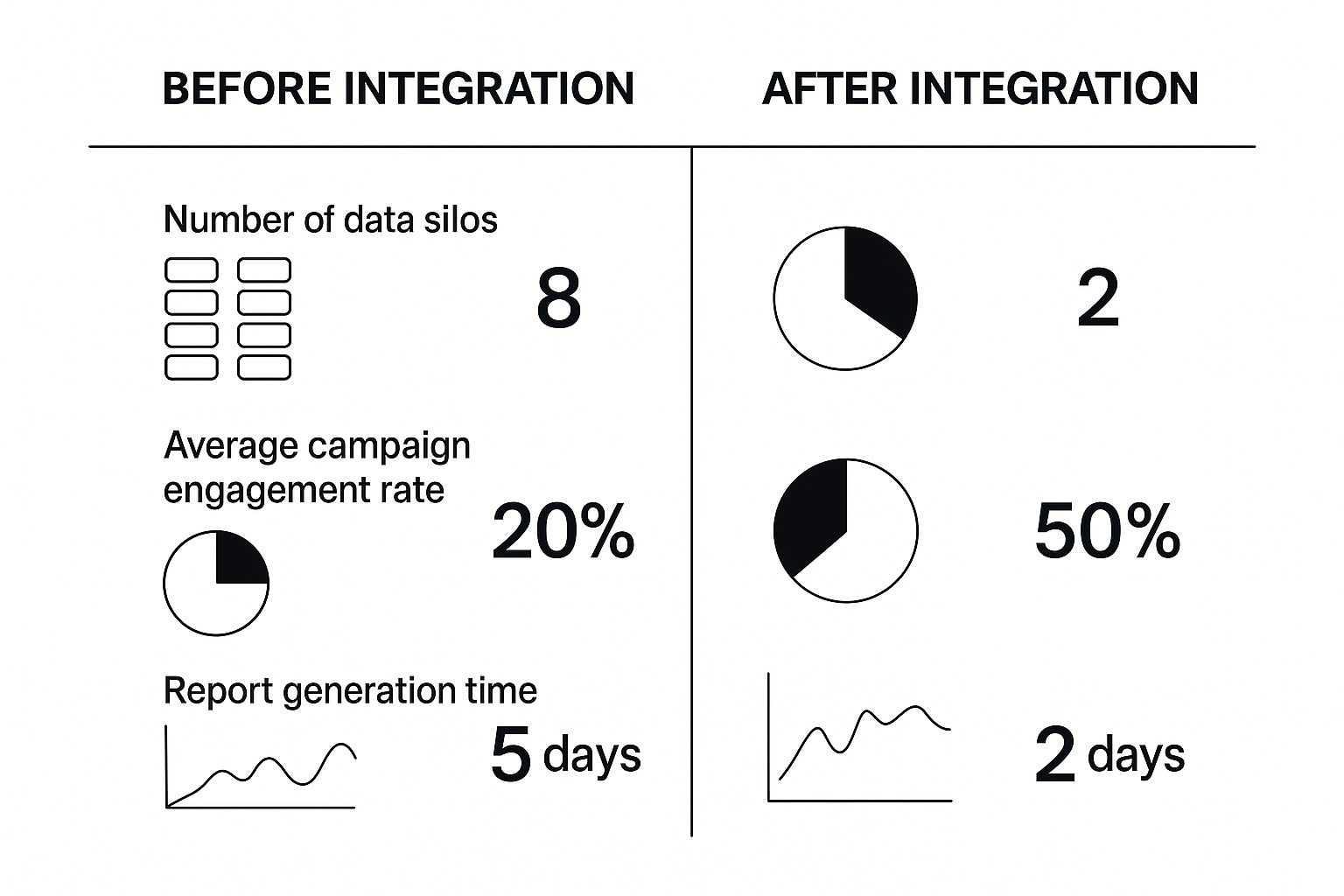
As you can see, the payoff is huge. Breaking down those data silos doesn’t just clean up your database—it directly leads to faster insights and much higher engagement rates.
Getting Your Integration Live and Activated

This is it—the moment where all the strategy docs and planning meetings turn into reality. You're about to physically connect your data sources and, more importantly, start using that unified data to build smarter marketing campaigns.
The first move in any customer data platform integration is getting the data in. This is all about configuring your CDP to start pulling from your most critical systems. Let's look at two classic examples.
- Plugging in Salesforce (your CRM): This is usually priority number one and almost always an API-driven connection. You'll map standard objects like Leads and Contacts, sure, but the real power comes from mapping the custom fields unique to your business, like a
Product_Interest_ScoreorLast_Demo_Date. The whole point is to get that rich, historical view of the sales relationship into one place. - Connecting Google Analytics (your web analytics): This connection is totally different—it's event-based and real-time. You'll set up tracking for user behaviors as they happen:
page_view,add_to_cart,form_submission. This data gives you the crucial context of what your customers are doing right now.
Putting these two together is powerful. One gives you the long-term relationship story, the other gives you immediate behavioral intent.
From Data Ingestion to Audience Activation
Once data is flowing into your CDP and its identity resolution engine is stitching together unified profiles, the real fun begins: activation. This is where you build incredibly specific customer segments and push them out to your downstream tools to actually do something.
A perfect real-world example is creating a segment for "high-value, at-risk customers." Inside your CDP, you'd build this audience by layering rules from different data sources:
- From your payment system: Customers with a lifetime value over $5,000.
- From your app database: Users who haven't logged in or purchased anything in the last 90 days.
- From your email platform: Contacts who haven't opened an email in the past 60 days.
You simply can't build this segment inside your ESP or CRM alone because the data lives in three different places. With the CDP integration live, you can build this audience in minutes and push it to your marketing platforms to kick off a targeted re-engagement campaign.
The magic isn't just in collecting the data; it's in activating it. A unified profile allows you to move from generic batch-and-blast campaigns to precise, behavior-triggered actions that feel personal and timely to the customer.
Always Validate in a Staging Environment
Before you push these new, powerful segments to your entire customer base, you have to test everything. This is non-negotiable. Always, always use a staging or sandbox environment to validate your connections first. This is your chance to confirm data is flowing correctly without breaking anything in your live operations.
Here's an actionable checklist for validation:
- Data Accuracy: Does the final count of customers in my CDP segment match what I'd expect from the source systems? Is it even close?
- Attribute Mapping: Are those custom fields from Salesforce actually showing up correctly on the unified profiles?
- Sync Latency: How long does it take for a new event from Google Analytics to appear in the CDP and get someone added to an audience? Is it minutes? Hours?
- Endpoint Test: Does pushing an audience to your email tool actually create the list correctly? Send a test campaign to an internal seed list first.
The insane growth of the CDP market—skyrocketing from USD 1.75 billion to an estimated USD 5.11 billion in just a few years—is driven by exactly these capabilities. Marketers who get it understand that fixing fragmented data is the only way to create consistent experiences across every channel. You can see more data on how CDPs are transforming marketing strategies and why they’ve become so critical for advertisers.
A huge part of this is using AI for predictive segmentation. To see how this works in the real world, check out these practical playbooks on AI lead scoring.
Common Integration Pitfalls and How to Avoid Them
Even the most buttoned-up customer data platform integration can hit a few speed bumps. Honestly, it's expected. The trick is knowing where the usual traps are so you can sidestep them. Learning from the mistakes I've seen others make is the fastest way to get your project across the finish line instead of letting it become another stalled initiative.
https://www.youtube.com/embed/FgL7sMij-zo
Let's start with the biggest project killer: the classic "garbage in, garbage out" problem.
It happens every time. Teams get so excited about the possibilities of a unified customer view that they just start connecting everything, completely forgetting to check the quality of the data they're piping in. If your source systems are a mess of duplicate contacts, stale information, and wildly inconsistent formatting, your shiny new CDP will just be a faster way to look at that same mess.
Tackling Data Quality Head-On
Before you even think about connecting a single data source, you need a plan for data cleansing and standardization. This isn't a one-and-done task you check off a list; it's an ongoing discipline your team has to commit to.
I once worked with a retail company whose CDP launch was nearly torpedoed by this exact issue. Their CRM and e-commerce platform had different formats for everything—names, addresses, you name it. The result? Thousands of duplicate profiles that made any real personalization a complete fantasy.
They had to slam the brakes on the entire project, which caused a six-week delay, just to build and run the necessary data normalization scripts.
The smarter way to do this is to start small. Run a pilot with just two or three of your highest-quality data sources. Think your CRM and maybe your payment processor. This lets you build a clean, solid foundation and, more importantly, prove the CDP's value quickly before you start wrestling with your messier, secondary systems.
Resisting Scope Creep and Securing Real Buy-In
Another pitfall I see all the time is scope creep. The project kicks off with a crystal-clear goal, something like "personalize our email campaigns." Then, the folks in customer support hear about it and want to add their ticketing data. Then sales wants to pipe in their call logs. Suddenly, your focused three-month project has morphed into a year-long behemoth that feels like it will never launch.
This is almost always a symptom of a much deeper problem: a lack of genuine stakeholder buy-in from the get-go. When leaders from sales, marketing, and product aren't truly aligned on the primary business objectives, their teams will inevitably pull the project in a dozen different directions.
A successful integration needs a single, accountable project owner and a steering committee with reps from every key department. This group's most important job is to ruthlessly protect the project's core scope and learn to say "not now" to any request that doesn't directly serve that initial business goal.
To get that kind of alignment, you have to frame the project around business outcomes, not technical jargon. The difference is night and day.
| Approach | The Pitch | The Outcome |
|---|---|---|
| The Technical Pitch | "We need to integrate our martech stack to create a single customer view." | Stakeholders nod politely but don't feel any urgency. The project gets branded as an "IT thing." |
| The Business Pitch | "By integrating our data, we can identify our top 10% of at-risk customers and cut churn by 15% in the next six months." | Now leaders are invested. They see a direct line to revenue and become champions for the project. |
Finally, don't underestimate the need for ongoing maintenance. A CDP integration is not a "set it and forget it" kind of deal. APIs change, your company will adopt new tools, and data schemas will evolve. You absolutely have to budget time and resources for continuous monitoring and optimization to make sure the system stays reliable and keeps delivering value long after you pop the champagne at launch.
Frequently Asked Questions About CDP Integration

As you start mapping out a customer data platform integration, you're bound to run into a few common—and important—questions. Let's tackle some of the ones that come up most often, based on our experience in the trenches.
How Long Does a CDP Integration Typically Take?
This is the big "it depends" question. The timeline really hinges on the complexity of your stack and the state of your data.
A straightforward setup can be surprisingly fast. If you're just connecting a few key systems with native, out-of-the-box connectors—say, pulling data from Shopify and sending it to Mailchimp—you could be looking at a 2-4 week project.
On the other hand, a heavy-duty implementation is a different beast entirely. Think custom API work, connecting to multiple data warehouses, and a serious data cleansing effort. That kind of project can easily stretch out to 6-9 months. The biggest variables are almost always the cleanliness of your data and the number of sources you need to wrangle.
CDP vs. CRM: What's the Actual Difference?
This one is critical to get right, as the tools are often confused but serve fundamentally different roles. Think of it as a System of Record versus a System of Intelligence.
| Feature | CRM (Customer Relationship Management) | CDP (Customer Data Platform) |
|---|---|---|
| Primary Goal | Manage direct customer interactions (sales, support). | Unify all customer data (behavioral, transactional, demographic). |
| Data Sources | Mainly manual entry by sales/support teams. | Automated ingestion from dozens of sources (web, app, CRM, etc.). |
| User Focus | Sales, Customer Service. | Marketing, Analytics, Business Intelligence. |
| Core Function | System of Record for interactions. | System of Intelligence for a unified customer view. |
Simply put, your CRM manages your relationships, while your CDP manages the data that defines them.
A CRM tells you what a sales rep discussed with a customer. A CDP tells you that, plus what pages they browsed last night, which ad they clicked last week, and their entire purchase history. It gives you the full, unvarnished story.
Can We Build Our Own CDP?
You absolutely can, but it’s a massive commitment. Building a CDP from scratch isn't just a side project; it demands a dedicated team of data engineers to construct everything. We're talking data collection pipelines, sophisticated identity resolution logic, and all the API connectors to activate that data.
While a DIY approach gives you ultimate control, it often comes at a steep price: pulling your best engineering talent away from your actual product. For the vast majority of companies, buying a dedicated CDP solution delivers results much faster and with far less risk.
When you factor in the long-term cost of salaries, maintenance, and inevitable upgrades, the total cost of ownership for a commercial CDP is almost always lower than trying to build one yourself.
Ready to stop guessing and start personalizing? marketbetter.ai uses an integrated AI approach across content, campaigns, and customer engagement to turn your unified data into measurable revenue. Discover how our platform can accelerate your ROI by visiting https://www.marketbetter.ai.