How to Improve Email Open Rates: Proven Tips & Strategies
To get more people opening your emails, you have to nail three things: the subject line, who you're sending it to, and when you send it. Get those right, and you’ll cut through the noise of a crowded inbox every time. Instead of just sending emails, this guide will show you how to start strategic conversations that demand to be opened.
Why Your Email Open Rates Matter More Than Ever

Before we get into the tactical weeds, let’s be clear about why this one metric is so important. A healthy open rate isn't just a number to brag about in a meeting; it's a direct signal of your audience's engagement and a huge factor in your sender reputation.
Internet Service Providers like Gmail and Outlook are always watching. When people consistently open your emails, it tells their algorithms your content is wanted. That's what keeps you out of the spam folder. Think of it as a comparison: a sender with a 40% open rate is seen as a trusted source, while a sender with a 5% open rate looks like a potential spammer.
The open is the first domino. No open means no click, no conversion, and definitely no sale. A higher open rate gives you a bigger pool of engaged people who might actually click your call-to-action, which is what really moves the needle on revenue.
What Is a Good Email Open Rate
There's no single "good" open rate. It's completely different depending on your industry and who you're talking to. The benchmark for a B2B SaaS company sending emails to warm leads looks nothing like a DTC e-commerce brand blasting out a holiday promotion. A B2B brand might be thrilled with a 35% open rate on a targeted campaign, while a retail brand might shoot for 20% on its weekly newsletter.
Understanding these differences is crucial. In 2025, we’re seeing huge variations across industries.
- SaaS companies: often see rates from 15% to 45%.
- DTC e-commerce: typically falls between 32% and 42%.
- Nonprofits: can range from 25% to 32%.
Some brands with fiercely loyal followers and sharp segmentation are even hitting 50-60%. It all comes down to knowing your specific audience.
To help you get a handle on the core actions you can take, here's a quick summary of what works.
Quick Guide to Improving Email Open Rates
This table breaks down the key strategies we'll be covering and shows how each one directly contributes to getting more of your emails opened.
| Strategy | Primary Goal | Key Action |
|---|---|---|
| Subject Line Optimization | Grab attention immediately | Craft short, intriguing, and personalized subject lines. |
| Audience Segmentation | Increase relevance | Group subscribers by behavior, demographics, or purchase history. |
| Personalization | Create a one-to-one feel | Use subscriber data (like their name or interests) in your content. |
| Send Time Optimization | Land at the top of the inbox | Analyze past data to find when your audience is most active. |
| A/B Testing | Make data-driven decisions | Test one variable at a time (e.g., two different subject lines). |
| AI-Powered Tools | Automate and refine | Use AI to predict optimal send times or generate subject line ideas. |
By focusing on these areas, you shift from simply sending emails to creating valuable touchpoints that your audience actually wants to engage with.
From Sending Emails to Building Relationships
The biggest leap you can make is a mental one. Stop thinking about "sending emails" and start thinking about creating communication that your subscribers genuinely look forward to. This simple reframe turns your email list from a broadcast channel into a real community.
The goal is to make every email feel like a valuable, one-to-one conversation. When subscribers anticipate value from your brand, they are far more likely to open your messages consistently.
This is how you build trust and turn passive subscribers into loyal fans. When you make relevance and value your top priorities, higher open rates just become the natural outcome of a strong relationship with your audience.
If you want to go deeper on this, check out these proven strategies to increase your email open rate.
Writing Subject Lines That Get Opened
Your subject line is the gatekeeper. It doesn't matter how brilliant your email is if nobody opens it. In a slammed inbox, you've got maybe three seconds to convince someone your message is worth their time over the 50 others begging for attention.
This is where a little psychology goes a long way. A great subject line isn't just a label for the email's contents; it's an invitation. It sparks an emotion or poses a question that makes someone need to know more.
Let's compare. A flat, corporate-speak subject line like "Our New Product Update" is begging to be archived. But something like, "A new way to tackle your biggest challenge," gets the gears turning. The first is a broadcast; the second is a conversation starter.
The Power of Curiosity and Urgency
Two of the most reliable tools in your subject line toolkit are curiosity and urgency. They come at the problem from different angles, but both are incredibly effective at driving opens.
Curiosity-driven subject lines create an "information gap." You hint at something valuable or unexpected inside, and people click just to scratch that mental itch. This is perfect for newsletters, content promotions, and anything educational.
Urgency, on the other hand, is all about FOMO—the fear of missing out. Time-sensitive language or the hint of scarcity pushes people to act now. This is your go-to for sales, webinar sign-ups, and limited-time offers.
Here’s a quick comparison of weak vs. strong subject lines:
| Trigger | Goal | Subject Line Example (Weak) | Subject Line Example (Strong) |
|---|---|---|---|
| Curiosity | Encourage exploration and learning. | "New blog post available" | "The one marketing metric you're not tracking" |
| Urgency | Drive immediate action or decision. | "Sale happening now" | "Last chance: 40% off ends at midnight" |
The key is using them strategically. Hammering the urgency button every day leads to burnout. Relying only on curiosity might not get you the immediate action you need for a flash sale. Your action item is to review your last five campaigns and categorize them. Are you over-relying on one trigger? If so, plan your next email to use the opposite approach.
Crafting Actionable Subject Lines
Beyond psychological triggers, the words you choose and how you structure them matter. Tiny tweaks can have a massive impact. I always focus on three things: clarity, relevance, and a human touch.
Here are a few actionable frameworks you can use right now:
- Ask a Question: Questions demand a mental response. Instead of "New marketing tips," try "Are you making this common marketing mistake?"
- Use Numbers and Data: Numbers feel concrete and make your claims more believable. Compare "5x your content output with this framework" to the weaker "Write content faster." The first is specific and powerful.
- Incorporate Emojis (Carefully): The right emoji can make your email pop in a sea of text and convey tone in a split second. A plane ✈️ for a travel deal or a chart 📈 for a data report works well. Just don't overdo it, and make sure it fits your brand's voice.
A subject line's primary job is to make a clear promise about the value inside the email. Whether that promise is a solution, a discount, or an intriguing story, it must be compelling enough to earn the click.
Don't forget that your subject line and preheader text work as a one-two punch. The subject line grabs their eye, and the preheader—that little snippet of text right after it—gives them another reason to click. For a deeper dive, check out these 8 Email Subject Line Best Practices.
By ditching generic phrases and tapping into what actually makes people tick, you can write subject lines that not only get opened but start building a real connection with your audience.
Go Way Beyond First Names with Smart Segmentation
If you're still sending one-size-fits-all email blasts, you're not just leaving money on the table—you're actively training your audience to ignore you. Let's compare two approaches. Approach A: Send one email to 10,000 people. Approach B: Send 10 different, targeted emails to 1,000 people each. Approach B will almost always win on open rates and revenue. Real connection, the kind that gets emails opened, starts with smart audience segmentation.
This is all about slicing your main list into smaller, more focused groups. The goal is simple: send people messages so relevant they feel like they were written just for them.
With global email users projected to hit 4.83 billion by 2025, the inbox is more competitive than ever. The data is screaming at us: segmented campaigns can boost revenue by a staggering 760%, and personalized emails convert up to six times better. The lesson here is crystal clear—relevance is your most powerful lever.
Demographic vs. Behavioral Data: Know the Difference
To segment effectively, you need to understand the two main approaches: demographic and behavioral. Both have their place, but one gives you a much sharper edge for boosting open rates.
Demographic segmentation is the old-school way. You group people by static attributes like their age, location, or job title. It's a decent starting point, but it forces you to make a lot of assumptions.
Behavioral segmentation, on the other hand, is all about action. It groups subscribers based on what they do—the pages they visit, the products they buy, the links they click. It’s dynamic, it’s specific, and it’s incredibly powerful because it’s based on proven interest, not guesswork.
Here's a quick comparison:
| Segmentation Type | Demographic (Who they are) | Behavioral (What they do) |
|---|---|---|
| Data Points | Location, age, gender, job title | Purchase history, pages visited, videos watched, email clicks |
| Nature | Static and general | Dynamic and specific |
| Primary Use | Broad targeting (e.g., regional promotions) | Hyper-relevant messaging (e.g., abandoned cart emails) |
| Impact on Opens | Moderate | High |
Sure, a B2B company might use demographics to send different content to a Marketing Director versus a CEO. But behavioral data lets you target the Marketing Director who just downloaded your whitepaper on SEO. See the difference?
High-Impact Behavioral Segments to Build Today
The best part is you can start building these powerful segments with the data you’re probably already collecting. This is where the magic happens, turning average email campaigns into revenue-driving machines.
Here are a few actionable segments you can set up right now in your email platform:
- Recent Buyers: These folks are red-hot. Action: Follow up within 24 hours to ask for a review, recommend a complementary product, or just say thanks with a small discount on their next order.
- Cart Abandoners: They were this close to buying. Action: Set up an automated 3-part email series that triggers one hour, 24 hours, and 72 hours after they abandon their cart.
- Hyper-Engaged Fans: These are your loyalists who open and click everything. Action: Create a "VIP" segment and give them early access to sales, exclusive content, or a special loyalty reward.
- The Unengaged: Find subscribers who haven't opened an email in 90 days. Action: Hit them with a 2-step re-engagement campaign using a punchy subject line like, "Should we say goodbye?" This either wins them back or helps you clean your list. Need to get serious about list hygiene? Our guide to automate email scanning can help keep it healthy.
The core idea is simple: message people based on their recent actions. Someone who just bought a product has a completely different mindset than someone who hasn't opened an email in six months. Your messaging must reflect that.
A Real-World Example: The Coffee Roaster
Imagine an online store selling high-end coffee beans. Sending a generic "20% off all coffee!" email is fine. But watch what happens when they use behavioral segmentation.
They start by splitting their list into three groups:
- New Subscribers: Signed up but haven't made a purchase yet.
- Espresso Lovers: Customers who consistently buy dark, espresso-style roasts.
- Light Roast Fans: Customers who only purchase light, single-origin beans.
Instead of one generic blast, they craft three hyper-targeted emails. New subscribers get a "Welcome! Here’s what makes our coffee special" email with an intro offer. Espresso lovers hear about a new Italian dark roast. Light roast fans get a notification about a rare Ethiopian bean that just landed.
The result? The subject lines are irresistible, the content speaks directly to each person's taste, and the open rates go through the roof. That’s how you stop broadcasting and start building real connections.
Nail Your Timing and Master the Mobile Experience
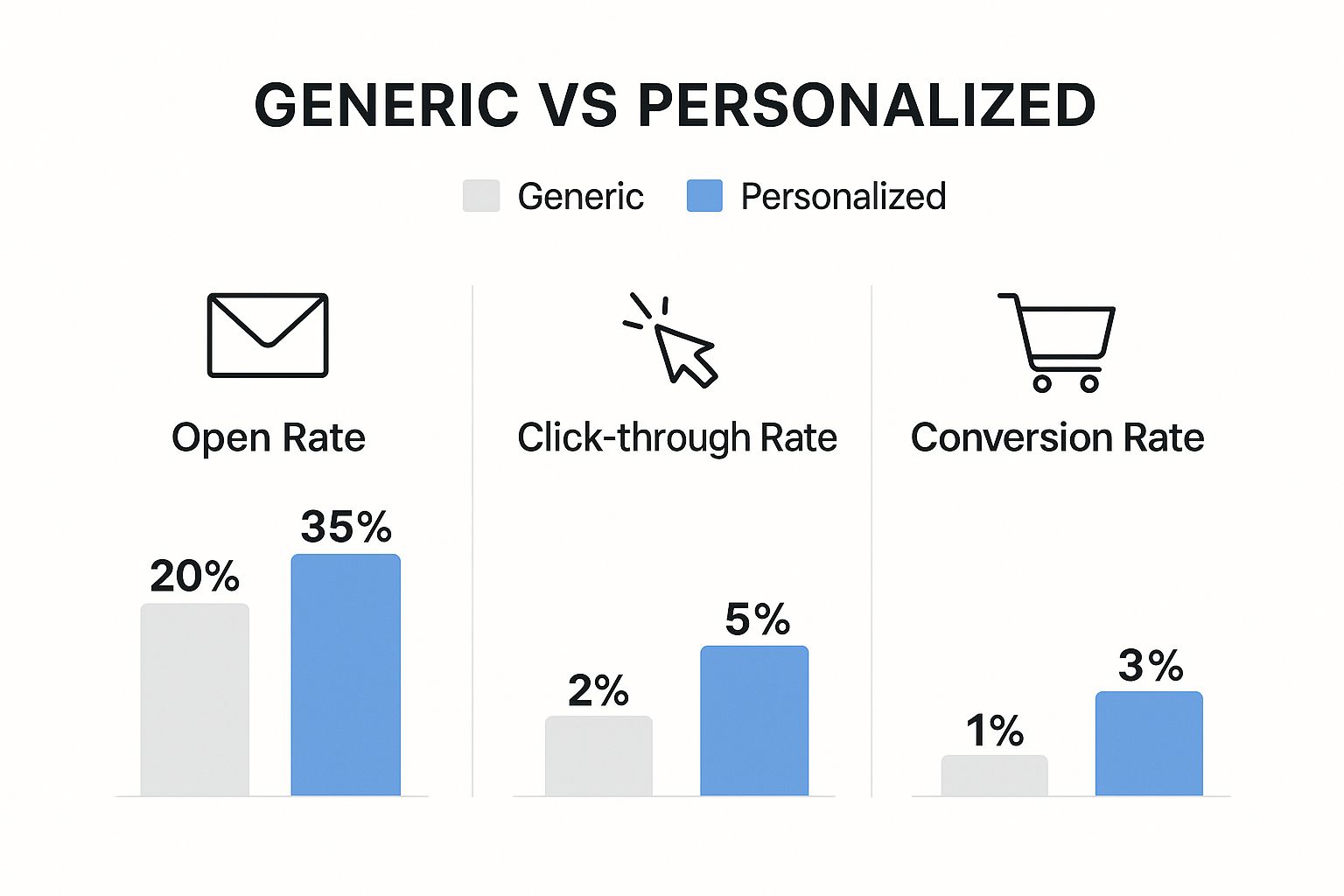
This graphic says it all. The gap between generic and genuinely personalized emails isn't a small one—it's a chasm. Better opens, more clicks, and higher conversions. The proof is right there.
Now, let's talk about timing. Sending a brilliant email at the wrong moment is like showing up to a party after everyone’s gone home. Even the best message gets lost in the noise.
You’ve probably heard the generic advice: "Send emails on Tuesday mornings." That’s a decent starting point, but it's not a strategy. Your audience is unique, and your data holds the real answers.
Finding Your Audience's Sweet Spot
Stop guessing and start listening to what your subscribers are already telling you. Your email service provider's analytics are a goldmine. Action: This week, log into your ESP, pull the engagement report for your last 10 campaigns, and look for patterns. Is there a specific day or time with a clear spike in opens?
Better yet, let your tools do the heavy lifting. Most modern email platforms have send-time optimization features that do this for you. They analyze individual user behavior and deliver your email at the precise moment each person is most likely to be in their inbox. It’s a game-changer.
If you're handling it manually, A/B testing is your best friend. Send the same email to one segment at 9 AM and another at 2 PM. Run a few of these tests, and a clear winner will emerge. You’ll have a data-backed window for peak engagement.
The goal isn't to find the single "best" time to email everyone. It’s to understand the rhythm of your specific audience segments. A high-value customer in London operates on a completely different clock than a new lead in Los Angeles.
This is how you move from just blasting emails to running a coordinated communication plan that actually respects your subscribers' time. Layering this kind of timing with dynamic content, like we cover in our guide on video email automation, is where you start seeing serious results.
The Mobile-First Imperative
Okay, so timing gets your email to the top of the inbox. But what happens next? The mobile experience is what determines if it gets read or instantly deleted.
Let’s be blunt: a non-mobile-friendly email is a broken email. With 85% of users checking their inboxes on their phones, ignoring mobile isn't just a mistake—it's malpractice.
The numbers don't lie. Mobile email open rates hover around 41.9%, absolutely crushing the 16.2% on desktops. And for younger demographics, especially the 25-34 age group, it's pretty much mobile-only. This isn't a trend; it's the standard.
Here are the non-negotiables for making your emails look great on a small screen:
- Single-Column Layout: This is the bedrock of mobile-friendly design. It keeps everything flowing in a logical, scrollable line. No pinching, no zooming.
- Big, Tappable Buttons: Your calls-to-action need to be thumb-friendly. Aim for at least 44x44 pixels. Anything smaller is just asking for user frustration and missed clicks.
- Optimized Images: Heavy images are the fastest way to get your email ignored. They kill load times and burn through data. Keep them light and compressed.
- Readable Font: Use a font size of at least 16px for your body text. If someone has to squint to read your message, they won't. They'll just delete it.
Getting these two things right—smart timing and a flawless mobile design—solves more than half the battle of getting your emails noticed and acted upon.
Mobile vs. Desktop Email Optimization Checklist
Optimizing for email isn't a one-size-fits-all game. What works beautifully on a widescreen desktop monitor can fall apart on a phone screen. Use this actionable checklist to ensure you're covering your bases for both experiences.
| Checklist Item | Why It Matters for Mobile | Why It Matters for Desktop |
|---|---|---|
| Responsive Design | Absolutely critical. Content must reflow to fit a narrow, vertical screen without horizontal scrolling. | Important for accommodating various window sizes and monitor resolutions, ensuring a clean layout. |
| Single-Column Layout | The gold standard for readability. Ensures a logical flow and easy scrolling with a thumb. | While multi-column layouts can work, a single column is often cleaner and focuses attention. |
| Concise Subject Lines | Mobile screens cut off long subject lines. Keep it under 40 characters to ensure the core message is seen. | More space is available, but brevity is still key to grabbing attention in a crowded inbox. |
| Large, Tappable CTAs | Thumbs need a clear target. Buttons should be at least 44x44 pixels to prevent accidental clicks. | Cursors are precise, but large, clearly defined buttons still improve click-through rates. |
| Readable Font Size | Text must be legible without zooming. A minimum of 16px for body copy is a safe bet. | Smaller fonts are readable, but 14px-16px remains a comfortable standard for legibility. |
| Image Optimization | Essential. Large files slow down loading on cellular networks, leading to high abandonment rates. | Still important for quick loading, but less critical than on mobile due to faster, more stable connections. |
| Use of White Space | Breaks up text and makes content scannable on a small screen, reducing cognitive load. | Helps create a clean, professional, and uncluttered design that guides the reader's eye. |
| Minimalist Navigation | Limit links to the essentials. Too many options create clutter and decision fatigue on a small interface. | More room for navigation bars or footers, but the focus should remain on the primary call-to-action. |
By thinking through these elements for both environments, you ensure every subscriber gets a great experience, no matter how they choose to open your email.
Using Data and A/B Testing to Drive Growth
Chasing higher open rates isn't a one-and-done project. It's a constant cycle of listening, testing, and tweaking your strategy based on what your audience actually does—not what you think they'll do. Think of your data as the compass and A/B testing as the engine pushing you forward.
Guesswork is the enemy of growth. You might be convinced that an emoji-filled subject line is a stroke of genius, but if the data says it bombs, your opinion doesn’t matter. This is where A/B testing, or split testing, comes in. It’s a beautifully simple method for comparing two versions of a single element to see which one gets the job done.
The golden rule is to isolate one variable at a time. This is non-negotiable. If you change the subject line and the sender name in the same test, you’ll have no clue which change moved the needle. The whole test becomes useless.
Setting Up a Meaningful A/B Test
Before you even think about launching a test, you need a solid hypothesis. A good hypothesis isn't just a vague idea; it's a specific, testable statement that explains your reasoning.
For instance, compare a weak hypothesis to a strong one. Weak: "I think shorter subject lines are better."
A strong, actionable hypothesis sounds like this: "A subject line under 40 characters will get a higher open rate than one over 60 characters because it’s fully visible on mobile email clients." See the difference? This gives your test a clear purpose and a measurable path to victory.
Once you have your hypothesis, focus your tests on the elements that have the biggest, most direct impact on opens.
- Subject Lines: This is the obvious one. Test length, tone (curious vs. urgent), personalization, and whether adding numbers or emojis makes a difference.
- Sender Name: Pit a real person's name ("Sarah from MarketBetter") against the company name ("The MarketBetter Team"). You'd be surprised how often a human touch builds more trust.
- Preheader Text: That little snippet of text next to the subject line is prime real estate. Test a straightforward summary against a question that sparks curiosity.
The real goal of A/B testing isn't just to find a single winner. It's about building a deep, cumulative understanding of what makes your audience tick, one data-backed insight at a time.
This disciplined approach means you learn something valuable from every single send, whether you "win" or "lose" the test. You can see how this iterative process leads to serious gains by checking out some of our AI-powered marketing case studies.
How to Compare Variables Effectively
Getting actionable results is about more than just seeing which version got more clicks. You need to structure your tests to reveal genuine insights. Let’s compare a vague test setup with an actionable one.
| Test Variable | Vague Approach (Less useful) | Actionable Approach (More useful) |
|---|---|---|
| Sender Name | Testing "Marketing Team" vs. "Sarah." | Testing "[First Name] at [Company]" vs. "[Company] Newsletter" to see if personalization from a specific person builds more trust than a generic brand sender. |
| Subject Line | Testing a "funny" subject line vs. a "serious" one. | Testing a question-based subject line ("Making this SEO mistake?") against a benefit-driven statement ("Boost your SEO with this tip") to see which framework drives more curiosity. |
The actionable approach zeroes in on a specific psychological trigger or format. This means that even if your hypothesis doesn't pan out, you’ve still learned something concrete about your audience that you can apply to every campaign from here on out.
Beyond Open Rates: What to Measure
Hold on, the open rate isn't the whole story. A clickbait-y subject line might get you a ton of opens but result in zero engagement and a flood of unsubscribes. You need a secondary metric to gauge the quality of those opens.
Enter the click-to-open rate (CTOR). It’s the perfect wingman for your open rate, measuring how many of the people who opened your email actually clicked a link inside.
Here’s why comparing these two metrics is so critical:
- High Opens, Low CTOR: This is a red flag. It usually means your subject line made a promise that the email content couldn't deliver. You got them in the door, but they left unimpressed.
- Average Opens, High CTOR: Now this is a fantastic sign. The people who opened were genuinely engaged, proving your subject line attracted the right people and set the right expectations.
By analyzing CTOR alongside your open rate, you get a much richer, more honest picture of your performance. It creates a data-driven feedback loop that is absolutely essential for sustainably improving your email open rates for the long haul.
Got Questions About Email Open Rates? We've Got Answers.
Even with the best game plan, a few tricky questions always seem to pop up when you're trying to nudge those open rates higher. Let's tackle some of the most common ones I hear from marketers, with straight-up, actionable advice to help you fine-tune your strategy.
Should I Resend Emails to People Who Didn't Open?
Absolutely, but you have to be smart about it. Just blasting the same email out a second time feels lazy and is a quick way to annoy your subscribers. The right move is to give it another shot 24-48 hours later, but only after you’ve changed a critical element.
Think of it as a second chance to make that first impression. Compare your original email with these resend tactics:
| Original Element | Resend Tactic | Why It Works |
|---|---|---|
| Subject Line | Rephrase it. If the first one was a statement, make the new one a question. If you led with urgency, try sparking curiosity this time. | You're hitting a different psychological trigger. The first one didn't work for this segment, so a new angle might be just what they need. |
| Sender Name | Change it from "[Company Name]" to "[Your Name] from [Company]". | This is a simple way to add a human touch. It cuts through the noise of corporate-sounding senders and can build a bit of trust. |
| Send Time | Send at a completely different time. If you sent at 9 AM, try 7 PM. | You might have just missed their active window. An evening resend could catch them when they’re scrolling and less swamped with work. |
Here's the key: only resend your most important emails. We’re talking about webinar invites, flash sales, or limited-time offers. If you overdo it, you'll just train your audience to ignore you or, even worse, send you straight to the spam folder.
How Often Should I Clean My Email List?
This isn't optional. Regular list hygiene is the bedrock of good deliverability, which is what gets you into the inbox in the first place. As a general rule, you should do a major list cleaning every 3 to 6 months.
But "cleaning" isn't just about mass-deleting contacts. It’s a deliberate, actionable process:
- Spot the Inactive Subscribers: First, build a segment of everyone who hasn't opened an email from you in the last 90-120 days.
- Run a Re-engagement Campaign: Send a targeted 2-3 email series just to this group. Use a punchy subject line like, "Is this goodbye?" or offer them something special to stick around.
- Let Go of the Non-Responders: If they don't bite after that win-back campaign, it's time to say farewell. Keeping them on your list actively hurts your sender reputation and throws off all your metrics.
A huge list full of unengaged contacts is just a vanity metric. Compare two lists: a 100,000-subscriber list with a 10% open rate vs. a clean 20,000-subscriber list with a 40% open rate. The smaller list gets fewer opens overall, but it has a much healthier sender reputation and higher engagement per subscriber.
Do Emojis in Subject Lines Actually Work?
They can, but their success really hinges on your brand and your audience. Emojis have the power to make your subject line pop in a sea of text-only emails, and they communicate emotion or context in a flash. A 🎁 for a special deal or a ⏰ for a deadline is understood instantly.
But there’s a razor-thin line between clever and cringey. The impact often comes down to context.
- B2C E-commerce: Usually a big win. Emojis can signal promotions, new stuff, or holiday vibes, which fits perfectly with the casual, visual world of retail.
- B2B SaaS: Tread carefully. An emoji in a webinar invite can work well, but it might feel totally out of place in a serious email about a security update.
My advice? A/B test it. It's the only way to know for sure. Send one version with an emoji and one without. Let your own data tell you what your audience responds to. Don't just follow a trend—find what works for your brand. Often, a single, relevant emoji is far more powerful than a string of random ones.
Ready to stop guessing and start making data-driven decisions? The marketbetter.ai platform uses predictive analytics to optimize your campaigns, from generating high-performing subject lines to identifying the perfect send time for every subscriber. Learn more and see how our AI can boost your ROI.